> ## Documentation Index
> Fetch the complete documentation index at: https://docs.scanoss.com/llms.txt
> Use this file to discover all available pages before exploring further.
# Vulnerability and Crypto Scanning
> Guide to identifying, analysing, and managing vulnerabilities and cryptographic algorithms in SBOM Workbench.
## Vulnerabilities
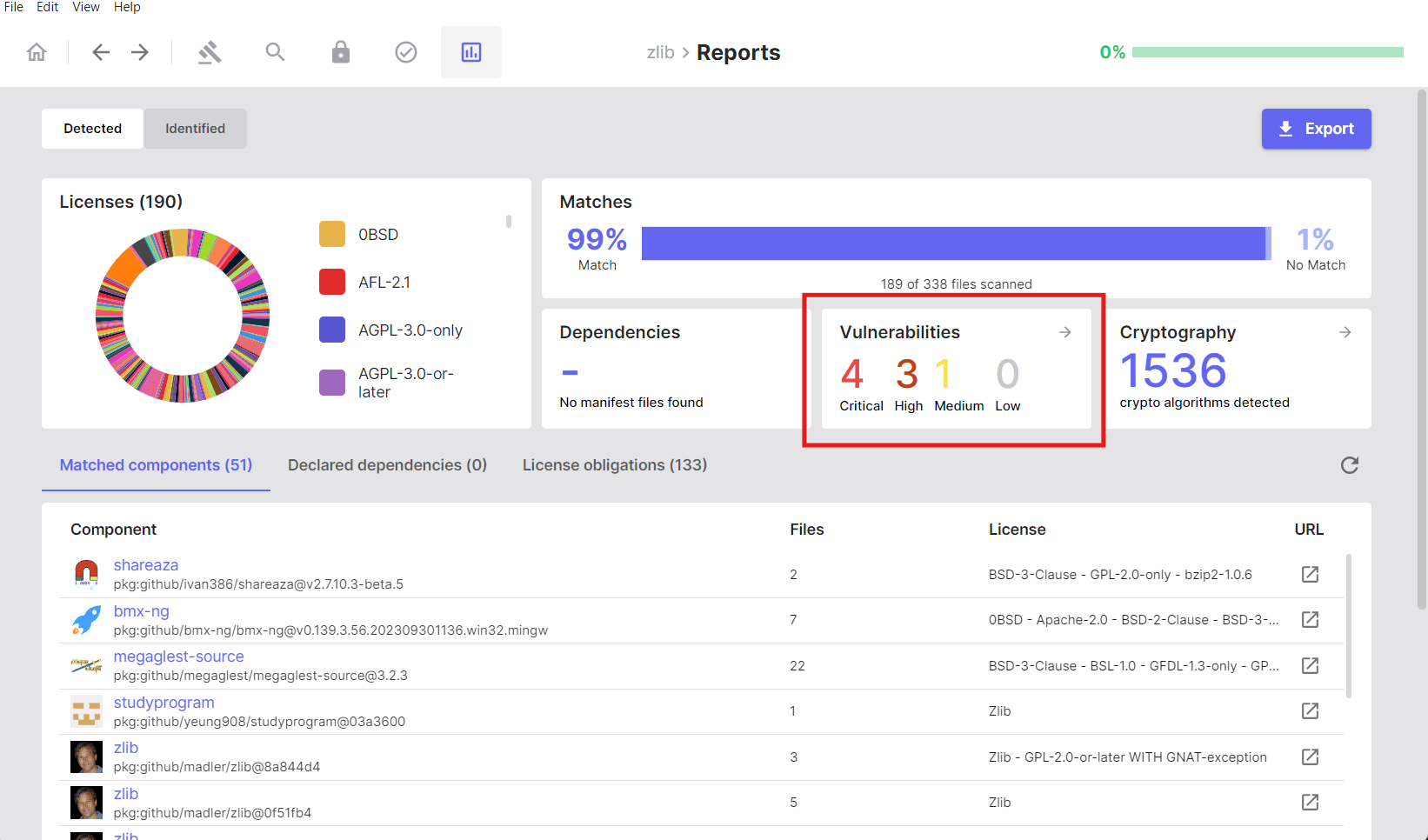
The **Vulnerabilities** section provides a security-focused view of known
vulnerabilities (CVEs) detected in your matched components and dependencies.
Use this section to identify and prioritise security risks in your software
supply chain.
### Overview
Vulnerabilities are categorised by severity:
* **Critical**
* **High**
* **Medium**
* **Low**
Each severity level displays the count of vulnerabilities in that category,
allowing you to assess the risk profile of your project at a glance.
 ### Viewing Vulnerability Details
Clicking the **Vulnerabilities** tab reveals a table with detailed information
for each detected vulnerability:
| Column | Description |
| ------------- | --------------------------------------------------------------------------- |
| **ID** | Package URL (PURL) identifier |
| **Component** | The name of the affected component |
| **CVE** | Common Vulnerabilities and Exposures identifier |
| **Severity** | Risk level classification (Critical, High, Medium, or Low) |
| **CVSS** | Common Vulnerability Scoring System score and severity rating |
| **Source** | Vulnerability database source (e.g., NVD — National Vulnerability Database) |
| **Published** | Date the vulnerability was first disclosed |
| **Modified** | Date the vulnerability record was last updated |
### Viewing Vulnerability Details
Clicking the **Vulnerabilities** tab reveals a table with detailed information
for each detected vulnerability:
| Column | Description |
| ------------- | --------------------------------------------------------------------------- |
| **ID** | Package URL (PURL) identifier |
| **Component** | The name of the affected component |
| **CVE** | Common Vulnerabilities and Exposures identifier |
| **Severity** | Risk level classification (Critical, High, Medium, or Low) |
| **CVSS** | Common Vulnerability Scoring System score and severity rating |
| **Source** | Vulnerability database source (e.g., NVD — National Vulnerability Database) |
| **Published** | Date the vulnerability was first disclosed |
| **Modified** | Date the vulnerability record was last updated |
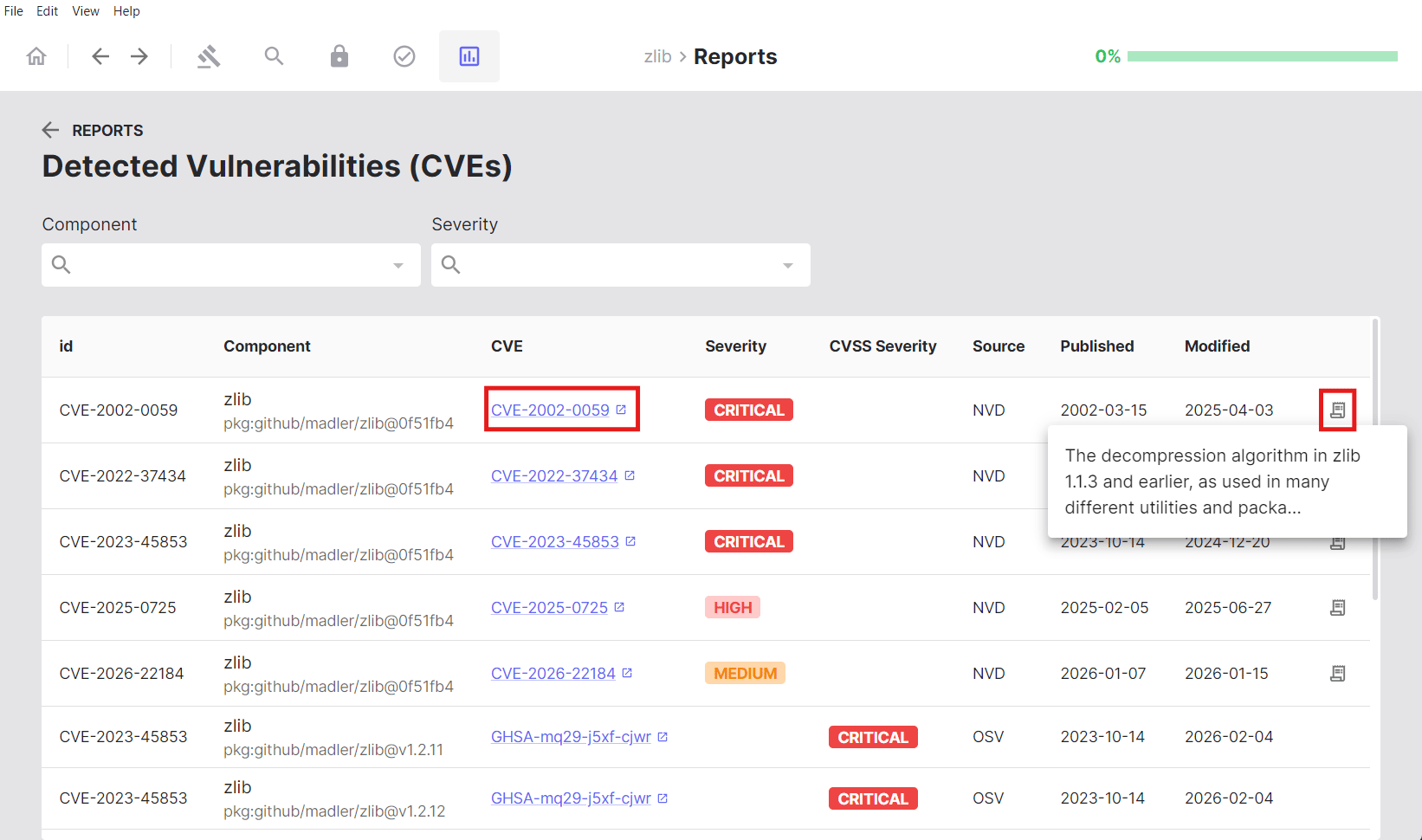 Clicking the information icon (ℹ) in a row opens a detailed view with a
description of the selected vulnerability.
## Cryptography Detection
SBOM Workbench includes a cryptography detection feature that identifies the
use of cryptographic algorithms in source code by matching against a set of
cryptography-related keywords. The analysis is performed on both local source
code files and external dependencies.
This feature enables you to locate cryptographic algorithm occurrences,
understand where they are used, and navigate directly to the relevant sections
of code.
### Overview
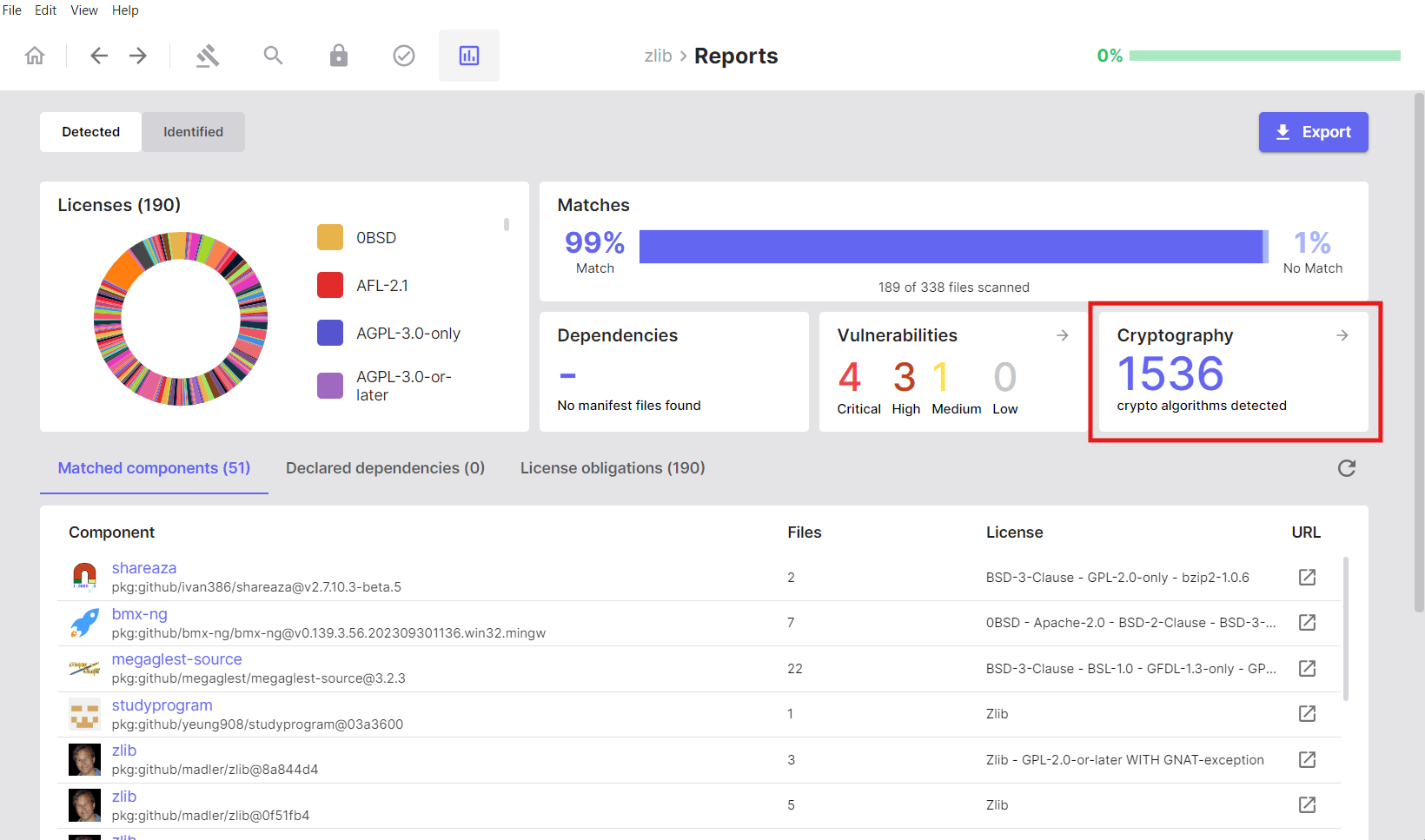
The **Cryptography** section displays the total count of cryptographic
algorithms detected across your project.
Clicking the information icon (ℹ) in a row opens a detailed view with a
description of the selected vulnerability.
## Cryptography Detection
SBOM Workbench includes a cryptography detection feature that identifies the
use of cryptographic algorithms in source code by matching against a set of
cryptography-related keywords. The analysis is performed on both local source
code files and external dependencies.
This feature enables you to locate cryptographic algorithm occurrences,
understand where they are used, and navigate directly to the relevant sections
of code.
### Overview
The **Cryptography** section displays the total count of cryptographic
algorithms detected across your project.
 Clicking into the **Cryptography** section reveals two tabs that separate
detections by source.
### Local Cryptography
Displays cryptographic algorithms detected by analysing your local source code
files. This represents cryptographic algorithm usage within your own codebase.
Clicking into the **Cryptography** section reveals two tabs that separate
detections by source.
### Local Cryptography
Displays cryptographic algorithms detected by analysing your local source code
files. This represents cryptographic algorithm usage within your own codebase.
 ### Components Cryptography
Displays cryptographic algorithms found in matched components and dependencies.
This represents cryptographic capabilities provided by third-party libraries
and components included in your project.
### Components Cryptography
Displays cryptographic algorithms found in matched components and dependencies.
This represents cryptographic capabilities provided by third-party libraries
and components included in your project.
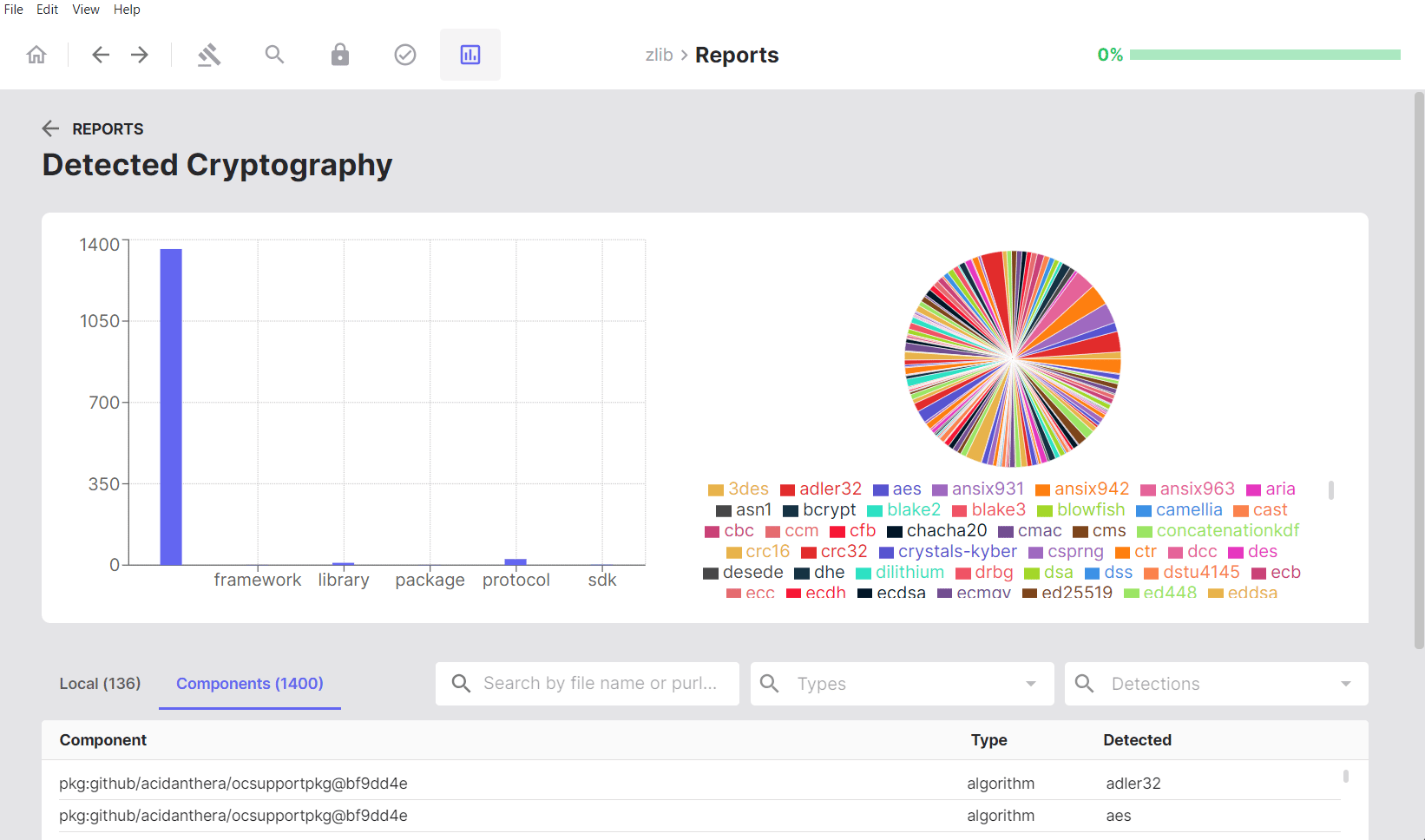 ### Visual Analytics
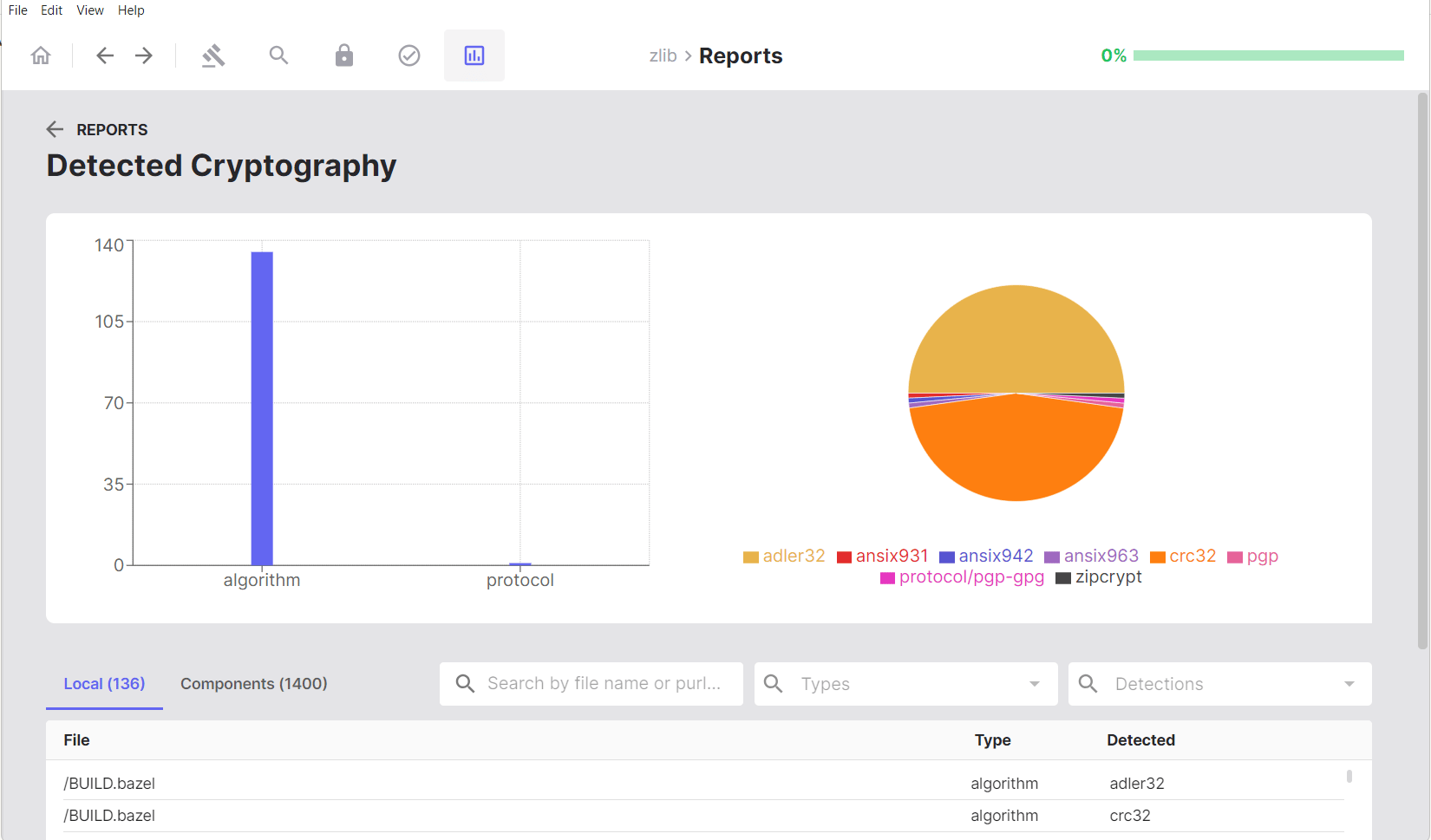
Visual analytics include:
* **Bar chart**: Shows detections by algorithm type
* **Pie chart**: Illustrates the proportion of each detected algorithm,
providing an overview of cryptographic diversity across the project
Below the charts, a detailed, searchable, and filterable table lists detections
by file or component, algorithm type, and specific algorithm name.
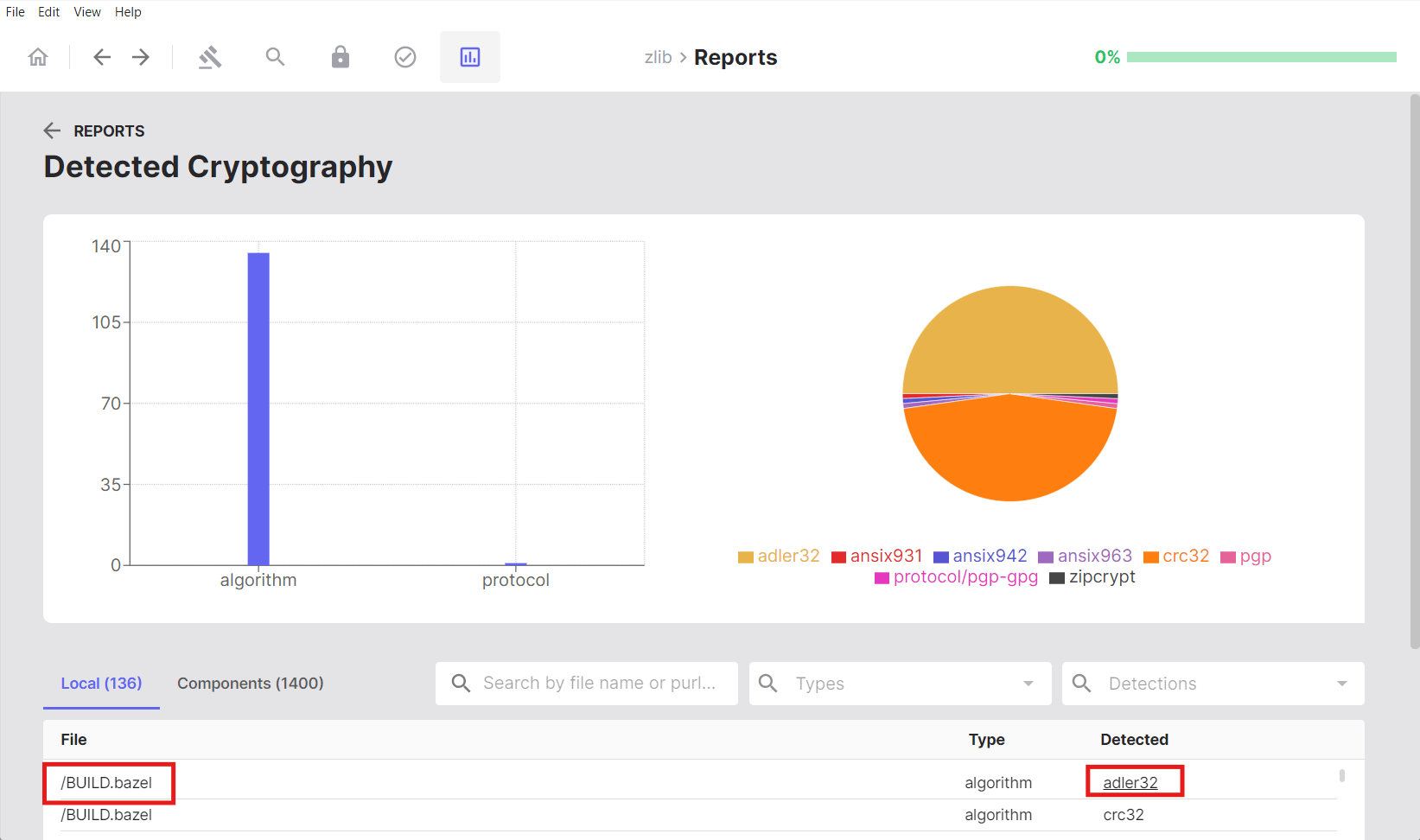
### Viewing Cryptographic Algorithms in Files
In the **Local** tab, clicking on either a file name or a detected keyword
opens the **Cryptography Search** page, where you can view the source code
with that cryptographic keyword highlighted for easier review.
### Visual Analytics
Visual analytics include:
* **Bar chart**: Shows detections by algorithm type
* **Pie chart**: Illustrates the proportion of each detected algorithm,
providing an overview of cryptographic diversity across the project
Below the charts, a detailed, searchable, and filterable table lists detections
by file or component, algorithm type, and specific algorithm name.
### Viewing Cryptographic Algorithms in Files
In the **Local** tab, clicking on either a file name or a detected keyword
opens the **Cryptography Search** page, where you can view the source code
with that cryptographic keyword highlighted for easier review.
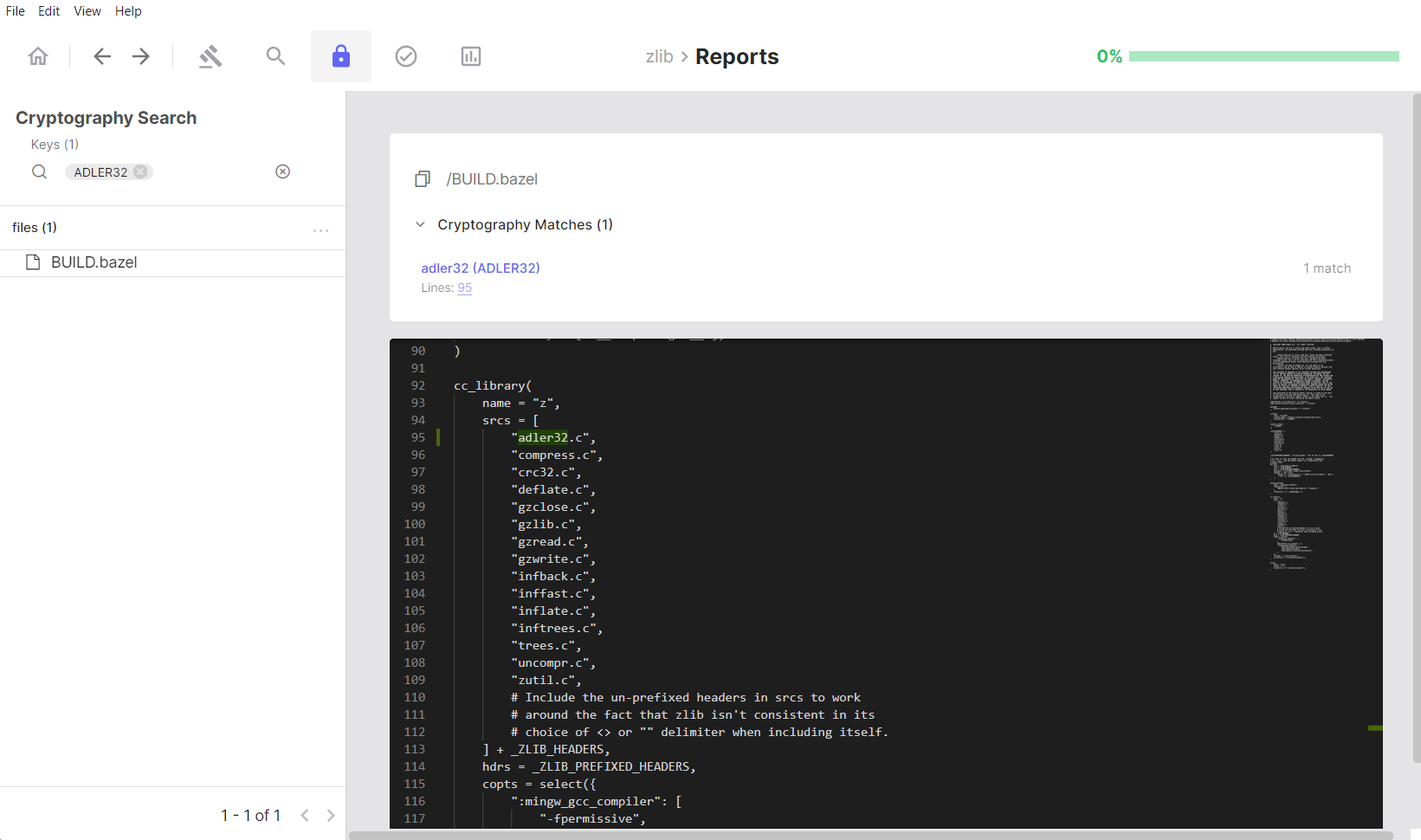
 This view provides full visibility into where a given cryptographic algorithm
is implemented within the selected file.
This view provides full visibility into where a given cryptographic algorithm
is implemented within the selected file.
 ## Cryptography Search
The **Cryptography Search** section allows you to filter and find files
containing specific cryptographic algorithms.
## Cryptography Search
The **Cryptography Search** section allows you to filter and find files
containing specific cryptographic algorithms.
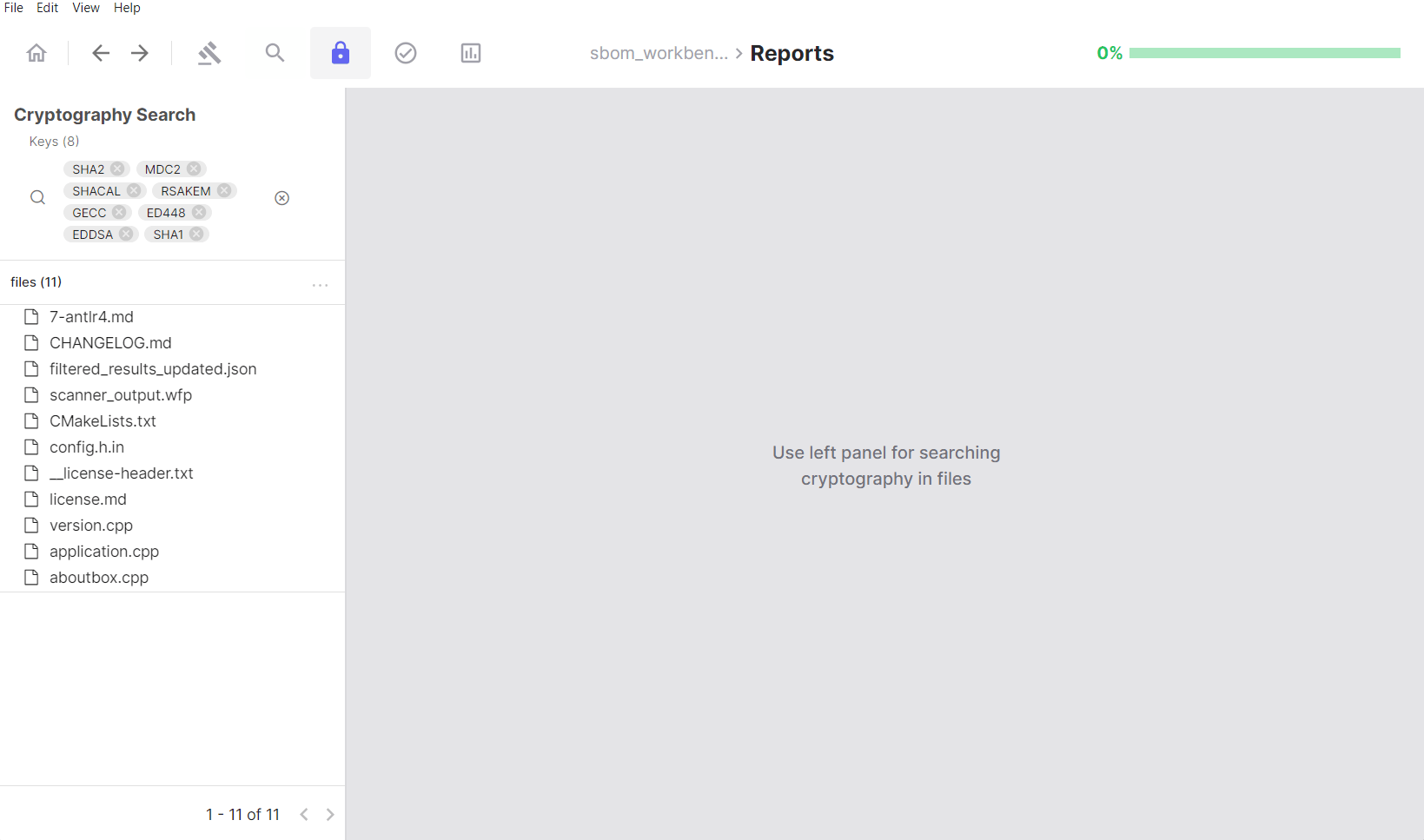 ### Using the Keys Filter
The **Keys** panel acts as the primary filter for cryptographic algorithm
detection:
### Using the Keys Filter
The **Keys** panel acts as the primary filter for cryptographic algorithm
detection:
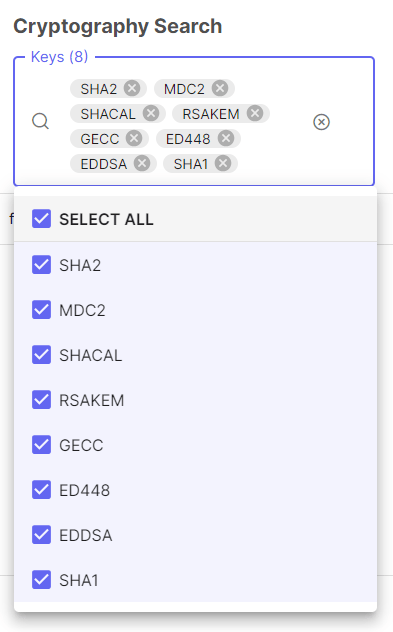 * Lists all cryptographic algorithms identified in your project
* Click an algorithm tag to filter results to files containing that algorithm
* Displays the count of unique algorithms detected
* Select multiple algorithm tags to show files that contain any of the
selected algorithms (OR logic)
### Default Filters
By default, all detected cryptographic algorithms are included in the active
filters. These represent all algorithms identified across the analysed source
code.
### Navigating Results
The left panel displays a hierarchical file tree of your source code. Selecting
a file or node in the tree updates the right panel with:
* The source code of the selected file
* Detected cryptographic keywords highlighted within that file
* Lists all cryptographic algorithms identified in your project
* Click an algorithm tag to filter results to files containing that algorithm
* Displays the count of unique algorithms detected
* Select multiple algorithm tags to show files that contain any of the
selected algorithms (OR logic)
### Default Filters
By default, all detected cryptographic algorithms are included in the active
filters. These represent all algorithms identified across the analysed source
code.
### Navigating Results
The left panel displays a hierarchical file tree of your source code. Selecting
a file or node in the tree updates the right panel with:
* The source code of the selected file
* Detected cryptographic keywords highlighted within that file
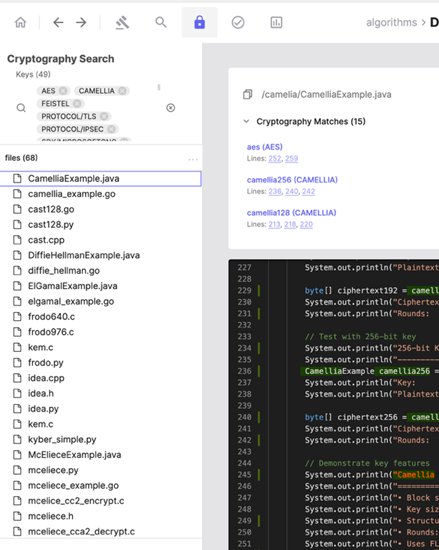 The file tree (left panel) shows detected cryptographic keywords; the
corresponding source code is displayed in the right panel.
### Detection Details
At the top of the right panel, SBOM Workbench displays the following for each
detection:
* The matched keyword
* The associated algorithm, library, SDK, or protocol
* The line number(s) where the keyword was detected
Line numbers are clickable and navigate directly to the corresponding location
in the source code. Detected keywords are highlighted using contrasting
colours. Note that colour schemes may differ between the Local and Components
views.
The file tree (left panel) shows detected cryptographic keywords; the
corresponding source code is displayed in the right panel.
### Detection Details
At the top of the right panel, SBOM Workbench displays the following for each
detection:
* The matched keyword
* The associated algorithm, library, SDK, or protocol
* The line number(s) where the keyword was detected
Line numbers are clickable and navigate directly to the corresponding location
in the source code. Detected keywords are highlighted using contrasting
colours. Note that colour schemes may differ between the Local and Components
views.
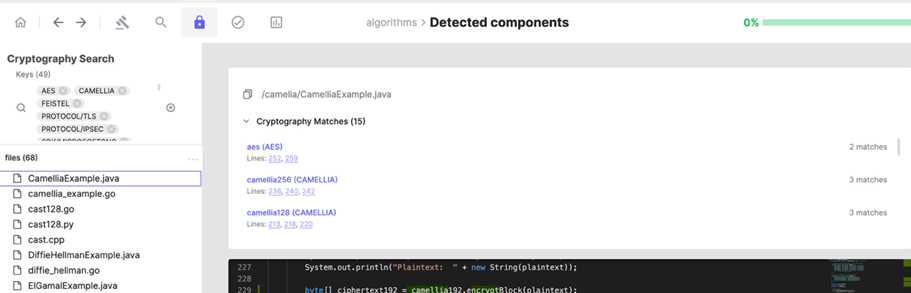 Detected keywords with associated cryptographic algorithm details and
navigable line numbers, highlighted in the source code view.
### Reviewing Files Containing Cryptographic Algorithms
The **Files** section lists all files in which cryptographic algorithms have
been detected:
1. Click on a file from the filtered list
2. The file opens in the code viewer on the right
3. All detected cryptographic keywords are highlighted
4. An algorithm panel lists which algorithms appear in that file
5. Click an algorithm in the panel to jump directly to its first occurrence
in the code
Detected keywords with associated cryptographic algorithm details and
navigable line numbers, highlighted in the source code view.
### Reviewing Files Containing Cryptographic Algorithms
The **Files** section lists all files in which cryptographic algorithms have
been detected:
1. Click on a file from the filtered list
2. The file opens in the code viewer on the right
3. All detected cryptographic keywords are highlighted
4. An algorithm panel lists which algorithms appear in that file
5. Click an algorithm in the panel to jump directly to its first occurrence
in the code
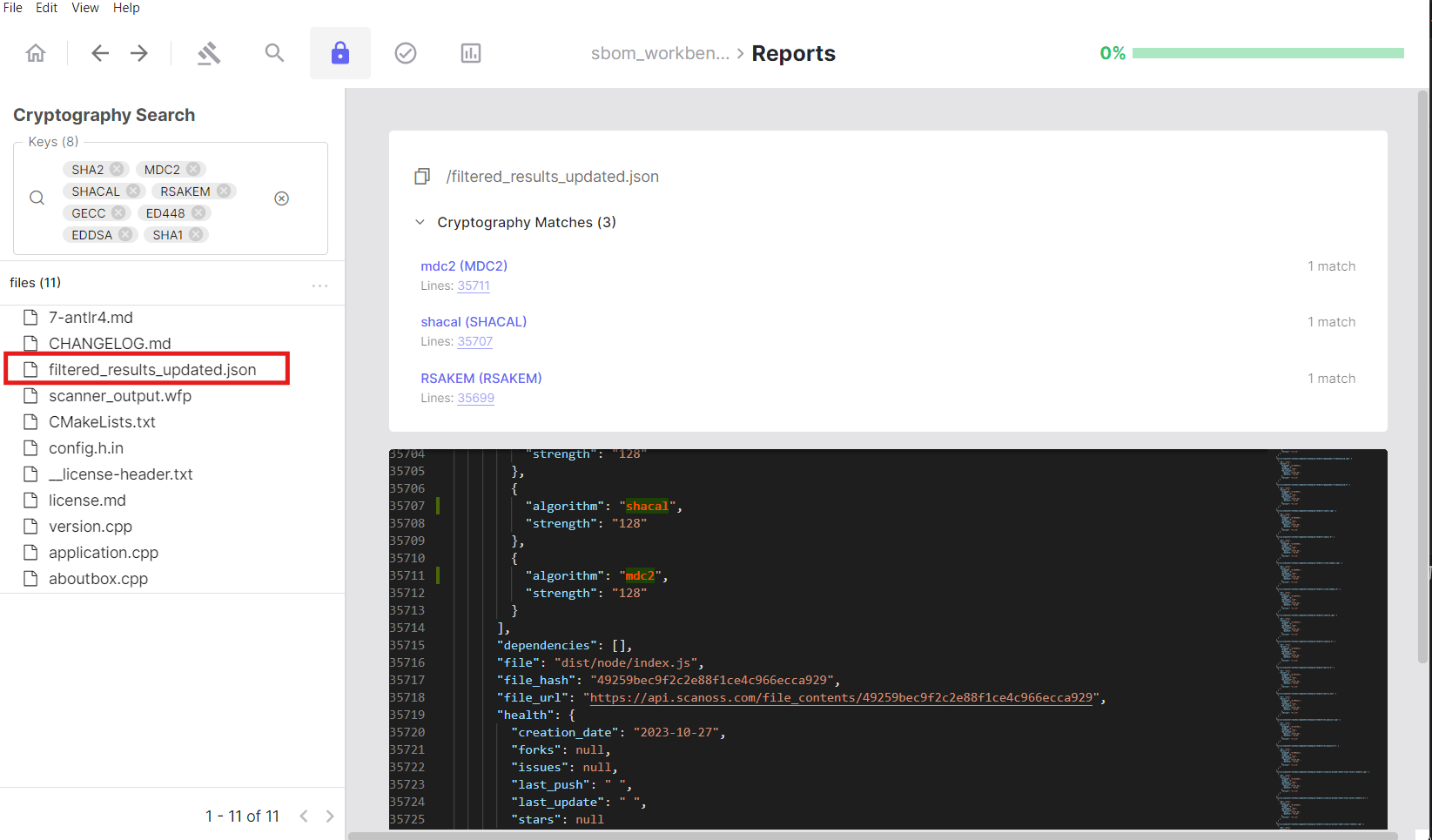 This provides full visibility into where cryptographic algorithms are
implemented within individual files.
## Limitations
* Cryptography detection is based on keyword matching and does not perform
static analysis or validate the correctness of cryptographic implementations.
* Both local source code files and component dependencies are analysed.
* The analysis identifies cryptographic patterns and algorithm usage; it does
not assess whether detected algorithms are considered weak, deprecated, or
otherwise insecure.
This provides full visibility into where cryptographic algorithms are
implemented within individual files.
## Limitations
* Cryptography detection is based on keyword matching and does not perform
static analysis or validate the correctness of cryptographic implementations.
* Both local source code files and component dependencies are analysed.
* The analysis identifies cryptographic patterns and algorithm usage; it does
not assess whether detected algorithms are considered weak, deprecated, or
otherwise insecure.