> ## Documentation Index
> Fetch the complete documentation index at: https://docs.scanoss.com/llms.txt
> Use this file to discover all available pages before exploring further.
# Proving It Later
> What the organisation-wide audit log records, how to filter it, and when to use it instead of a finding's own audit trail.
## Why the Audit Log Exists
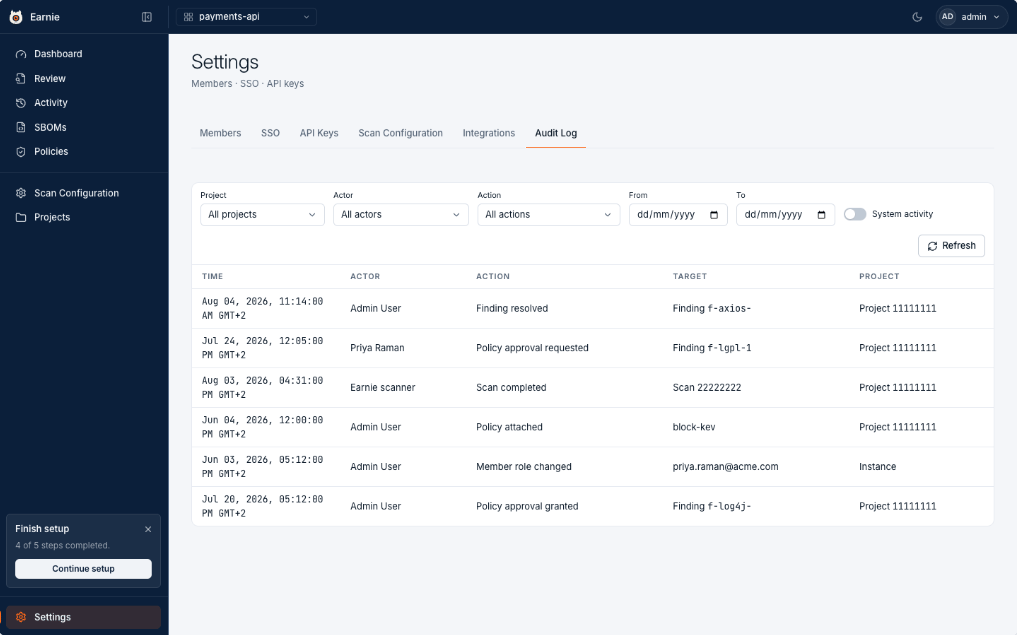 Months after the fact, someone will ask why a component was accepted. The audit log is the answer.
## What Gets Recorded
The log records:
* Scans completing
* Findings being resolved
* Policies being attached and changed
* Policy approvals requested and granted
* Roles changed
Filter it by project, by who acted, by the kind of action, or by date. Select any row to see the full detail of that event.
## What Makes It Evidence
Two things make it useful as evidence:
* Entries are never edited or deleted.
* Actions taken by automation are attributed to the key or worker that took them, rather than being folded silently into a person.
## Two Levels of History
For a single finding, the **Audit Trail** in the Review Workspace is faster,
because it shows that finding's story in place. Use the organisation-wide log
when you need to search across projects or people.
## What's Next
With the record intact, the next step is who's allowed to make these decisions in the first place, [your team's roles and API keys](/en/latest/earnie/administration/team-and-roles).
Months after the fact, someone will ask why a component was accepted. The audit log is the answer.
## What Gets Recorded
The log records:
* Scans completing
* Findings being resolved
* Policies being attached and changed
* Policy approvals requested and granted
* Roles changed
Filter it by project, by who acted, by the kind of action, or by date. Select any row to see the full detail of that event.
## What Makes It Evidence
Two things make it useful as evidence:
* Entries are never edited or deleted.
* Actions taken by automation are attributed to the key or worker that took them, rather than being folded silently into a person.
## Two Levels of History
For a single finding, the **Audit Trail** in the Review Workspace is faster,
because it shows that finding's story in place. Use the organisation-wide log
when you need to search across projects or people.
## What's Next
With the record intact, the next step is who's allowed to make these decisions in the first place, [your team's roles and API keys](/en/latest/earnie/administration/team-and-roles).