> ## Documentation Index
> Fetch the complete documentation index at: https://docs.scanoss.com/llms.txt
> Use this file to discover all available pages before exploring further.
# Exporting an SBOM
> How to generate an SBOM snapshot, choose its format, and render the Attribution Document that carries the licence text you're obliged to distribute.
## What an SBOM Is, in Earnie
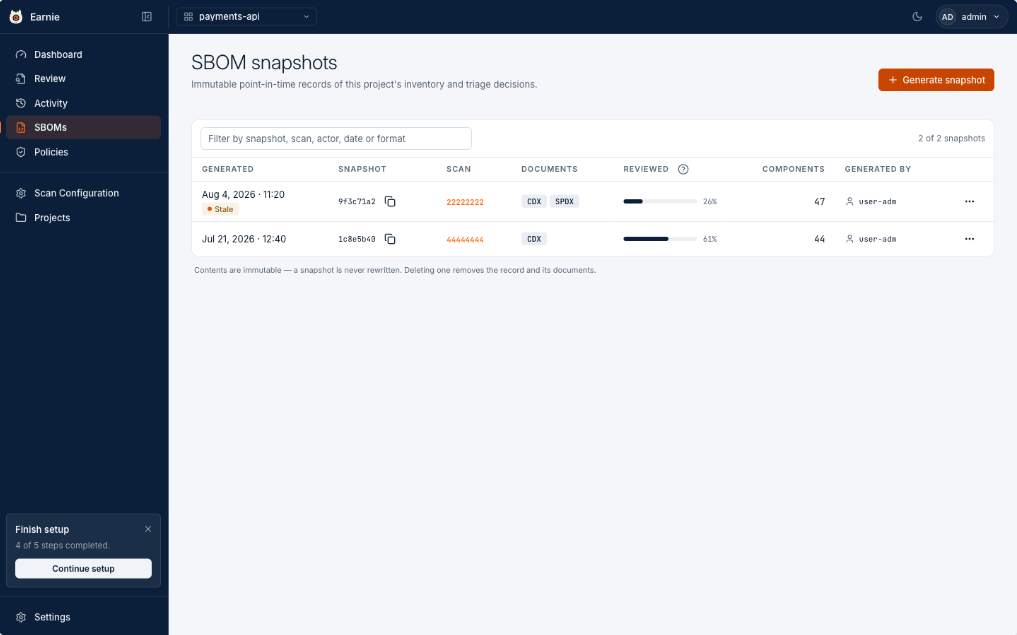 A software bill of materials is what you hand to a customer, an auditor, or a regulator. In Earnie it's a snapshot: fixed, and never rewritten.
## Generating a Snapshot
Generate one from the Review Workspace with **Export SBOM**, or from the SBOM page with **+ Generate Snapshot**. You choose:
* **Format** — CycloneDX 1.7 (broad tool support) and/or SPDX 2.3 Lite (licence-focused). You can render the other format later from the same snapshot.
* **Include Vulnerabilities** — embeds known vulnerability data (CycloneDX only).
* **Include Cryptographic Assets** — when cryptography scanning is enabled for the organisation, adds detected algorithms and their source occurrences to the merged CycloneDX export. Each cryptographic-asset component also carries `scanoss:exportControl:*` export-control metadata: the rolled-up signal state, the asset's purpose, and the control regime and regime version the signals were evaluated against. Off by default, and disabled for SPDX.
Earnie stamps the snapshot with the review coverage at the moment of generation, the component count, and who generated it.
If triage has moved on since, the newest snapshot is flagged **Triage changed
since snapshot**, your cue to export again before sending it out.
**Immutable on purpose.** A snapshot is never edited. If the inventory
changes, you generate a new one. That way a document you sent to a customer
last quarter still says exactly what it said when you sent it.
## Attribution Documents
An SBOM lists what's present. An Attribution Document is a different deliverable, the compliance package an OSPO ships alongside a release: for every component it carries its licences, the full text of its `LICENSE` and `NOTICE` files, its copyright holders, and its obligations.
An SBOM names a licence; an Attribution Document carries the text you're obliged to distribute. The two are never interchangeable.
You don't produce one from the generate dialog. Once a snapshot exists, open its row menu and choose **Render Attribution Document**. Earnie fetches the licence data for every component in that snapshot's inventory and writes it out as a plain-text file.
**Frozen on first render.** The first time you render a snapshot's Attribution
Document, its content is fixed for good, re-downloading it later always
returns those exact bytes, even if upstream licence text changes afterwards.
The Documents column shows an **ATTR** badge; hover it to see when that
licence text was fetched, so you can judge how current it is against what
you're about to ship.
A component whose licence data couldn't be resolved isn't dropped silently, it's listed in the document as unresolved, so you always know exactly what the deliverable does and doesn't cover.
## What's Next
With a snapshot exported, the next step is knowing where to look when someone asks why a component was accepted months from now, [the audit log](/en/latest/earnie/evidence/audit-log).
A software bill of materials is what you hand to a customer, an auditor, or a regulator. In Earnie it's a snapshot: fixed, and never rewritten.
## Generating a Snapshot
Generate one from the Review Workspace with **Export SBOM**, or from the SBOM page with **+ Generate Snapshot**. You choose:
* **Format** — CycloneDX 1.7 (broad tool support) and/or SPDX 2.3 Lite (licence-focused). You can render the other format later from the same snapshot.
* **Include Vulnerabilities** — embeds known vulnerability data (CycloneDX only).
* **Include Cryptographic Assets** — when cryptography scanning is enabled for the organisation, adds detected algorithms and their source occurrences to the merged CycloneDX export. Each cryptographic-asset component also carries `scanoss:exportControl:*` export-control metadata: the rolled-up signal state, the asset's purpose, and the control regime and regime version the signals were evaluated against. Off by default, and disabled for SPDX.
Earnie stamps the snapshot with the review coverage at the moment of generation, the component count, and who generated it.
If triage has moved on since, the newest snapshot is flagged **Triage changed
since snapshot**, your cue to export again before sending it out.
**Immutable on purpose.** A snapshot is never edited. If the inventory
changes, you generate a new one. That way a document you sent to a customer
last quarter still says exactly what it said when you sent it.
## Attribution Documents
An SBOM lists what's present. An Attribution Document is a different deliverable, the compliance package an OSPO ships alongside a release: for every component it carries its licences, the full text of its `LICENSE` and `NOTICE` files, its copyright holders, and its obligations.
An SBOM names a licence; an Attribution Document carries the text you're obliged to distribute. The two are never interchangeable.
You don't produce one from the generate dialog. Once a snapshot exists, open its row menu and choose **Render Attribution Document**. Earnie fetches the licence data for every component in that snapshot's inventory and writes it out as a plain-text file.
**Frozen on first render.** The first time you render a snapshot's Attribution
Document, its content is fixed for good, re-downloading it later always
returns those exact bytes, even if upstream licence text changes afterwards.
The Documents column shows an **ATTR** badge; hover it to see when that
licence text was fetched, so you can judge how current it is against what
you're about to ship.
A component whose licence data couldn't be resolved isn't dropped silently, it's listed in the document as unresolved, so you always know exactly what the deliverable does and doesn't cover.
## What's Next
With a snapshot exported, the next step is knowing where to look when someone asks why a component was accepted months from now, [the audit log](/en/latest/earnie/evidence/audit-log).