> ## Documentation Index
> Fetch the complete documentation index at: https://docs.scanoss.com/llms.txt
> Use this file to discover all available pages before exploring further.
# Reading the Dashboard
> How to read the Earnie Dashboard top to bottom: the merge gate, the work queue, and the risk context behind it.
## One Screen, Three Questions
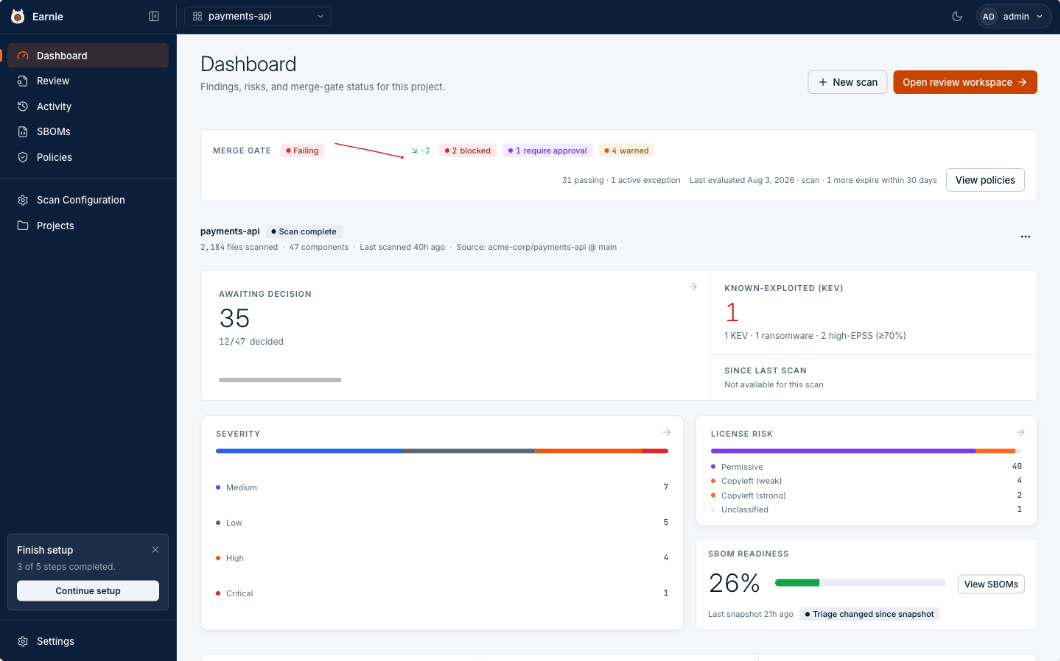 The Dashboard answers three questions: can we ship, what needs a human, and what is actually dangerous? Read it top to bottom, the gate, then the work, then the context.
## The Merge Gate, at the Top
The single most important line on the page: **Passing**, **Needs Approval**, **Failing**, or not yet evaluated, followed by counts of what is blocked, held for approval, and warned. Each count links straight to the policies behind it. A small trend line shows the direction since the last few evaluations.
## The Work, in the Middle
**Awaiting Decision** is your queue, how many findings still need a human, out of how many total.
Beside it, **Known-Exploited (KEV)** is the honest danger signal, counting vulnerabilities that are being exploited in the wild right now rather than raw CVEs. When the cryptography scanner is enabled, a **Weak Crypto** line joins it, counting weak algorithms that are actually reachable from your code, it only appears when there's something to act on, and clicks through to those findings in Review.
## The Context, Below
* **Severity** breaks vulnerabilities down by how bad they are.
* **License Risk** groups components by obligation: permissive, weak copyleft, strong copyleft, unclassified.
* **SBOM Readiness** tells you how much of the inventory has actually been reviewed, and flags when triage has moved on since your last export.
**Why review coverage matters.** An SBOM generated at 26% review coverage is
still a valid document. It reflects the decisions made so far, and Earnie
never blocks the export. It records the coverage on the snapshot so the reader
knows what they're holding.
## The Cryptography Card
Organisations with the cryptography scanner enabled also get a **Cryptography** card in the context row: reachable weak findings up top, then how much of the crypto is reachable, not reached, or unknown, the most-sighted algorithms tinted by severity, and the quantum-vulnerable and first-party-versus-dependency splits.
The card is explicit about its blank states, **No cryptographic findings** means the scanner ran and found nothing, while **Crypto not scanned in this scan** means the latest scan ran without it, so a clean card is never confused with a scan that didn't look.
**Export readiness** then shows **Ready** or the number of findings with incomplete current EAR evidence. It measures whether the evidence is complete, not whether a signal is met or not met; support-purpose findings don't block it.
Export readiness is evidence only, never a determination. No ECCN is stated
or implied.
## What's Next
With the Dashboard telling you what needs attention, the next step is opening the [Review Workspace and triaging those findings](/en/latest/earnie/using-earnie/triaging-findings) one by one.
The Dashboard answers three questions: can we ship, what needs a human, and what is actually dangerous? Read it top to bottom, the gate, then the work, then the context.
## The Merge Gate, at the Top
The single most important line on the page: **Passing**, **Needs Approval**, **Failing**, or not yet evaluated, followed by counts of what is blocked, held for approval, and warned. Each count links straight to the policies behind it. A small trend line shows the direction since the last few evaluations.
## The Work, in the Middle
**Awaiting Decision** is your queue, how many findings still need a human, out of how many total.
Beside it, **Known-Exploited (KEV)** is the honest danger signal, counting vulnerabilities that are being exploited in the wild right now rather than raw CVEs. When the cryptography scanner is enabled, a **Weak Crypto** line joins it, counting weak algorithms that are actually reachable from your code, it only appears when there's something to act on, and clicks through to those findings in Review.
## The Context, Below
* **Severity** breaks vulnerabilities down by how bad they are.
* **License Risk** groups components by obligation: permissive, weak copyleft, strong copyleft, unclassified.
* **SBOM Readiness** tells you how much of the inventory has actually been reviewed, and flags when triage has moved on since your last export.
**Why review coverage matters.** An SBOM generated at 26% review coverage is
still a valid document. It reflects the decisions made so far, and Earnie
never blocks the export. It records the coverage on the snapshot so the reader
knows what they're holding.
## The Cryptography Card
Organisations with the cryptography scanner enabled also get a **Cryptography** card in the context row: reachable weak findings up top, then how much of the crypto is reachable, not reached, or unknown, the most-sighted algorithms tinted by severity, and the quantum-vulnerable and first-party-versus-dependency splits.
The card is explicit about its blank states, **No cryptographic findings** means the scanner ran and found nothing, while **Crypto not scanned in this scan** means the latest scan ran without it, so a clean card is never confused with a scan that didn't look.
**Export readiness** then shows **Ready** or the number of findings with incomplete current EAR evidence. It measures whether the evidence is complete, not whether a signal is met or not met; support-purpose findings don't block it.
Export readiness is evidence only, never a determination. No ECCN is stated
or implied.
## What's Next
With the Dashboard telling you what needs attention, the next step is opening the [Review Workspace and triaging those findings](/en/latest/earnie/using-earnie/triaging-findings) one by one.