> ## Documentation Index
> Fetch the complete documentation index at: https://docs.scanoss.com/llms.txt
> Use this file to discover all available pages before exploring further.
# Self-Checks
> How a Self-check reviews a developer's or coding agent's changes against the project's policies before anything is pushed, how to read one, and why a pass isn't a clean bill of health.
A **Self-check** is a quick review of a handful of files against the project's policies, run before anything is pushed. It tells a developer, or their coding agent, what the [merge gate](/en/latest/earnie/using-earnie/merge-gate) would say, in seconds, while the change is still on their machine.
Not every check is a scan. A Self-check creates no findings, doesn't change the project's posture (its overall status on the Dashboard), and leaves the Dashboard exactly as it was. It's advice for the person making the change, not a record of the project.
**Before you start:** Self-checks are produced by two tools, so you need one of them set up:
* the Earnie [pre-commit hook](/en/latest/earnie/using-earnie/earnie-cli#checking-before-you-commit), or
* a coding agent connected to [Earnie MCP](/en/latest/earnie/mcp/overview), either with review hooks from `earnie mcp setup`, or calling the `earnie_review_code` tool itself.
## When a Self-Check Runs
A Self-check runs when:
* a coding agent finishes a turn and calls its review tool, or
* the pre-commit hook runs before a commit lands.
Earnie reviews only the files it was handed, a slice of the codebase, against the project's policies.
## Finding a Self-Check
Self-checks are listed under **Self-checks** in a project's sidebar, next to **Scan history**, and never inside it.
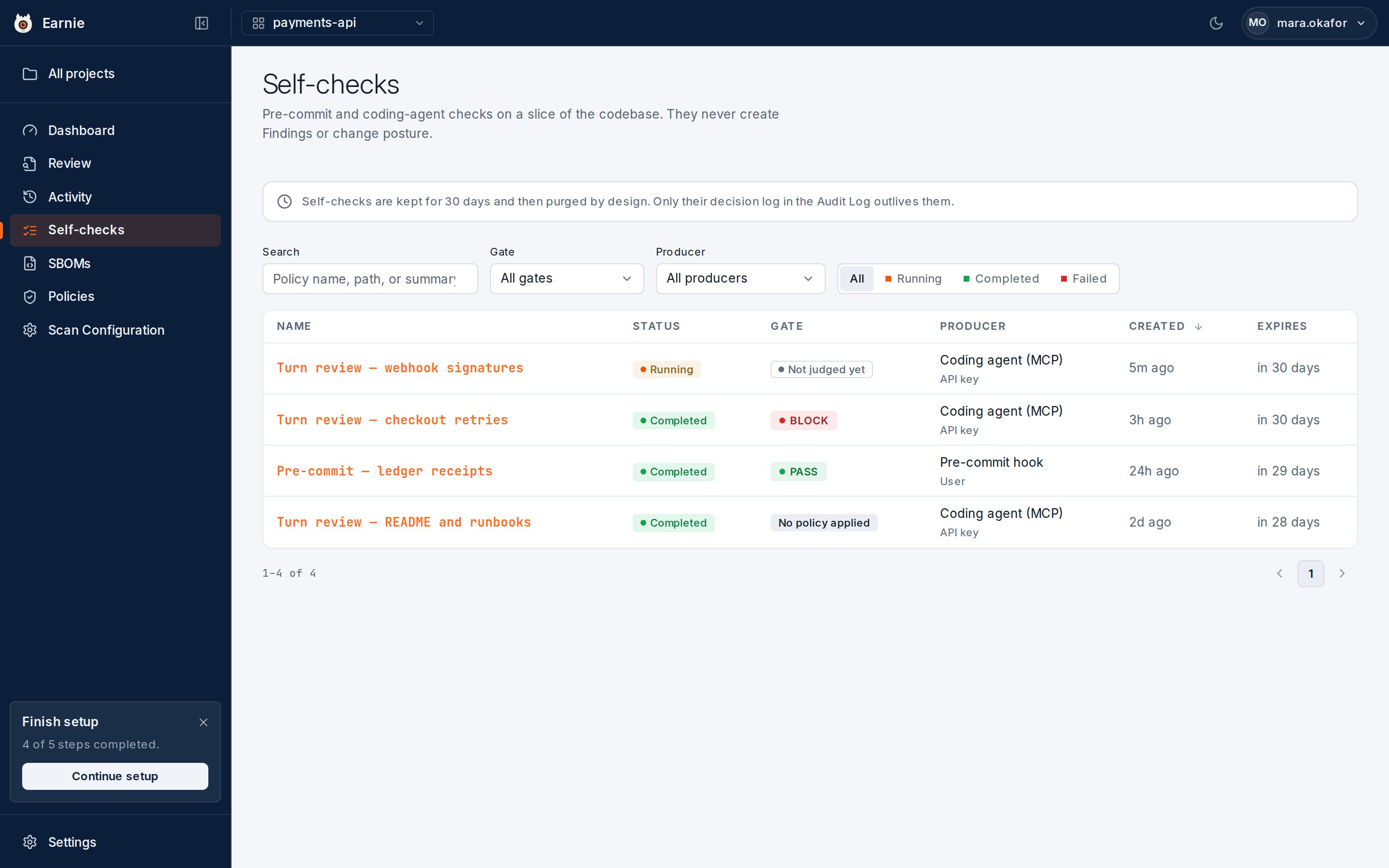 * **Search** matches a policy name, a detection's file path, or its summary.
* **Gate** narrows the list to one verdict.
* **Producer** narrows the list to one source.
* A status toggle narrows the list to Running, Completed, or Failed.
Four columns matter:
| Column | What It Shows |
| ------------ | ----------------------------------------------------------------------------------------------------------------------------------------------------------------------------------------------------------------------------------------------------------------------------------- |
| **Status** | The lifecycle: Running, Completed, or Failed. It says nothing about the outcome. Completed doesn't mean "passed". |
| **Gate** | The outcome, in the same vocabulary a scan's gate uses: Pass, Warn, Require, Block, or Error. Plus two deliberate non-green values: **Not judged yet** (still running, no verdict exists) and **No policy applied** (finished, but nothing could be enforced on what it was given). |
| **Producer** | Where the run came from: Coding agent (MCP) or Pre-commit hook. |
| **Expires** | How long the run has left, such as "in 30 days" or "today". Hover to see the exact date, in UTC. |
## Reading a Self-Check
* **Search** matches a policy name, a detection's file path, or its summary.
* **Gate** narrows the list to one verdict.
* **Producer** narrows the list to one source.
* A status toggle narrows the list to Running, Completed, or Failed.
Four columns matter:
| Column | What It Shows |
| ------------ | ----------------------------------------------------------------------------------------------------------------------------------------------------------------------------------------------------------------------------------------------------------------------------------- |
| **Status** | The lifecycle: Running, Completed, or Failed. It says nothing about the outcome. Completed doesn't mean "passed". |
| **Gate** | The outcome, in the same vocabulary a scan's gate uses: Pass, Warn, Require, Block, or Error. Plus two deliberate non-green values: **Not judged yet** (still running, no verdict exists) and **No policy applied** (finished, but nothing could be enforced on what it was given). |
| **Producer** | Where the run came from: Coding agent (MCP) or Pre-commit hook. |
| **Expires** | How long the run has left, such as "in 30 days" or "today". Hover to see the exact date, in UTC. |
## Reading a Self-Check
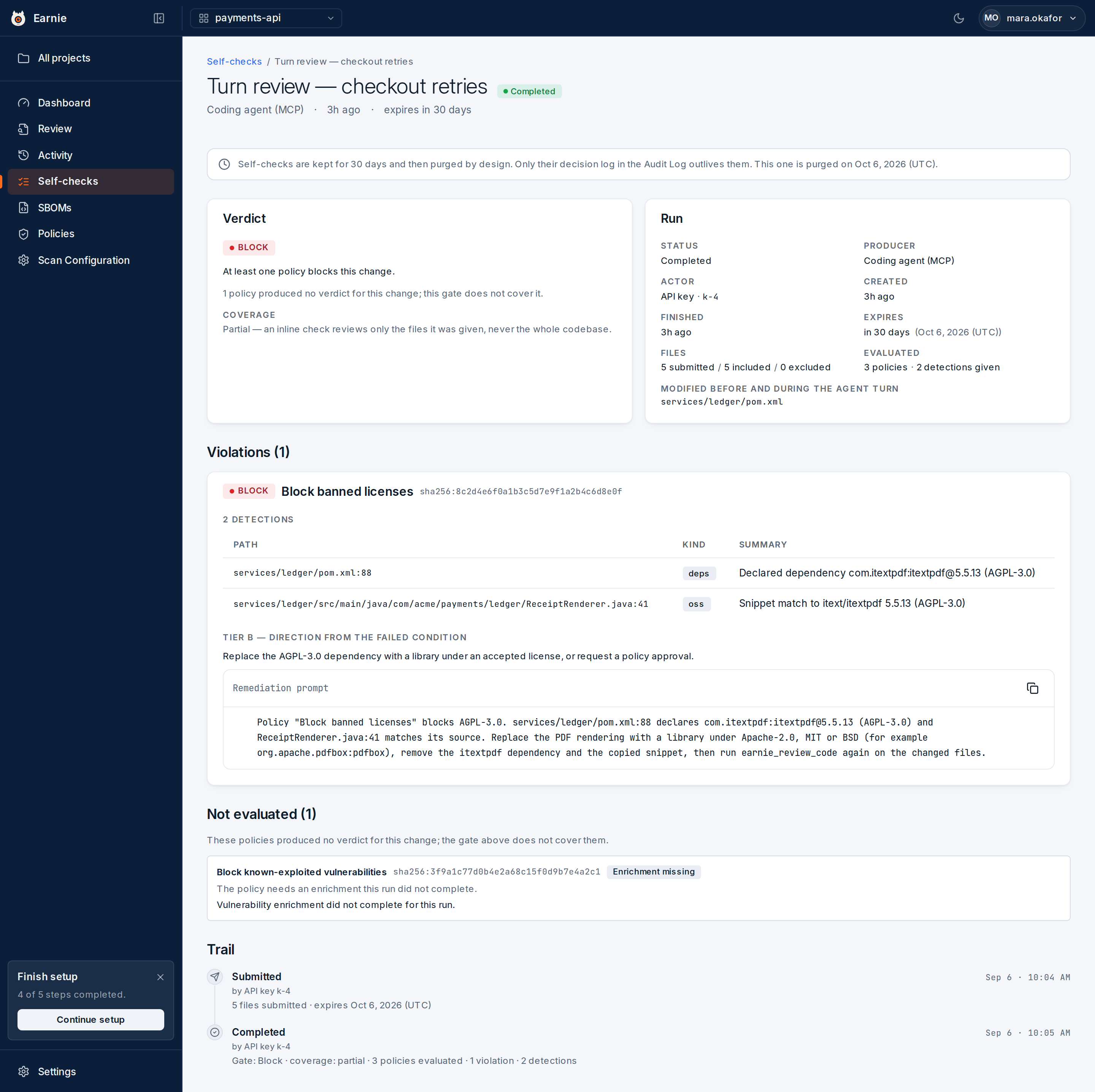 Open a run to see its detail:
* **Verdict** — states the gate in one sentence.
* **Violations** — one entry for each policy the files broke. Each entry names the policy at the revision that was evaluated, and lists the detections that triggered it: a file and line, the kind of detection, and what was seen. Where Earnie can work one out, the entry also offers a remediation: a short summary and a prompt written for a coding agent. **Copy prompt** copies that prompt to your clipboard exactly as written.
Detections are not findings. They're kept only for the life of the Self-check, and they never enter the Review queue.
### Why a Pass Isn't a Clean Bill of Health
A Self-check only ever sees a slice of the codebase, so some policies can't be answered from it. The **Not evaluated** list shows each of these, with the reason. For example:
* an enrichment that didn't complete
* an expression that couldn't be evaluated
* a policy whose inputs none of the submitted files carried
The Verdict card repeats the count. A **Pass** above that list means nothing Earnie reviewed violated a policy. It doesn't mean the change is clear of everything the project enforces.
For the same reason, a Self-check's coverage is always **Partial**. An inline check reviews the files it was given, never the whole codebase, and a partial run can never mark anything absent. See [Coverage: Full vs Partial](/en/latest/earnie/getting-started/first-scan#coverage-full-vs-partial).
### The Self-Check Trail
Below the Not evaluated list, a **Trail** section shows the run's own history:
* **Submitted** — how many files it was given, and when the run expires.
* **Completed** — the gate, the coverage, how many policies were evaluated, and the violation and detection counts.
* **Failed** — for a run whose scanner never produced a verdict, the error code and message.
**Self-checks are kept for 30 days**, then the run itself is purged by design.
A Self-check is a moment's advice to a developer, not a record of the project.
What outlives it is its Trail. A run's link keeps showing its history for as
long as the audit log does, because the Trail is read from the audit log
itself, not from the purgeable run. A page for a purged run still shows that
Trail, with a note that the run was purged.
If a link answers "Self-check not found" with no Trail at all, the ID is wrong
or belongs to another organisation. It hasn't merely expired.
## What's Next
Self-checks and the merge gate keep problems out of your code. The next step is producing evidence of what your code contains for people outside your team: [exporting an SBOM](/en/latest/earnie/evidence/exporting-sboms).
Open a run to see its detail:
* **Verdict** — states the gate in one sentence.
* **Violations** — one entry for each policy the files broke. Each entry names the policy at the revision that was evaluated, and lists the detections that triggered it: a file and line, the kind of detection, and what was seen. Where Earnie can work one out, the entry also offers a remediation: a short summary and a prompt written for a coding agent. **Copy prompt** copies that prompt to your clipboard exactly as written.
Detections are not findings. They're kept only for the life of the Self-check, and they never enter the Review queue.
### Why a Pass Isn't a Clean Bill of Health
A Self-check only ever sees a slice of the codebase, so some policies can't be answered from it. The **Not evaluated** list shows each of these, with the reason. For example:
* an enrichment that didn't complete
* an expression that couldn't be evaluated
* a policy whose inputs none of the submitted files carried
The Verdict card repeats the count. A **Pass** above that list means nothing Earnie reviewed violated a policy. It doesn't mean the change is clear of everything the project enforces.
For the same reason, a Self-check's coverage is always **Partial**. An inline check reviews the files it was given, never the whole codebase, and a partial run can never mark anything absent. See [Coverage: Full vs Partial](/en/latest/earnie/getting-started/first-scan#coverage-full-vs-partial).
### The Self-Check Trail
Below the Not evaluated list, a **Trail** section shows the run's own history:
* **Submitted** — how many files it was given, and when the run expires.
* **Completed** — the gate, the coverage, how many policies were evaluated, and the violation and detection counts.
* **Failed** — for a run whose scanner never produced a verdict, the error code and message.
**Self-checks are kept for 30 days**, then the run itself is purged by design.
A Self-check is a moment's advice to a developer, not a record of the project.
What outlives it is its Trail. A run's link keeps showing its history for as
long as the audit log does, because the Trail is read from the audit log
itself, not from the purgeable run. A page for a purged run still shows that
Trail, with a note that the run was purged.
If a link answers "Self-check not found" with no Trail at all, the ID is wrong
or belongs to another organisation. It hasn't merely expired.
## What's Next
Self-checks and the merge gate keep problems out of your code. The next step is producing evidence of what your code contains for people outside your team: [exporting an SBOM](/en/latest/earnie/evidence/exporting-sboms).