> ## Documentation Index
> Fetch the complete documentation index at: https://docs.scanoss.com/llms.txt
> Use this file to discover all available pages before exploring further.
# Setting Your First Policy
> How to write a policy, choose its action, understand where it applies across your projects, and clone one to start a new rule.
## What a Policy Does
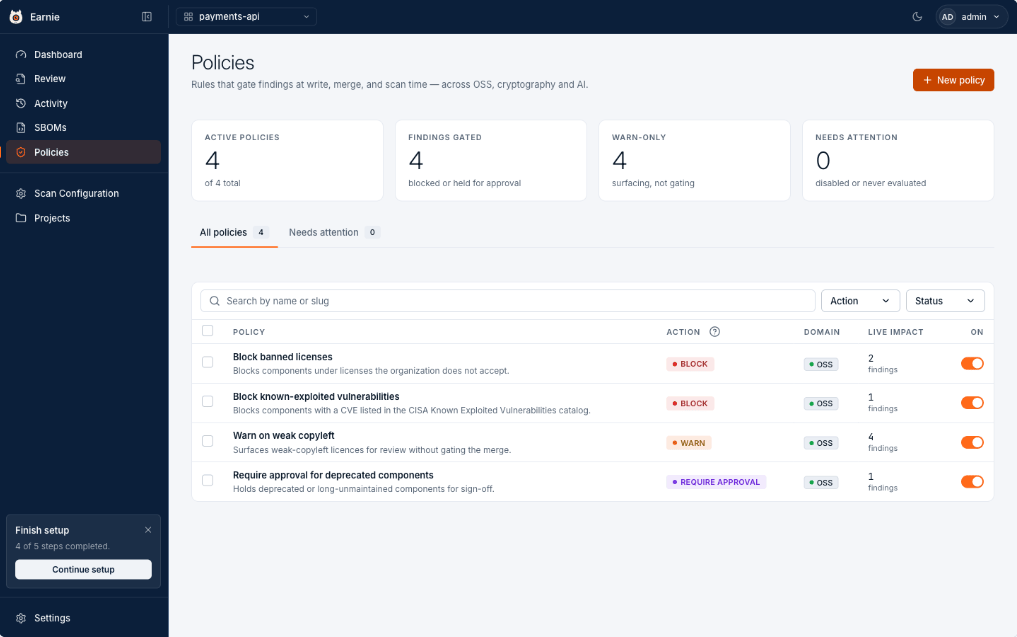 A policy turns a judgement you keep repeating into a rule that applies itself. Each policy shows what it does, and what it's catching right now.
## Three Possible Actions
| Action | What Happens at Merge Time |
| -------------------- | ------------------------------------------------------------------------- |
| **Block** | The gate fails. The change doesn't merge until it's resolved or approved. |
| **Require Approval** | Held until someone with approval authority (an Admin) approves it. |
| **Warn** | Surfaced, but nothing is gated. |
**Start with Warn.** Introducing a new rule as Warn shows you the true blast
radius without stopping anyone's merge. Promote it to Block once the backlog
it surfaces is dealt with.
## Writing a Policy
Select **+ New Policy**. Start from a template, or build from scratch. The built-in set covers the rules most teams want first, such as banned licences and known-exploited vulnerabilities.
You then have two ways to express the rule, and they stay in sync:
* **Sentence** — build the condition by picking fields, operators, and values. No syntax to learn.
* **Code** — write the expression directly, with autocomplete and live validation, for conditions the builder can't express.
Choose the action, save, and the policy is live on the next evaluation.
## Rules About Cryptography
With Cryptography enabled, the same builder gains a **Crypto** field group, and six starter templates are available under Crypto:
| Template | What It Catches |
| ---------------------------------------------------- | ------------------------------------------------------------------------------------------------------------------- |
| Block reachable weak cryptography | Cryptography at the severities you choose that Earnie also traced a call path to, broken *and* provably in use. |
| Flag quantum-vulnerable cryptography | Any algorithm Earnie cannot confirm is quantum-safe, so you can build a migration inventory before gating anything. |
| Block weak key sizes | One algorithm family used below a key length you set, such as RSA under 2048 bits. |
| Warn on legacy TLS versions | TLS 1.0 and TLS 1.1. |
| Warn on confidentiality crypto over export threshold | Evidence that a confidentiality mechanism is over the cited EAR threshold. |
| Warn on unresolved export evidence | Any EAR export signal that still needs evidence before it can be resolved. |
The Crypto group also exposes the finding's **Purpose** (`confidentiality`, `excluded`, `support`, or `unknown`) and three evidence-only EAR signals, each `met`, `not_met`, or `unknown`:
| Field | CEL Path | Meaning |
| ----------------------- | ---------------------------------------- | ---------------------------------------------------------------------------------------------------------------------------------------------------------------------------------------------- |
| Purpose | `finding.crypto.purpose` | The mechanism's EAR Technical Note 1 purpose class. |
| Export Confidentiality | `finding.crypto.export_confidentiality` | `met` means the cited confidentiality threshold is exceeded; `not_met` means it isn't; `unknown` means the mechanism, key size, or cited threshold is unresolved. |
| Export PQC | `finding.crypto.export_pqc` | `met` means the assessed algorithm is post-quantum; `not_met` means it isn't; `unknown` means the algorithm or purpose can't be assessed. |
| Export Mass-Market Line | `finding.crypto.export_mass_market_line` | `met` or `not_met` reflects the cited per-finding reporting-line evidence; `unknown` means evidence is unresolved, including product-level mass-market facts that one finding can't establish. |
These signals support your export review; they are not an ECCN or a
classification decision. Use `has()` when a field may be absent, an absent
field means the producer supplied no value, `unknown` means the producer
supplied the field but couldn't resolve its evidence.
Two of these read more precisely than they look. Reachability has three values, not two, a rule writes them `reachable`, `unreachable`, and `unknown`, which the finding itself shows as Reachable, Not Reached, and Unknown, so a rule that should only fire on proven usage must say `reachable`; asking for "not unreachable" also catches everything the analysis couldn't decide. Key size exists only where Earnie resolved an actual key length; where it couldn't, the field is absent and a key-size rule passes over the finding rather than guessing. The same holds for the algorithm family: a rule can only name a family Earnie assesses, and cryptography it has never assessed is treated as **not** quantum-safe rather than quietly waved through.
Without Cryptography enabled, none of this appears, no field group, no
templates, nothing to discover. The policy page looks exactly as it does
today.
## Where a Policy Applies
A policy belongs to your organisation rather than to a single project, so the same rule can be attached to several projects at once. Open a policy and its **Where This Applies** panel names every project it's currently attached to, and the repository connected to each one, so "which repositories does this cover?" has a direct answer.
A project with no repository connected yet is marked as covering nothing.
Because the rule is shared, editing it changes the gate for every project on that list. When a policy is attached to more than one, Earnie asks you to confirm before saving and shows you exactly which projects the change reaches. A policy attached to a single project saves without the extra step.
## Cloning a Policy
To start a new rule from an existing one instead of a blank template, open a policy and choose **Clone Policy** from its **More Actions** menu. The copy is entirely independent, it starts with the same rule and settings, but from then on the two are edited separately, so changing one never affects the other, including their parameter values.
The clone is named after the source with "(copy)" appended, gets its own identifier, and is attached to the project you cloned it from so you can find and tune it immediately.
A copy of a built-in template becomes a regular custom policy, so it's yours
to edit freely.
## What's Next
With a policy live, the next step is seeing what happens on the other side of it, [when the gate actually blocks a merge](/en/latest/earnie/using-earnie/merge-gate).
A policy turns a judgement you keep repeating into a rule that applies itself. Each policy shows what it does, and what it's catching right now.
## Three Possible Actions
| Action | What Happens at Merge Time |
| -------------------- | ------------------------------------------------------------------------- |
| **Block** | The gate fails. The change doesn't merge until it's resolved or approved. |
| **Require Approval** | Held until someone with approval authority (an Admin) approves it. |
| **Warn** | Surfaced, but nothing is gated. |
**Start with Warn.** Introducing a new rule as Warn shows you the true blast
radius without stopping anyone's merge. Promote it to Block once the backlog
it surfaces is dealt with.
## Writing a Policy
Select **+ New Policy**. Start from a template, or build from scratch. The built-in set covers the rules most teams want first, such as banned licences and known-exploited vulnerabilities.
You then have two ways to express the rule, and they stay in sync:
* **Sentence** — build the condition by picking fields, operators, and values. No syntax to learn.
* **Code** — write the expression directly, with autocomplete and live validation, for conditions the builder can't express.
Choose the action, save, and the policy is live on the next evaluation.
## Rules About Cryptography
With Cryptography enabled, the same builder gains a **Crypto** field group, and six starter templates are available under Crypto:
| Template | What It Catches |
| ---------------------------------------------------- | ------------------------------------------------------------------------------------------------------------------- |
| Block reachable weak cryptography | Cryptography at the severities you choose that Earnie also traced a call path to, broken *and* provably in use. |
| Flag quantum-vulnerable cryptography | Any algorithm Earnie cannot confirm is quantum-safe, so you can build a migration inventory before gating anything. |
| Block weak key sizes | One algorithm family used below a key length you set, such as RSA under 2048 bits. |
| Warn on legacy TLS versions | TLS 1.0 and TLS 1.1. |
| Warn on confidentiality crypto over export threshold | Evidence that a confidentiality mechanism is over the cited EAR threshold. |
| Warn on unresolved export evidence | Any EAR export signal that still needs evidence before it can be resolved. |
The Crypto group also exposes the finding's **Purpose** (`confidentiality`, `excluded`, `support`, or `unknown`) and three evidence-only EAR signals, each `met`, `not_met`, or `unknown`:
| Field | CEL Path | Meaning |
| ----------------------- | ---------------------------------------- | ---------------------------------------------------------------------------------------------------------------------------------------------------------------------------------------------- |
| Purpose | `finding.crypto.purpose` | The mechanism's EAR Technical Note 1 purpose class. |
| Export Confidentiality | `finding.crypto.export_confidentiality` | `met` means the cited confidentiality threshold is exceeded; `not_met` means it isn't; `unknown` means the mechanism, key size, or cited threshold is unresolved. |
| Export PQC | `finding.crypto.export_pqc` | `met` means the assessed algorithm is post-quantum; `not_met` means it isn't; `unknown` means the algorithm or purpose can't be assessed. |
| Export Mass-Market Line | `finding.crypto.export_mass_market_line` | `met` or `not_met` reflects the cited per-finding reporting-line evidence; `unknown` means evidence is unresolved, including product-level mass-market facts that one finding can't establish. |
These signals support your export review; they are not an ECCN or a
classification decision. Use `has()` when a field may be absent, an absent
field means the producer supplied no value, `unknown` means the producer
supplied the field but couldn't resolve its evidence.
Two of these read more precisely than they look. Reachability has three values, not two, a rule writes them `reachable`, `unreachable`, and `unknown`, which the finding itself shows as Reachable, Not Reached, and Unknown, so a rule that should only fire on proven usage must say `reachable`; asking for "not unreachable" also catches everything the analysis couldn't decide. Key size exists only where Earnie resolved an actual key length; where it couldn't, the field is absent and a key-size rule passes over the finding rather than guessing. The same holds for the algorithm family: a rule can only name a family Earnie assesses, and cryptography it has never assessed is treated as **not** quantum-safe rather than quietly waved through.
Without Cryptography enabled, none of this appears, no field group, no
templates, nothing to discover. The policy page looks exactly as it does
today.
## Where a Policy Applies
A policy belongs to your organisation rather than to a single project, so the same rule can be attached to several projects at once. Open a policy and its **Where This Applies** panel names every project it's currently attached to, and the repository connected to each one, so "which repositories does this cover?" has a direct answer.
A project with no repository connected yet is marked as covering nothing.
Because the rule is shared, editing it changes the gate for every project on that list. When a policy is attached to more than one, Earnie asks you to confirm before saving and shows you exactly which projects the change reaches. A policy attached to a single project saves without the extra step.
## Cloning a Policy
To start a new rule from an existing one instead of a blank template, open a policy and choose **Clone Policy** from its **More Actions** menu. The copy is entirely independent, it starts with the same rule and settings, but from then on the two are edited separately, so changing one never affects the other, including their parameter values.
The clone is named after the source with "(copy)" appended, gets its own identifier, and is attached to the project you cloned it from so you can find and tune it immediately.
A copy of a built-in template becomes a regular custom policy, so it's yours
to edit freely.
## What's Next
With a policy live, the next step is seeing what happens on the other side of it, [when the gate actually blocks a merge](/en/latest/earnie/using-earnie/merge-gate).