> ## Documentation Index
> Fetch the complete documentation index at: https://docs.scanoss.com/llms.txt
> Use this file to discover all available pages before exploring further.
# Triaging Findings
> How to work through the Review Workspace backlog, make a defensible decision on each finding, and use keyboard shortcuts to triage at speed.
## The Review Workspace
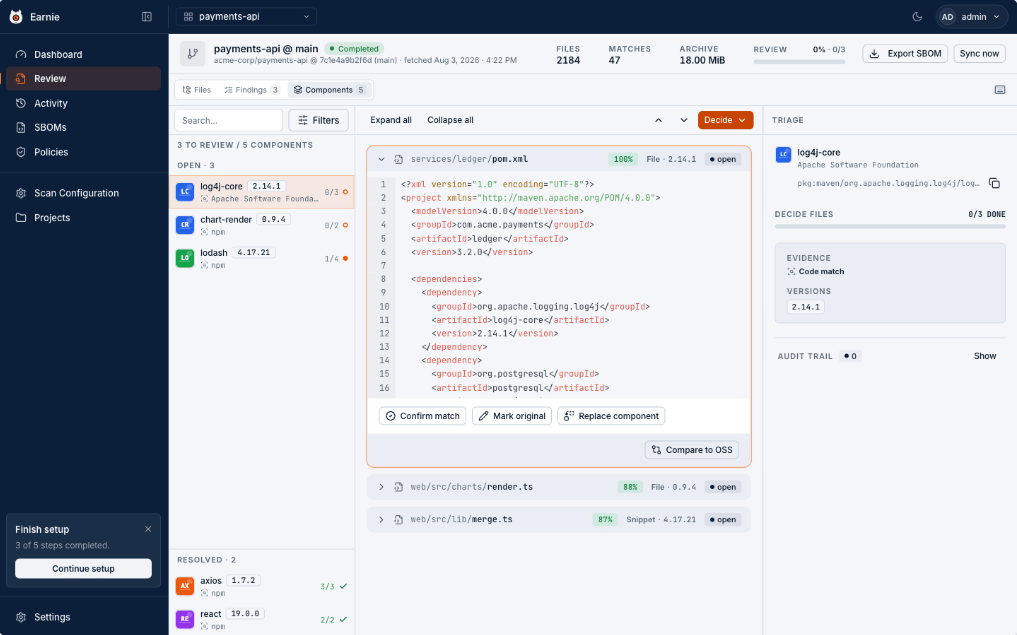 This is where the work happens. The Review Workspace is built so a reviewer can go through a backlog quickly without losing the evidence trail. It's arranged into three panels: what to review, the evidence, and the record.
## Three Ways to Work
The toggle at the top switches how the backlog is organised.
| Mode | Groups By |
| ------------------------ | ----------- |
| **Components** (default) | Package |
| **Findings** | File |
| **Files** | Source tree |
Use Components to clear volume, and drop to Files when you need to see a match in context.
## Reading the Evidence
The middle panel shows the actual matched source with the match percentage, 100% for a whole-file match, lower for a snippet. The right-hand panel identifies the component (name, vendor, package identifier) with its licence, known vulnerabilities, and how far behind the current release it is.
## Cryptographic Findings
A cryptographic finding highlights the exact lines where the algorithm is used, in the same source panel, there's no separate view to learn. A finding in your own code shows **No package — first-party code**; one inside a dependency names that package instead.
The right-hand panel adds a reachability pill and one line explaining it:
* **Reachable** means Earnie traced a call path from an entry point to that code.
* **Not reached** means it looked and found none.
* **Unknown** means the analysis couldn't decide.
When there's a path, **View call trace** opens it, entry point first, each step naming the function, its file, and its line.
When the finding sits inside a dependency, its code lives in that package's own source, which isn't among your scanned files. Earnie shows the real file anyway when it resolved that package's source during the scan, today Java projects built with Maven or Gradle, opened at the line where the algorithm is used, in the same source panel as your own code. Otherwise the panel shows the single matched line instead of the whole file, captioned with the line number and the package it came from. If even that is unavailable it says **Code not available**, rather than showing what looks like an empty file. The decision controls stay available in every case.
**Not reached is not the same as not used.** The trace is static analysis.
It can't follow code reached through reflection, dynamic dispatch, or
configuration, and some languages have no call-graph support at all, which
is why Earnie says Unknown rather than guessing. Treat a reachable finding
as more urgent; never treat an unreachable one as harmless.
## Making a Decision
Use **Decide**, and pick the answer that's true:
| Decision | Use It When | Effect on the Gate |
| --------------------- | ------------------------------------------------------------ | ----------------------------------- |
| **Confirm Match** | It really is that third-party component. | Stays, attribution now validated. |
| **Mark Original** | It's your own code that happens to match its published copy. | Removed from the gate. |
| **Replace Component** | A real match, but identified as the wrong package. | Stays, against the correct package. |
For a declared dependency the pair is **Accept into SBOM** or **Dismiss**. Earnie moves you to the next open finding automatically after each decision, and every decision offers **Undo**.
A cryptographic finding has its own three decisions:
| Decision | Use It When | Effect on the Gate |
| ------------------ | ------------------------------------------------------ | ---------------------- |
| **Confirm Usage** | The algorithm really is in use. | Stays in the gate. |
| **False Positive** | It isn't actually cryptography. | Removed from the gate. |
| **Accepted Risk** | The usage is real and you're choosing to live with it. | Removed from the gate. |
All three close the finding and keep its row, so an accepted risk stays visible instead of quietly disappearing. Whether the algorithm is reachable changes what you decide, never which decisions you're offered.
**There is no "Fixed" for cryptography.** You record a fix by removing the
weak algorithm and re-scanning. The next run reports it as gone and keeps
your decision history, a claim Earnie can verify, rather than one it has to
take your word for.
**Decide a whole component at once.** From Components mode, the Decide menu
applies to every open file for that component, `Shift+1` to confirm all,
`Shift+2` to mark all original. This is the single biggest time-saver on a
large first triage.
**Teach Earnie once.** When you replace a component, you can also save it to
the project's Scan Configuration. Future scans apply the same correction on
their own, instead of asking you again.
Every action is written to the finding's Audit Trail: what was decided, by whom, when, and what the state was before. That record is what makes the decision defensible later.
## Keyboard Shortcuts
Triage is the one screen worth learning the keys for. Press `?` anywhere in the Review Workspace for the live list.
| Key | Does |
| --------------------------------- | --------------------------------------------------------------------------------- |
| `j` / `k` | Next / previous finding |
| `Shift+j` / `Shift+k` | Next / previous group with open work |
| `N` | Skip to the next open finding |
| `1` | Confirm match (Accept, on a declared dependency · Confirm usage, on cryptography) |
| `2` | Mark original (Dismiss · False positive) |
| `3` | Replace component (Accepted risk, on cryptography) |
| `Shift+1` / `Shift+2` / `Shift+3` | Apply that decision to every open file in the component |
| `?` | Show the shortcuts panel |
Shortcuts are inert while you're typing in a field, and the decision keys only
appear for roles that can record decisions.
## Finding States
| State | Meaning |
| ------------- | ---------------------------------------------------------------------------------------------------------------------------------------------------------------------------------- |
| Open | Found, and nobody has decided yet. |
| Assigned | Someone owns it. |
| Resolved | Decided and closed. |
| Rule-Resolved | Closed automatically by a rule you configured. |
| Reopened | Was closed, then reopened. |
| Suppressed | Excluded from the gate and from metrics. A flag, not a state, it can sit alongside any of the above. A decision that removes a finding from the gate sets it; reopening clears it. |
In the workspace these collapse to three practical buckets: **pending** (needs you), **identified** (decided), and **original** (your own code).
## What's Next
With findings triaged, the next step is turning the judgement calls you keep repeating into [a policy that applies itself](/en/latest/earnie/using-earnie/setting-policies).
This is where the work happens. The Review Workspace is built so a reviewer can go through a backlog quickly without losing the evidence trail. It's arranged into three panels: what to review, the evidence, and the record.
## Three Ways to Work
The toggle at the top switches how the backlog is organised.
| Mode | Groups By |
| ------------------------ | ----------- |
| **Components** (default) | Package |
| **Findings** | File |
| **Files** | Source tree |
Use Components to clear volume, and drop to Files when you need to see a match in context.
## Reading the Evidence
The middle panel shows the actual matched source with the match percentage, 100% for a whole-file match, lower for a snippet. The right-hand panel identifies the component (name, vendor, package identifier) with its licence, known vulnerabilities, and how far behind the current release it is.
## Cryptographic Findings
A cryptographic finding highlights the exact lines where the algorithm is used, in the same source panel, there's no separate view to learn. A finding in your own code shows **No package — first-party code**; one inside a dependency names that package instead.
The right-hand panel adds a reachability pill and one line explaining it:
* **Reachable** means Earnie traced a call path from an entry point to that code.
* **Not reached** means it looked and found none.
* **Unknown** means the analysis couldn't decide.
When there's a path, **View call trace** opens it, entry point first, each step naming the function, its file, and its line.
When the finding sits inside a dependency, its code lives in that package's own source, which isn't among your scanned files. Earnie shows the real file anyway when it resolved that package's source during the scan, today Java projects built with Maven or Gradle, opened at the line where the algorithm is used, in the same source panel as your own code. Otherwise the panel shows the single matched line instead of the whole file, captioned with the line number and the package it came from. If even that is unavailable it says **Code not available**, rather than showing what looks like an empty file. The decision controls stay available in every case.
**Not reached is not the same as not used.** The trace is static analysis.
It can't follow code reached through reflection, dynamic dispatch, or
configuration, and some languages have no call-graph support at all, which
is why Earnie says Unknown rather than guessing. Treat a reachable finding
as more urgent; never treat an unreachable one as harmless.
## Making a Decision
Use **Decide**, and pick the answer that's true:
| Decision | Use It When | Effect on the Gate |
| --------------------- | ------------------------------------------------------------ | ----------------------------------- |
| **Confirm Match** | It really is that third-party component. | Stays, attribution now validated. |
| **Mark Original** | It's your own code that happens to match its published copy. | Removed from the gate. |
| **Replace Component** | A real match, but identified as the wrong package. | Stays, against the correct package. |
For a declared dependency the pair is **Accept into SBOM** or **Dismiss**. Earnie moves you to the next open finding automatically after each decision, and every decision offers **Undo**.
A cryptographic finding has its own three decisions:
| Decision | Use It When | Effect on the Gate |
| ------------------ | ------------------------------------------------------ | ---------------------- |
| **Confirm Usage** | The algorithm really is in use. | Stays in the gate. |
| **False Positive** | It isn't actually cryptography. | Removed from the gate. |
| **Accepted Risk** | The usage is real and you're choosing to live with it. | Removed from the gate. |
All three close the finding and keep its row, so an accepted risk stays visible instead of quietly disappearing. Whether the algorithm is reachable changes what you decide, never which decisions you're offered.
**There is no "Fixed" for cryptography.** You record a fix by removing the
weak algorithm and re-scanning. The next run reports it as gone and keeps
your decision history, a claim Earnie can verify, rather than one it has to
take your word for.
**Decide a whole component at once.** From Components mode, the Decide menu
applies to every open file for that component, `Shift+1` to confirm all,
`Shift+2` to mark all original. This is the single biggest time-saver on a
large first triage.
**Teach Earnie once.** When you replace a component, you can also save it to
the project's Scan Configuration. Future scans apply the same correction on
their own, instead of asking you again.
Every action is written to the finding's Audit Trail: what was decided, by whom, when, and what the state was before. That record is what makes the decision defensible later.
## Keyboard Shortcuts
Triage is the one screen worth learning the keys for. Press `?` anywhere in the Review Workspace for the live list.
| Key | Does |
| --------------------------------- | --------------------------------------------------------------------------------- |
| `j` / `k` | Next / previous finding |
| `Shift+j` / `Shift+k` | Next / previous group with open work |
| `N` | Skip to the next open finding |
| `1` | Confirm match (Accept, on a declared dependency · Confirm usage, on cryptography) |
| `2` | Mark original (Dismiss · False positive) |
| `3` | Replace component (Accepted risk, on cryptography) |
| `Shift+1` / `Shift+2` / `Shift+3` | Apply that decision to every open file in the component |
| `?` | Show the shortcuts panel |
Shortcuts are inert while you're typing in a field, and the decision keys only
appear for roles that can record decisions.
## Finding States
| State | Meaning |
| ------------- | ---------------------------------------------------------------------------------------------------------------------------------------------------------------------------------- |
| Open | Found, and nobody has decided yet. |
| Assigned | Someone owns it. |
| Resolved | Decided and closed. |
| Rule-Resolved | Closed automatically by a rule you configured. |
| Reopened | Was closed, then reopened. |
| Suppressed | Excluded from the gate and from metrics. A flag, not a state, it can sit alongside any of the above. A decision that removes a finding from the gate sets it; reopening clears it. |
In the workspace these collapse to three practical buckets: **pending** (needs you), **identified** (decided), and **original** (your own code).
## What's Next
With findings triaged, the next step is turning the judgement calls you keep repeating into [a policy that applies itself](/en/latest/earnie/using-earnie/setting-policies).