> ## Documentation Index
> Fetch the complete documentation index at: https://docs.scanoss.com/llms.txt
> Use this file to discover all available pages before exploring further.
# Azure DevOps
> Integrate SCANOSS into your development workflow via Azure Pipelines.
## Prerequisites
Before you begin, ensure you have the following:
* An existing Azure DevOps repository
* The [SCANOSS Code Scan](https://marketplace.visualstudio.com/items?itemName=SCANOSS.scanoss-code-scan) task installed from the Azure Marketplace
* A valid SCANOSS API key (required only for enterprise features)
## How It Works
The SCANOSS Code Scan task runs inside your Azure Pipeline and scans your codebase for security vulnerabilities and licence compliance issues. On pull requests, it posts a summary comment and creates check statuses directly on the PR. When triggered manually or on a schedule, results are uploaded as pipeline run artefacts.
## Configuration
### Repository Permissions
The SCANOSS task uses the Azure API to create checks and post comments on pull requests. Before using it, configure the required permissions on your repository:
1. Navigate to **Project Settings → Repositories** and select your repository.
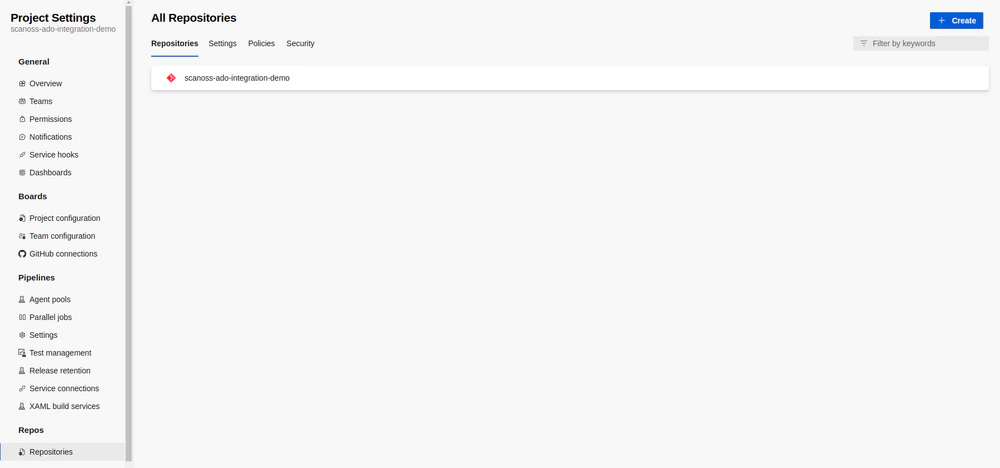 2. Open the **Security** tab.
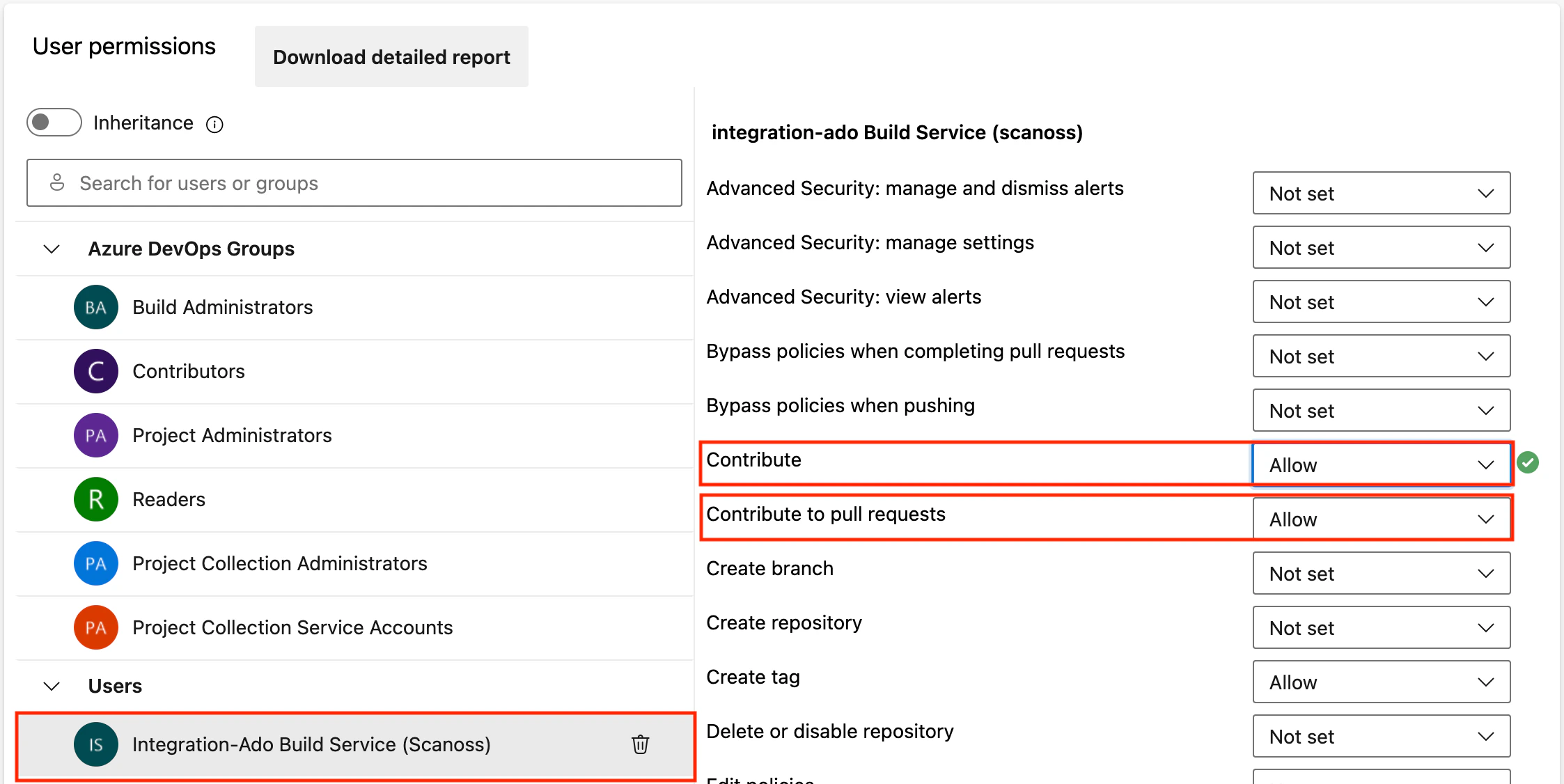
3. Under the **Users** group, select the repository **Build Service** account.
4. Set both `Contribute to pull requests` and `Contribute` permissions to **Allow**.
2. Open the **Security** tab.
3. Under the **Users** group, select the repository **Build Service** account.
4. Set both `Contribute to pull requests` and `Contribute` permissions to **Allow**.
 ### Personal Access Token (PAT)
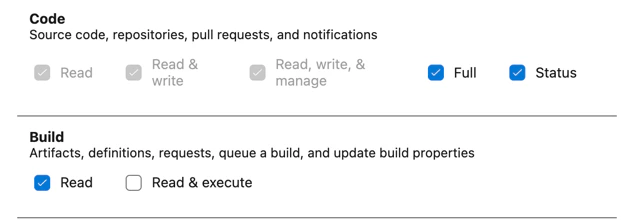
A Personal Access Token is **only required** when the pipeline setting **Limit job authorisation scope to current project for non-release pipelines** is set to **OFF**.
If this setting is **ON**, no PAT is needed. When a PAT is required, create one with the minimum necessary permissions and pass it via the `adoPat` input parameter.
### Personal Access Token (PAT)
A Personal Access Token is **only required** when the pipeline setting **Limit job authorisation scope to current project for non-release pipelines** is set to **OFF**.
If this setting is **ON**, no PAT is needed. When a PAT is required, create one with the minimum necessary permissions and pass it via the `adoPat` input parameter.
 ### Build Validation Policy
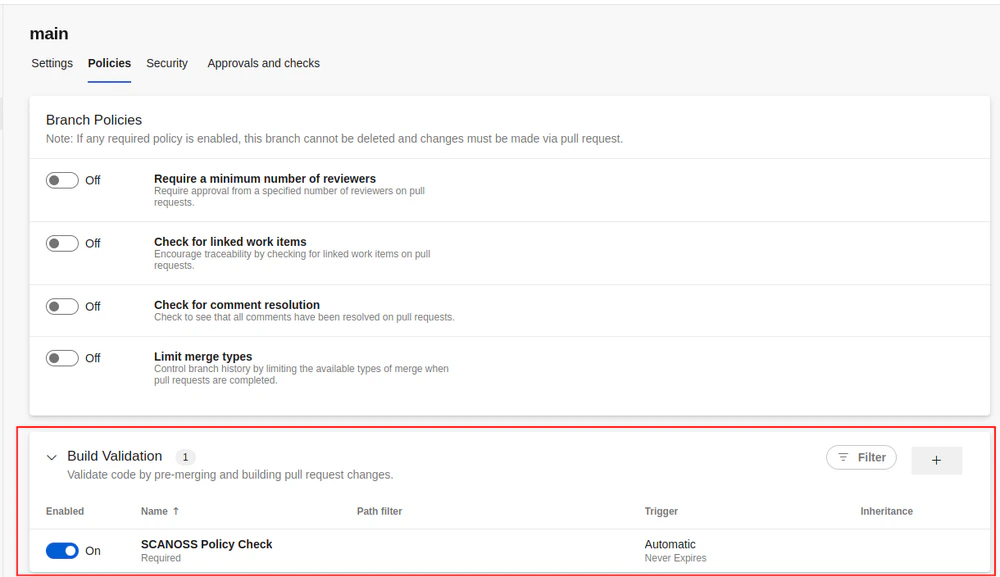
To automatically trigger the pipeline on pull requests:
1. Open the **Policies** tab for your repository.
2. Select the target branch under **Branch Policies**.
3. Add a new **Build Validation** policy and configure the following fields:
* **Build Pipeline**: Select your pipeline.
* **Trigger**: Set to **Automatic**.
* **Policy Requirement**: Select the appropriate option.
* **Build Expiration**: Select the appropriate option.
* **Display Name**: Set a descriptive name.
### Build Validation Policy
To automatically trigger the pipeline on pull requests:
1. Open the **Policies** tab for your repository.
2. Select the target branch under **Branch Policies**.
3. Add a new **Build Validation** policy and configure the following fields:
* **Build Pipeline**: Select your pipeline.
* **Trigger**: Set to **Automatic**.
* **Policy Requirement**: Select the appropriate option.
* **Build Expiration**: Select the appropriate option.
* **Display Name**: Set a descriptive name.
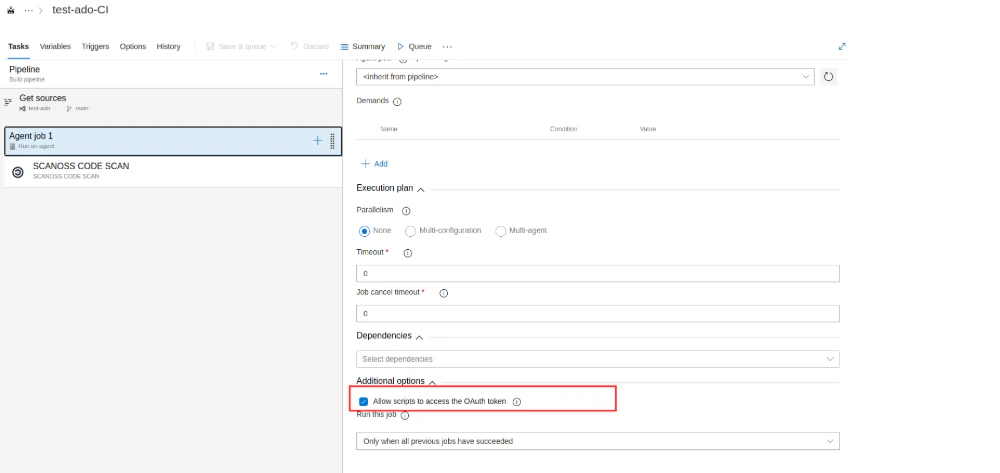
 ### Azure Agent Jobs
If using an Azure-hosted agent job, ensure the **Allow scripts to access OAuth token** option is enabled. The task requires access to the System Access Token to post results to the PR.
### Azure Agent Jobs
If using an Azure-hosted agent job, ensure the **Allow scripts to access OAuth token** option is enabled. The task requires access to the System Access Token to post results to the PR.
 ## Basic Pipeline Setup
The following is a minimal pipeline configuration that triggers the SCANOSS Code Scan task on pull requests to `main`:
```yaml theme={null}
trigger: none
pr:
- main
pool:
vmImage: ubuntu-latest
variables:
HTTP_PROXY: $(HTTP_PROXY_URL)
HTTPS_PROXY: $(HTTPS_PROXY_URL)
steps:
- checkout: self
persistCredentials: true
- task: scanoss@1.3.0
displayName: "SCANOSS Code Scan"
inputs:
# apiKey: $(APIKEY)
# apiUrl: 'https://api.scanoss.com/scan/direct'
policies: copyleft,undeclared
policiesHaltOnFailure: false
dependenciesEnabled: true
dependenciesScope: prod
```
> Minor versions can be pinned by specifying the full version after the `@` symbol (e.g., `scanoss@1.3.0`). Refer to the [Azure task versioning documentation](https://learn.microsoft.com/en-us/azure/devops/pipelines/process/tasks?view=azure-devops\&tabs=yaml#task-versions) for further details.
## Scanning a Subdirectory
By default, SCANOSS scans the entire repository root. Use the `scanPath` parameter to restrict
scanning to a specific subdirectory within the repository. This is useful for monorepos or
when only part of the codebase needs to be scanned.
```yaml theme={null}
steps:
- checkout: self
persistCredentials: true
- task: scanoss@1
displayName: "SCANOSS Code Scan"
inputs:
scanPath: "services/backend"
policies: copyleft,undeclared
policiesHaltOnFailure: false
```
The path must be **relative** to the repository root. Absolute paths and directory traversal
using `..` are not permitted and will cause the task to fall back to scanning the root (`"."`)
with a warning.
## Task Input Parameters
The SCANOSS Code Scan task accepts the following input parameters to customise scanning behaviour. For the latest and most complete list of parameters, refer to the [SCANOSS ADO source repository](https://github.com/scanoss/ado-code-scan).
| Parameter | Description | Required | Default |
| -------------------------- | --------------------------------------------------------------------------------------------------------------------------- | -------- | ------------------------------------ |
| `outputFilepath` | Scan output file name | Optional | `results.json` |
| `scanPath` | Relative path within the repository to scan. Must be a relative path — absolute paths and `..` traversal are not permitted. | Optional | `.` |
| `dependenciesEnabled` | Enable or disable dependency scanning | Optional | `false` |
| `dependenciesScope` | Dependency scope to scan (`dev` or `prod`) | Optional | — |
| `dependenciesScopeInclude` | Comma-separated list of dependency scopes to include | Optional | — |
| `dependenciesScopeExclude` | Comma-separated list of dependency scopes to exclude | Optional | — |
| `policies` | Comma-separated list of active policies (`copyleft`, `undeclared`, `deptrack`) | Optional | — |
| `policiesHaltOnFailure` | Halt the pipeline on policy failure. Set to `false` to report without failing | Optional | `true` |
| `depTrackEnabled` | Enable Dependency Track SBOM upload and status reporting | Optional | `false` |
| `depTrackUrl` | Dependency Track server URL | Optional | — |
| `depTrackApikey` | Dependency Track API key | Optional | — |
| `depTrackProjectId` | UUID of an existing Dependency Track project | Optional | — |
| `depTrackProjectName` | Dependency Track project name | Optional | — |
| `depTrackProjectVersion` | Dependency Track project version | Optional | — |
| `apiUrl` | SCANOSS API URL | Optional | `https://api.osskb.org/scan/direct` |
| `apiKey` | SCANOSS API key | Optional | — |
| `runtimeContainer` | Runtime container image URL | Optional | `ghcr.io/scanoss/scanoss-py:v1.46.0` |
| `licensesCopyleftInclude` | Copyleft licences to append to the default list | Optional | — |
| `licensesCopyleftExclude` | Copyleft licences to remove from the default list | Optional | — |
| `licensesCopyleftExplicit` | Explicit list of copyleft licences to use instead of the default list | Optional | — |
| `skipSnippets` | Skip snippet scanning (requires `scanFiles` to be enabled) | Optional | `false` |
| `scanFiles` | Enable or disable file and snippet scanning | Optional | `true` |
| `scanossSettings` | Use a SCANOSS settings file for scanning | Optional | `true` |
| `settingsFilepath` | Path to the SCANOSS settings file | Optional | `scanoss.json` |
| `debug` | Enable debug logging | Optional | `false` |
| `adoPat` | Azure DevOps Personal Access Token | Optional | — |
## Policy Checks
The SCANOSS Code Scan task supports three configurable policies to enforce compliance automatically on pull requests:
* **Copyleft** (`copyleft`) — Detects components or code snippets associated with copyleft licences. If found, the pull request check fails. The default copyleft licence list is defined in the [SCANOSS ADO repository](https://github.com/scanoss/ado-code-scan).
* **Undeclared** (`undeclared`) — Compares detected components against those declared in your `scanoss.json` file. If undeclared components are found, the PR check fails.
* **Dependency Track** (`deptrack`) — Queries a Dependency Track server for policy violations, including security vulnerabilities, licence violations, and compliance issues. The check reports any violations found in the pipeline.
**Requirements:**
* Dependency Track server URL and API key
* Either a project UUID or a project name and version
* Note: the policy check runs even if SBOM upload is disabled, but will report warnings if it is querying potentially stale data.
**Configuration example:**
```yaml theme={null}
inputs:
policies: copyleft,undeclared,deptrack
depTrackEnabled: true
depTrackUrl: "https://deptrack.example.com"
depTrackApikey: $(DEPTRACK_API_KEY)
depTrackProjectName: "my-project"
depTrackProjectVersion: "1.0.0"
```
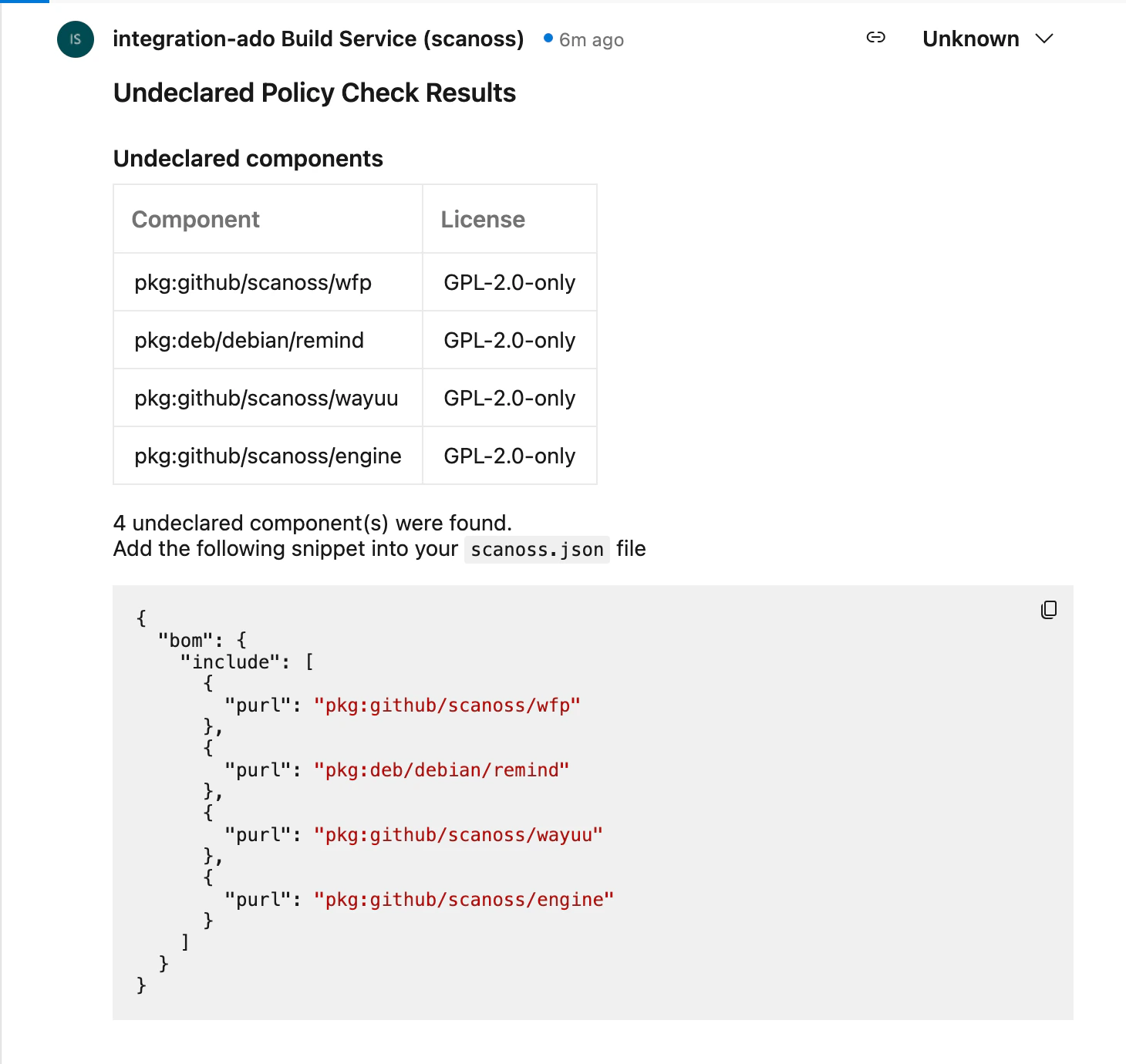
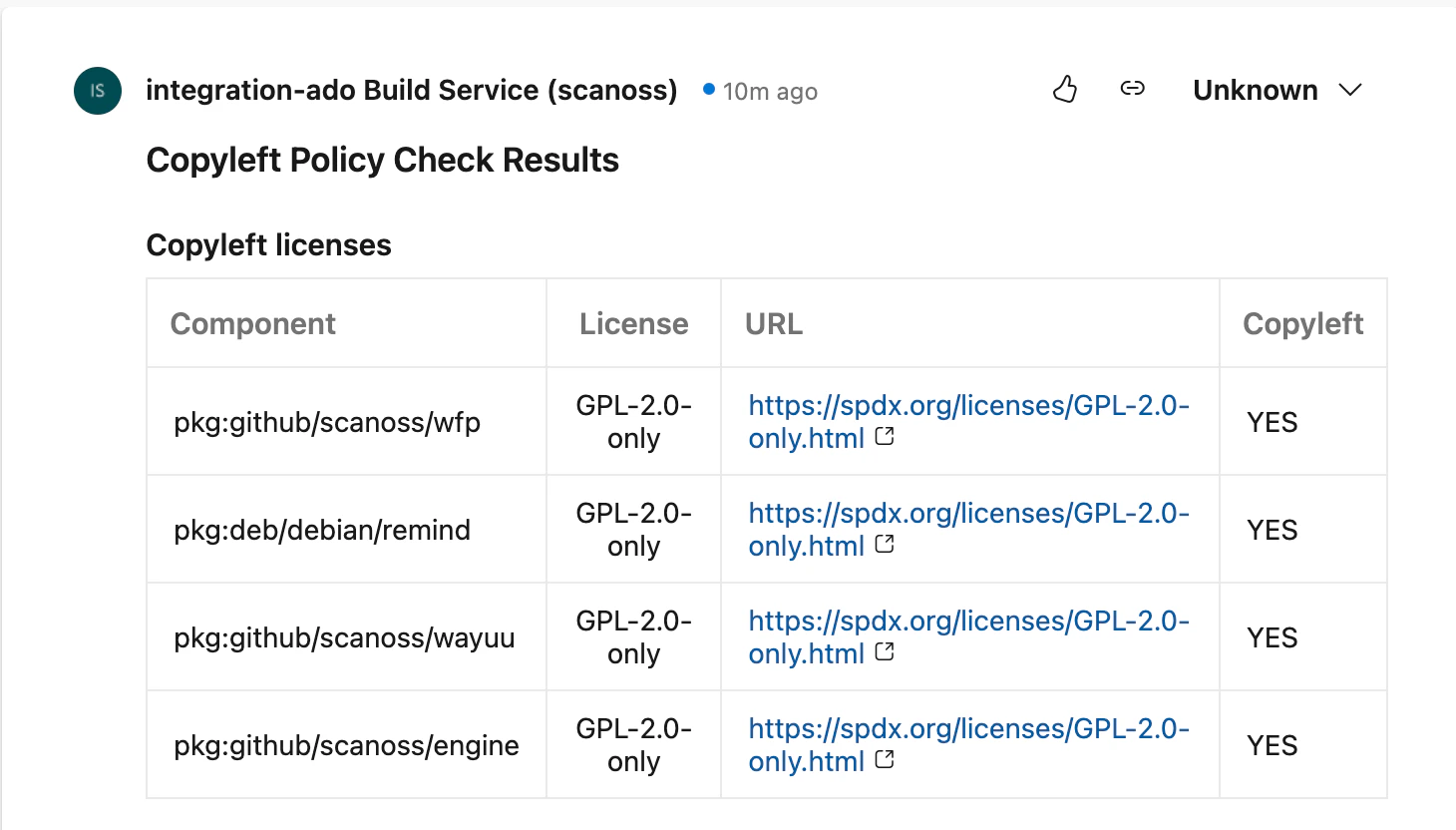
When a pull request is scanned, a comment summarising the results is automatically posted to the PR.
## Basic Pipeline Setup
The following is a minimal pipeline configuration that triggers the SCANOSS Code Scan task on pull requests to `main`:
```yaml theme={null}
trigger: none
pr:
- main
pool:
vmImage: ubuntu-latest
variables:
HTTP_PROXY: $(HTTP_PROXY_URL)
HTTPS_PROXY: $(HTTPS_PROXY_URL)
steps:
- checkout: self
persistCredentials: true
- task: scanoss@1.3.0
displayName: "SCANOSS Code Scan"
inputs:
# apiKey: $(APIKEY)
# apiUrl: 'https://api.scanoss.com/scan/direct'
policies: copyleft,undeclared
policiesHaltOnFailure: false
dependenciesEnabled: true
dependenciesScope: prod
```
> Minor versions can be pinned by specifying the full version after the `@` symbol (e.g., `scanoss@1.3.0`). Refer to the [Azure task versioning documentation](https://learn.microsoft.com/en-us/azure/devops/pipelines/process/tasks?view=azure-devops\&tabs=yaml#task-versions) for further details.
## Scanning a Subdirectory
By default, SCANOSS scans the entire repository root. Use the `scanPath` parameter to restrict
scanning to a specific subdirectory within the repository. This is useful for monorepos or
when only part of the codebase needs to be scanned.
```yaml theme={null}
steps:
- checkout: self
persistCredentials: true
- task: scanoss@1
displayName: "SCANOSS Code Scan"
inputs:
scanPath: "services/backend"
policies: copyleft,undeclared
policiesHaltOnFailure: false
```
The path must be **relative** to the repository root. Absolute paths and directory traversal
using `..` are not permitted and will cause the task to fall back to scanning the root (`"."`)
with a warning.
## Task Input Parameters
The SCANOSS Code Scan task accepts the following input parameters to customise scanning behaviour. For the latest and most complete list of parameters, refer to the [SCANOSS ADO source repository](https://github.com/scanoss/ado-code-scan).
| Parameter | Description | Required | Default |
| -------------------------- | --------------------------------------------------------------------------------------------------------------------------- | -------- | ------------------------------------ |
| `outputFilepath` | Scan output file name | Optional | `results.json` |
| `scanPath` | Relative path within the repository to scan. Must be a relative path — absolute paths and `..` traversal are not permitted. | Optional | `.` |
| `dependenciesEnabled` | Enable or disable dependency scanning | Optional | `false` |
| `dependenciesScope` | Dependency scope to scan (`dev` or `prod`) | Optional | — |
| `dependenciesScopeInclude` | Comma-separated list of dependency scopes to include | Optional | — |
| `dependenciesScopeExclude` | Comma-separated list of dependency scopes to exclude | Optional | — |
| `policies` | Comma-separated list of active policies (`copyleft`, `undeclared`, `deptrack`) | Optional | — |
| `policiesHaltOnFailure` | Halt the pipeline on policy failure. Set to `false` to report without failing | Optional | `true` |
| `depTrackEnabled` | Enable Dependency Track SBOM upload and status reporting | Optional | `false` |
| `depTrackUrl` | Dependency Track server URL | Optional | — |
| `depTrackApikey` | Dependency Track API key | Optional | — |
| `depTrackProjectId` | UUID of an existing Dependency Track project | Optional | — |
| `depTrackProjectName` | Dependency Track project name | Optional | — |
| `depTrackProjectVersion` | Dependency Track project version | Optional | — |
| `apiUrl` | SCANOSS API URL | Optional | `https://api.osskb.org/scan/direct` |
| `apiKey` | SCANOSS API key | Optional | — |
| `runtimeContainer` | Runtime container image URL | Optional | `ghcr.io/scanoss/scanoss-py:v1.46.0` |
| `licensesCopyleftInclude` | Copyleft licences to append to the default list | Optional | — |
| `licensesCopyleftExclude` | Copyleft licences to remove from the default list | Optional | — |
| `licensesCopyleftExplicit` | Explicit list of copyleft licences to use instead of the default list | Optional | — |
| `skipSnippets` | Skip snippet scanning (requires `scanFiles` to be enabled) | Optional | `false` |
| `scanFiles` | Enable or disable file and snippet scanning | Optional | `true` |
| `scanossSettings` | Use a SCANOSS settings file for scanning | Optional | `true` |
| `settingsFilepath` | Path to the SCANOSS settings file | Optional | `scanoss.json` |
| `debug` | Enable debug logging | Optional | `false` |
| `adoPat` | Azure DevOps Personal Access Token | Optional | — |
## Policy Checks
The SCANOSS Code Scan task supports three configurable policies to enforce compliance automatically on pull requests:
* **Copyleft** (`copyleft`) — Detects components or code snippets associated with copyleft licences. If found, the pull request check fails. The default copyleft licence list is defined in the [SCANOSS ADO repository](https://github.com/scanoss/ado-code-scan).
* **Undeclared** (`undeclared`) — Compares detected components against those declared in your `scanoss.json` file. If undeclared components are found, the PR check fails.
* **Dependency Track** (`deptrack`) — Queries a Dependency Track server for policy violations, including security vulnerabilities, licence violations, and compliance issues. The check reports any violations found in the pipeline.
**Requirements:**
* Dependency Track server URL and API key
* Either a project UUID or a project name and version
* Note: the policy check runs even if SBOM upload is disabled, but will report warnings if it is querying potentially stale data.
**Configuration example:**
```yaml theme={null}
inputs:
policies: copyleft,undeclared,deptrack
depTrackEnabled: true
depTrackUrl: "https://deptrack.example.com"
depTrackApikey: $(DEPTRACK_API_KEY)
depTrackProjectName: "my-project"
depTrackProjectVersion: "1.0.0"
```
When a pull request is scanned, a comment summarising the results is automatically posted to the PR.
 ## Proxy Configuration
If your pipeline runs behind a proxy, set the proxy environment variables and specify a self-hosted container image via the `runtimeContainer` parameter:
```yaml theme={null}
variables:
HTTP_PROXY: http://your-proxy:8080
HTTPS_PROXY: http://your-proxy:8080
steps:
- task: scanoss@1.3.0
displayName: "SCANOSS Code Scan"
inputs:
runtimeContainer: "/scanoss-py:v1.15.0"
```
## Pipeline Triggers
In addition to pull request triggers, pipelines can be run manually or on a schedule. When triggered outside of a PR context, scan results are uploaded to the pipeline run artefacts only — no PR comments or check statuses are created.
Example scheduled trigger:
```yaml theme={null}
schedules:
- cron: "*/5 * * * *"
displayName: "Run every 5 minutes"
always: true
branches:
include:
- main
```
## Scan Tuning Parameters
The SCANOSS scan engine supports [scan tuning parameters](https://github.com/scanoss/scanoss.py/blob/main/docs/source/scanoss_settings_schema.rst#scan-tuning-parameters) for snippet matching.
> **Important:** Scan tuning parameters must be configured via `scanoss.json`. They are **not** available as SCANOSS ADO task input parameters.
## Managing Components with scanoss.json
The `scanoss.json` file is used to manage your project's software bill of materials (SBOM). It allows you to declare approved components, record triage decisions, and customise scan behaviour to enforce your organisation's policies.
### File Structure and Location
Place `scanoss.json` in the root of your repository so the SCANOSS task can detect it automatically:
```
your-repository/
├── azure-pipelines.yml
├── src/
├── scanoss.json ← Place here and commit to Git
└── README.md
```
> The `scanoss.json` file should be **committed to version control**. It contains component declarations and governance decisions that should be tracked and shared across your team.
### scanoss.json Format
The SBOM configuration uses the following structure:
```json theme={null}
{
"bom": {
"include": [
{
"purl": "pkg:github/scanoss/scanner.c",
"comment": "Core scanner — approved by Tech Lead on 2024-12-10"
}
],
"remove": [
{
"purl": "pkg:npm/express@4.17.1",
"comment": "Old version with known vulnerabilities. Upgrade to 4.18.2+."
}
]
},
"settings": {
"scan": {
"ignore": ["**/test/**", "**/node_modules/**", "**/dist/**"]
}
}
}
```
* **`bom.include`** — Lists approved components. The scan verifies detected components against this list.
* **`bom.remove`** — Specifies components that must not be present. The scan flags any that are detected.
* **`settings.scan.ignore`** — Defines file or directory paths to exclude from the scan.
> If you are migrating from an earlier version that used `sbom.json`, rename the file to `scanoss.json` and update it to the format shown above. The `sbomEnabled`, `sbomFilepath`, and `sbomType` parameters were removed in v1.0.0.
### Step-by-Step Guide to Populating scanoss.json
#### Step 1: Run an Initial Scan
Trigger the pipeline without a `scanoss.json` file. The initial scan will detect all components in your repository and report them as undeclared.
#### Step 2: Review Scan Results
Once the pipeline run completes, navigate to the run in Azure Pipelines and download the scan results from the **Artefacts** section (`results.json` by default).
#### Step 3: Extract Component PURLs
Review the results file to identify the component PURLs detected in your codebase. These will be used to populate the `bom.include` section of `scanoss.json`.
#### Step 4: Create Your scanoss.json File
Create a `scanoss.json` file in your repository root using the PURLs identified in the previous step:
```json theme={null}
{
"bom": {
"include": [
{
"purl": "pkg:github/scanoss/scanner.c",
"comment": "Approved component"
}
]
}
}
```
#### Step 5: Commit and Push
Add `scanoss.json` to version control and push to trigger the pipeline again.
#### Step 6: Verify the Results
After the pipeline run completes, all previously undeclared components should now be reported as declared, and no policy violations should be raised.
## SBOM Export (Dependency Track)
The SCANOSS task can export your SBOM to a Dependency Track server for vulnerability and licence management. This integration provides two distinct features:
### SBOM Upload Status Check
When `depTrackEnabled` is set to `true`, the task uploads a CycloneDX SBOM to your Dependency Track server and reports the upload status as a separate PR status check. This includes:
* **Success/failure status** — Indicates whether the SBOM was uploaded successfully.
* **Upload details** — Project name and version, number of components analysed, file size, upload time, and a direct link to the project in Dependency Track.
* **PR comments** — Success or failure messages posted as PR comments.
* **Error guidance** — If the upload fails, the task reports an error message with configuration details to assist troubleshooting.
> The SBOM upload status check runs independently from the policy checks. You can enable SBOM upload (`depTrackEnabled: true`) without enabling the Dependency Track policy check (by omitting `deptrack` from the `policies` list).
### Dependency Track Policy Check
The Dependency Track policy check (enabled by adding `deptrack` to the `policies` parameter) queries your Dependency Track server for policy violations and fails the build if any are found. This is independent from the SBOM upload and can be used without it.
```yaml theme={null}
- task: scanoss@1.3.0
displayName: "SCANOSS Code Scan"
inputs:
policies: deptrack
depTrackEnabled: true
depTrackUrl: $(DT_SERVER_URL)
depTrackApikey: $(DT_API_KEY)
depTrackProjectName: "my-project"
depTrackProjectVersion: "1.0.0"
apiUrl: $(SCANOSS_URL)
apiKey: $(APIKEY)
```
## Artefacts
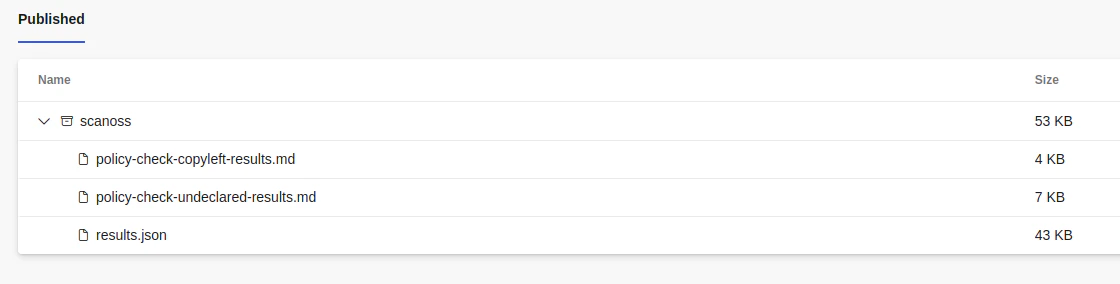
Scan results and policy check outcomes are uploaded to the artefacts folder of each pipeline run, regardless of how the pipeline was triggered. To access them, navigate to your pipeline run in Azure Pipelines and open the **Artefacts** section.
## Proxy Configuration
If your pipeline runs behind a proxy, set the proxy environment variables and specify a self-hosted container image via the `runtimeContainer` parameter:
```yaml theme={null}
variables:
HTTP_PROXY: http://your-proxy:8080
HTTPS_PROXY: http://your-proxy:8080
steps:
- task: scanoss@1.3.0
displayName: "SCANOSS Code Scan"
inputs:
runtimeContainer: "/scanoss-py:v1.15.0"
```
## Pipeline Triggers
In addition to pull request triggers, pipelines can be run manually or on a schedule. When triggered outside of a PR context, scan results are uploaded to the pipeline run artefacts only — no PR comments or check statuses are created.
Example scheduled trigger:
```yaml theme={null}
schedules:
- cron: "*/5 * * * *"
displayName: "Run every 5 minutes"
always: true
branches:
include:
- main
```
## Scan Tuning Parameters
The SCANOSS scan engine supports [scan tuning parameters](https://github.com/scanoss/scanoss.py/blob/main/docs/source/scanoss_settings_schema.rst#scan-tuning-parameters) for snippet matching.
> **Important:** Scan tuning parameters must be configured via `scanoss.json`. They are **not** available as SCANOSS ADO task input parameters.
## Managing Components with scanoss.json
The `scanoss.json` file is used to manage your project's software bill of materials (SBOM). It allows you to declare approved components, record triage decisions, and customise scan behaviour to enforce your organisation's policies.
### File Structure and Location
Place `scanoss.json` in the root of your repository so the SCANOSS task can detect it automatically:
```
your-repository/
├── azure-pipelines.yml
├── src/
├── scanoss.json ← Place here and commit to Git
└── README.md
```
> The `scanoss.json` file should be **committed to version control**. It contains component declarations and governance decisions that should be tracked and shared across your team.
### scanoss.json Format
The SBOM configuration uses the following structure:
```json theme={null}
{
"bom": {
"include": [
{
"purl": "pkg:github/scanoss/scanner.c",
"comment": "Core scanner — approved by Tech Lead on 2024-12-10"
}
],
"remove": [
{
"purl": "pkg:npm/express@4.17.1",
"comment": "Old version with known vulnerabilities. Upgrade to 4.18.2+."
}
]
},
"settings": {
"scan": {
"ignore": ["**/test/**", "**/node_modules/**", "**/dist/**"]
}
}
}
```
* **`bom.include`** — Lists approved components. The scan verifies detected components against this list.
* **`bom.remove`** — Specifies components that must not be present. The scan flags any that are detected.
* **`settings.scan.ignore`** — Defines file or directory paths to exclude from the scan.
> If you are migrating from an earlier version that used `sbom.json`, rename the file to `scanoss.json` and update it to the format shown above. The `sbomEnabled`, `sbomFilepath`, and `sbomType` parameters were removed in v1.0.0.
### Step-by-Step Guide to Populating scanoss.json
#### Step 1: Run an Initial Scan
Trigger the pipeline without a `scanoss.json` file. The initial scan will detect all components in your repository and report them as undeclared.
#### Step 2: Review Scan Results
Once the pipeline run completes, navigate to the run in Azure Pipelines and download the scan results from the **Artefacts** section (`results.json` by default).
#### Step 3: Extract Component PURLs
Review the results file to identify the component PURLs detected in your codebase. These will be used to populate the `bom.include` section of `scanoss.json`.
#### Step 4: Create Your scanoss.json File
Create a `scanoss.json` file in your repository root using the PURLs identified in the previous step:
```json theme={null}
{
"bom": {
"include": [
{
"purl": "pkg:github/scanoss/scanner.c",
"comment": "Approved component"
}
]
}
}
```
#### Step 5: Commit and Push
Add `scanoss.json` to version control and push to trigger the pipeline again.
#### Step 6: Verify the Results
After the pipeline run completes, all previously undeclared components should now be reported as declared, and no policy violations should be raised.
## SBOM Export (Dependency Track)
The SCANOSS task can export your SBOM to a Dependency Track server for vulnerability and licence management. This integration provides two distinct features:
### SBOM Upload Status Check
When `depTrackEnabled` is set to `true`, the task uploads a CycloneDX SBOM to your Dependency Track server and reports the upload status as a separate PR status check. This includes:
* **Success/failure status** — Indicates whether the SBOM was uploaded successfully.
* **Upload details** — Project name and version, number of components analysed, file size, upload time, and a direct link to the project in Dependency Track.
* **PR comments** — Success or failure messages posted as PR comments.
* **Error guidance** — If the upload fails, the task reports an error message with configuration details to assist troubleshooting.
> The SBOM upload status check runs independently from the policy checks. You can enable SBOM upload (`depTrackEnabled: true`) without enabling the Dependency Track policy check (by omitting `deptrack` from the `policies` list).
### Dependency Track Policy Check
The Dependency Track policy check (enabled by adding `deptrack` to the `policies` parameter) queries your Dependency Track server for policy violations and fails the build if any are found. This is independent from the SBOM upload and can be used without it.
```yaml theme={null}
- task: scanoss@1.3.0
displayName: "SCANOSS Code Scan"
inputs:
policies: deptrack
depTrackEnabled: true
depTrackUrl: $(DT_SERVER_URL)
depTrackApikey: $(DT_API_KEY)
depTrackProjectName: "my-project"
depTrackProjectVersion: "1.0.0"
apiUrl: $(SCANOSS_URL)
apiKey: $(APIKEY)
```
## Artefacts
Scan results and policy check outcomes are uploaded to the artefacts folder of each pipeline run, regardless of how the pipeline was triggered. To access them, navigate to your pipeline run in Azure Pipelines and open the **Artefacts** section.
 A full example pipeline demonstrating all of the above features is available in the [SCANOSS ADO Integration Demo](https://dev.azure.com/scanoss/scanoss-ado-integration-demo).