> ## Documentation Index
> Fetch the complete documentation index at: https://docs.scanoss.com/llms.txt
> Use this file to discover all available pages before exploring further.
# GitHub Actions
> Integrate [SCANOSS](https://github.com/scanoss/gha-code-scan) into your CI/CD pipeline via GitHub Actions for automated code scanning and licence compliance.
## Resources
* [SCANOSS Code Scan Action on GitHub Marketplace](https://github.com/marketplace/actions/scanoss-code-scan-action)
* [SCANOSS GitHub Repository](https://github.com/scanoss/gha-code-scan)
> Always refer to the [SCANOSS GitHub Repository](https://github.com/scanoss/gha-code-scan)
> for the most up-to-date version numbers and configuration parameters, as these may change
> with new releases.
## Prerequisites
Before you begin, ensure you have:
* An existing GitHub repository
* A valid SCANOSS API key
## How It Works
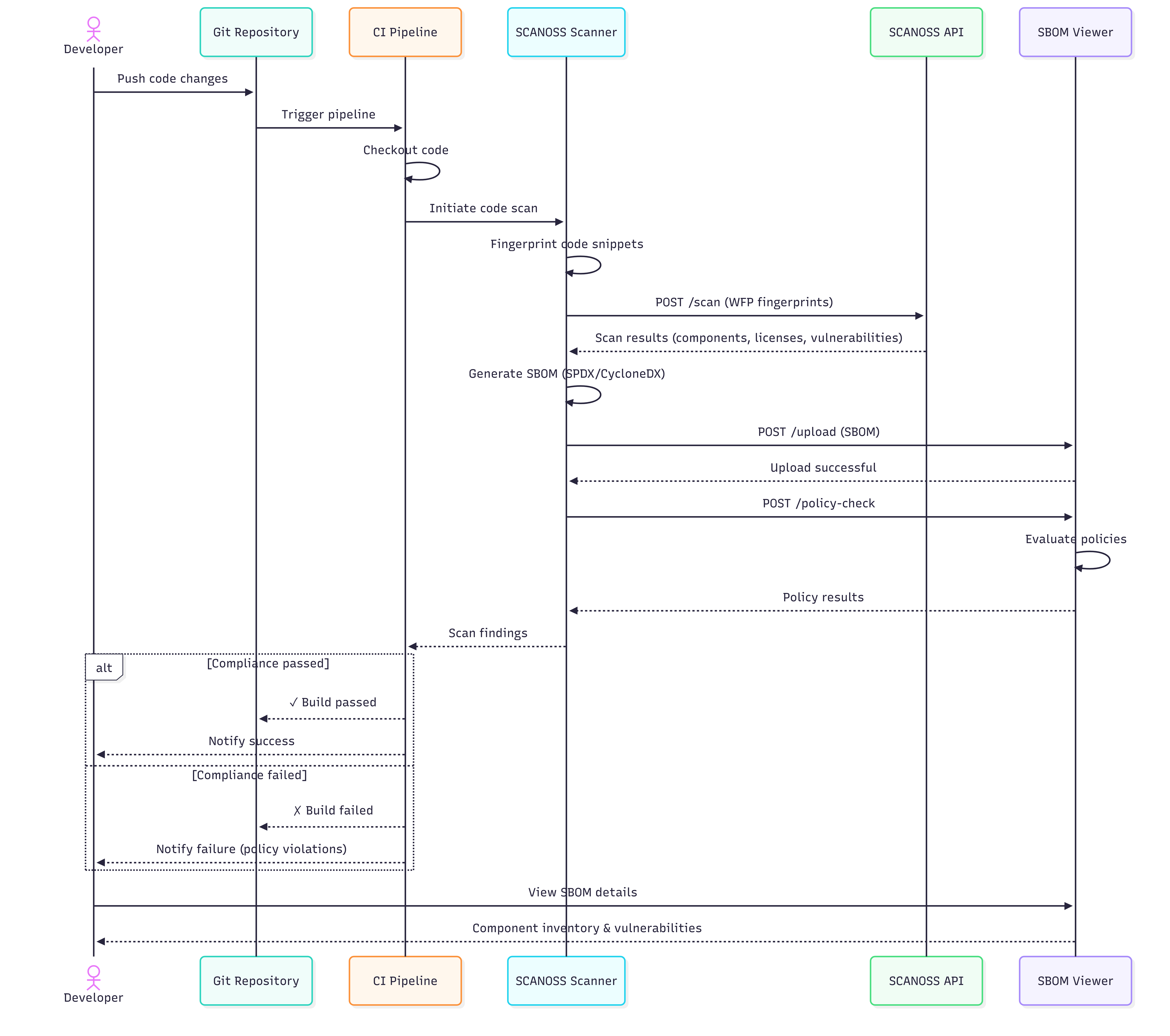
The following diagrams illustrate how SCANOSS integrates into a GitHub Actions CI/CD pipeline,
covering both success and failure scenarios.
### CI/CD Pipeline Sequence Flow
The diagram below shows the complete flow when SCANOSS is integrated into your GitHub Actions
workflow, including both success and failure scenarios.
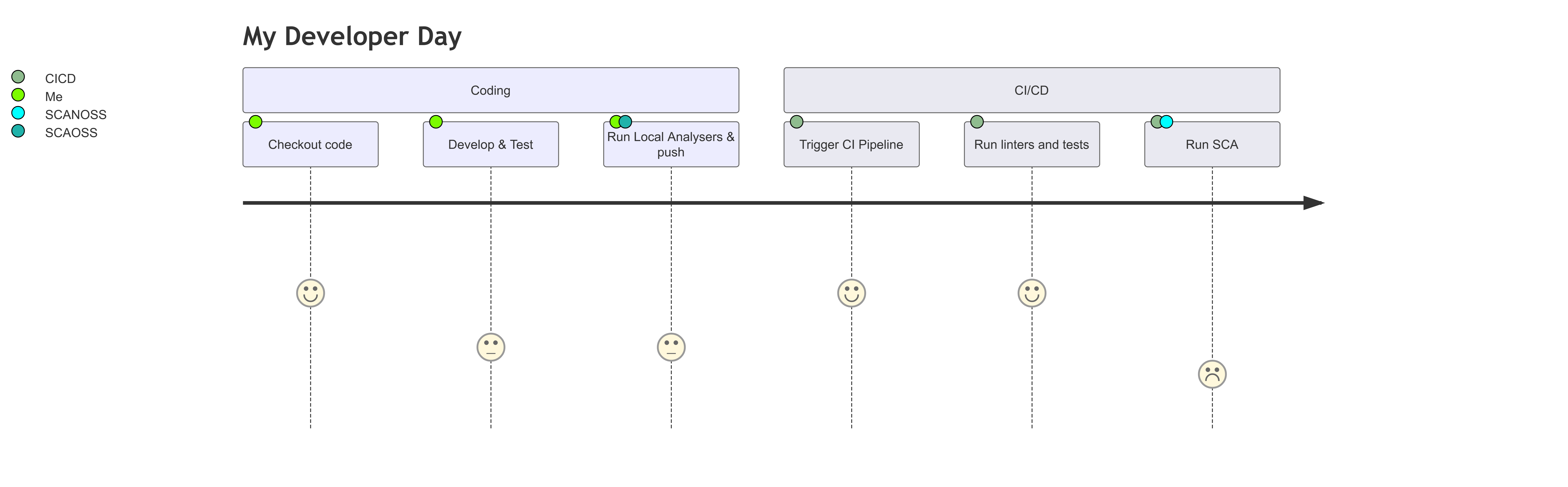
### Developer Workflow Overview
The diagram below shows a typical developer workflow when using SCANOSS within a pull request
cycle.
## Configuration
Navigate to your GitHub repository and add the following secret:
**Settings → Secrets and variables → Actions**
| Variable Name | Description | Value |
| ----------------- | --------------- | --------- |
| SCANOSS\_API\_KEY | SCANOSS API key | xyz789... |
## Full Scan on Pull Requests
Create a workflow file at `.github/workflows/scanoss.yml` and configure it to run SCANOSS:
```yaml theme={null}
name: SCANOSS Full Scan
on:
pull_request:
branches:
- "*"
permissions:
contents: write
pull-requests: write
checks: write
actions: read
jobs:
scanoss-code-scan:
name: SCANOSS Code Scan
runs-on: ubuntu-latest
steps:
- name: Checkout code
uses: actions/checkout@v6
- name: Run SCANOSS Code Scan
id: scanoss-code-scan-step
uses: scanoss/gha-code-scan@v1
with:
scanMode: full
api.key: ${{ secrets.SCANOSS_API_KEY }}
# api.url — only required if you are not using the SCANOSS SaaS endpoint
# api.url: ${{ secrets.SCANOSS_URL }}
```
For example workflow runs, refer to the
[SCANOSS Code Scan Action repository](https://github.com/scanoss/gha-code-scan).
## Action Input Parameters
The SCANOSS GitHub Action accepts the following input parameters to customise scanning
behaviour.
| Parameter | Description | Required | Default |
| ----------------------- | ------------------------------------------------------------------------------ | ---------- | ---------------------------------------------------------------------- |
| policies | Comma-separated list of active policies (`copyleft`, `undeclared`, `depTrack`) | Optional | — |
| api.url | SCANOSS API URL. Omit when using the SaaS endpoint. | Optional | [https://api.osskb.org/scan/direct](https://api.osskb.org/scan/direct) |
| api.key | SCANOSS API key | Optional | — |
| scanossSettings | Enable use of a settings file for scanning | Optional | true |
| settingsFilepath | Path to the SCANOSS settings file | Optional | scanoss.json |
| scanMode | Scan type: `delta` (changed files only) or `full` (entire repository) | Optional | full |
| deptrack.upload | Enable automatic upload to Dependency Track | Optional | false |
| deptrack.url | Dependency Track instance URL | Required\* | — |
| deptrack.apikey | Dependency Track API key | Required\* | — |
| deptrack.projectname | Dependency Track project name. Created automatically if it does not exist. | Optional | — |
| deptrack.projectversion | Dependency Track project version | Optional | — |
\* Required when `deptrack.upload` is set to `true`.
## Action Output Parameters
The action produces the following outputs, which can be referenced in subsequent workflow steps
or reporting tools.
| Parameter | Description |
| ------------------- | --------------------------------------- |
| result-filepath | Path to the generated scan results file |
| stdout-scan-command | Raw command output from the scanner |
## Policy Checks
The SCANOSS Code Scan Action supports the following configurable policy checks, which are
enforced automatically during CI runs:
* **Copyleft** (copyleft or cpl) – Detects Copyleft-licensed components or snippets. If found, the pull request is rejected. The default Copyleft license list is defined in the SCANOSS configuration. The copyleft determination is performed by [scanoss.py](https://github.com/scanoss/scanoss.py) (`scanoss-py inspect copyleft`), which uses the [OSADL copyleft checklist](https://www.osadl.org/fileadmin/checklists/copyleft.json) as the default list. Both strong (`Yes`) and weak/restricted (`Yes (restricted)`) copyleft entries are treated as copyleft, and this includes `-or-later` variants (e.g. `GPL-2.0-or-later`, `AGPL-3.0-or-later`). The default list can be customized with the `licenses.copyleft.include`, `licenses.copyleft.exclude`, and `licenses.copyleft.explicit` inputs.
* **Undeclared** (`undeclared` or `und`) — Compares detected components against those declared
in `scanoss.json` (configurable via `settingsFilepath`). Pull requests fail if undeclared
components are found.
* **Dependency Track** (`depTrack` or `dt`) — Integrates with Dependency Track to check for
vulnerabilities, licence violations, and compliance issues. Requires all `deptrack.*`
parameters to be configured.
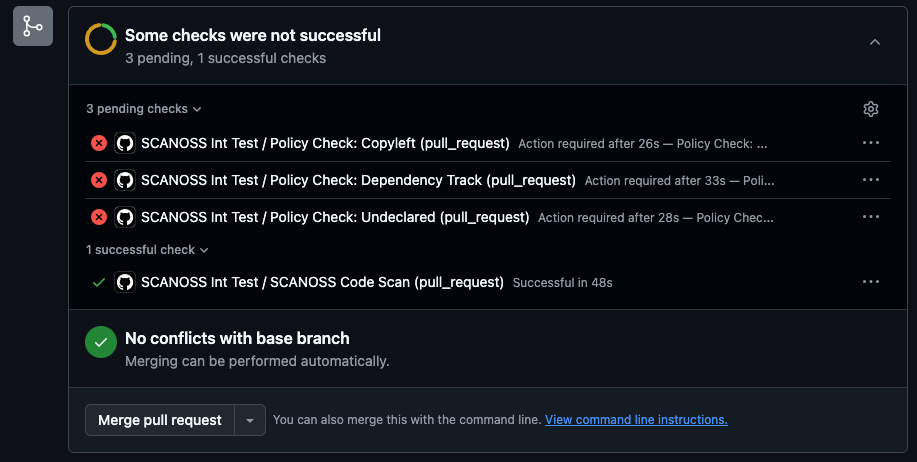
When the `copyleft` policy is enabled, the workflow will fail if any copyleft-licensed
components are detected in the scan results.
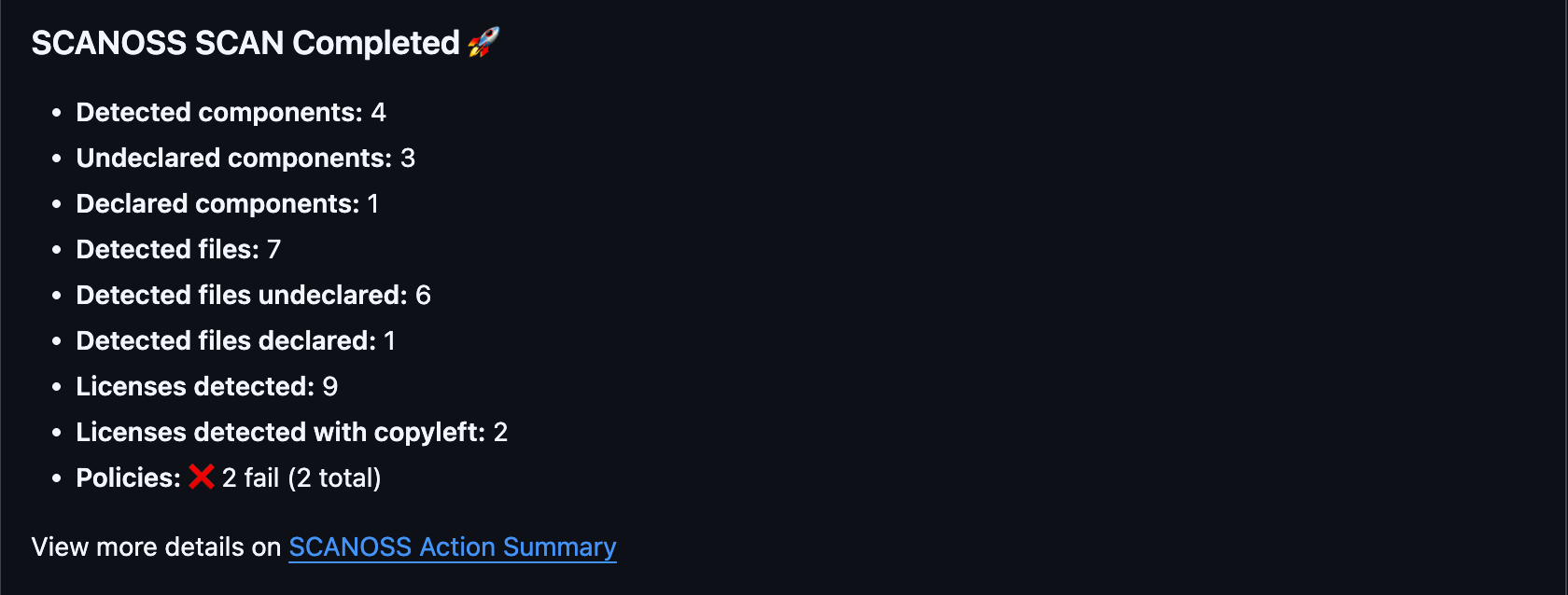
For pull request triggers, a comment containing a summary of the scan report is automatically
posted to the pull request.
## Delta Scan on Pull Requests
Use delta scan mode to scan only the files changed in a pull request. This avoids re-scanning
the entire repository on each run.
```yaml theme={null}
name: SCANOSS Delta Scan
on:
pull_request:
branches:
- "*"
permissions:
contents: write
pull-requests: write
checks: write
actions: read
jobs:
scanoss-code-scan:
name: SCANOSS Code Scan
runs-on: ubuntu-latest
steps:
- name: Checkout code
uses: actions/checkout@v6
with:
fetch-depth: 0
- name: Run SCANOSS Code Scan
id: scanoss-code-scan-step
uses: scanoss/gha-code-scan@v1
with:
scanMode: delta
api.key: ${{ secrets.SCANOSS_API_KEY }}
# api.url — only required if you are not using the SCANOSS SaaS endpoint
# api.url: ${{ secrets.SCANOSS_URL }}
```
> **Note:** Setting `fetch-depth: 0` is required. Without the full commit history, the action
> cannot determine which files have changed and the delta scan will not function correctly.
## Understanding the Scan Summary
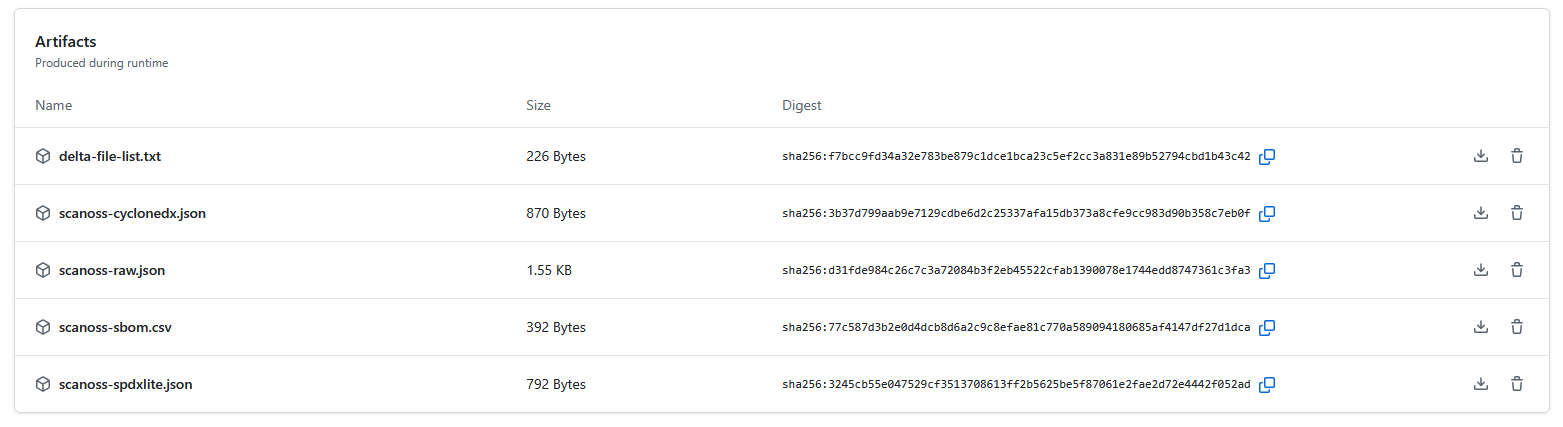
After a successful scan, GitHub Actions displays a summary of the results in the workflow run
view.
The summary includes:
* **Scan Report** — Lists all detected licences, policy evaluation results, and the status of
any configured integrations.
* **Downloadable Artefacts** — Includes SBOM files and detailed scan data. These can be used
with external compliance and vulnerability management tools.
To download artefacts, navigate to your workflow run, locate the **Artefacts** section, and
click the file you wish to download.
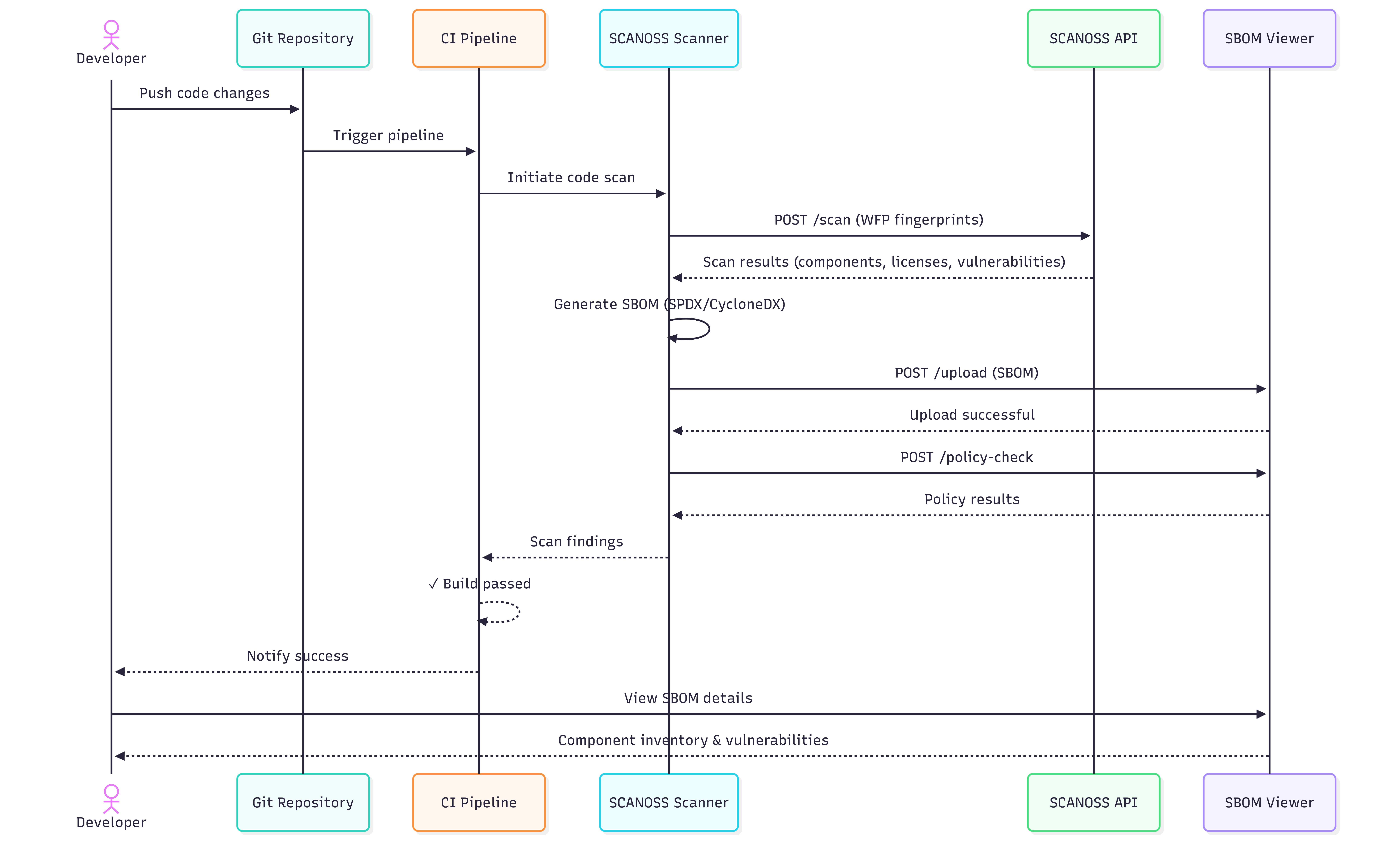
### Simplified CI/CD Pipeline Sequence Flow
The diagram below shows a streamlined view of the workflow for a successful scan.
## Managing Components with scanoss.json
The `scanoss.json` file manages your project's Software Bill of Materials (SBOM). It allows
you to declare approved components, record triage decisions, and customise scan behaviour to
enforce your organisation's policies.
This section covers how to set up and use `scanoss.json` in a GitHub Actions workflow.
### Recommended .gitignore Configuration
When working with SCANOSS in your repository, add the following entries to your `.gitignore`:
```gitignore theme={null}
# SCANOSS temporary files and cache
*.wfp
.scanoss/
```
**Important:** The `scanoss.json` file must be **committed to Git** and must not be added to
`.gitignore`. It contains your component declarations and governance decisions, which should be
version-controlled and shared across your team.
**Exclude from Git:**
* `*.wfp` — Winnowing fingerprint files generated during local scans
* `.scanoss/` — Local cache directory created by SCANOSS tools
**Commit to Git:**
* `scanoss.json` — Your project's SBOM declarations and scan settings
### File Structure and Location
Place `scanoss.json` in the root of your repository so that the SCANOSS action can detect it
automatically.
```
your-repository/
├── .github/
│ └── workflows/
│ └── scanoss.yml
├── src/
├── .gitignore ← Add SCANOSS exclusions here
├── scanoss.json ← Place here and commit to Git
└── README.md
```
The following example workflow uses `scanoss.json` and integrates with Dependency Track:
```yaml theme={null}
name: SCANOSS Analysis with scanoss.json
on:
pull_request:
branches:
- "*"
permissions:
contents: write
pull-requests: write
checks: write
actions: read
jobs:
scanoss-code-scan:
name: SCANOSS Code Scan
runs-on: ubuntu-latest
steps:
- name: Checkout code
uses: actions/checkout@v6
with:
fetch-depth: 0 # Required for delta scans
- name: Run SCANOSS Code Scan
uses: scanoss/gha-code-scan@v1
with:
# Scan mode for PRs/pushes
scanMode: delta
# Enable and specify the settings file
scanossSettings: true
settingsFilepath: scanoss.json
# Enforce policies for undeclared components and Dependency Track
policies: undeclared, dt
policies.halt_on_failure: false # Set to true to fail the build on violations
# Dependency Track integration
deptrack.upload: true
deptrack.url: ${{ secrets.DT_SERVER_URL }}
deptrack.apikey: ${{ secrets.DT_API_KEY }}
deptrack.projectname: "my-project"
deptrack.projectversion: "PR-${{ github.event.pull_request.number }}"
# SCANOSS API credentials
api.key: ${{ secrets.SCANOSS_API_KEY }}
# api.url — only required if you are not using the SCANOSS SaaS endpoint
# api.url: ${{ secrets.SCANOSS_URL }}
```
### Step-by-Step Guide to Populating scanoss.json
Follow these steps to create and populate your component declarations.
#### Step 1: Run an Initial Scan
Run the workflow without a `scanoss.json` file. The initial scan will identify all components
present in your repository and report them as undeclared.
```bash theme={null}
# Commit and push your code to trigger the workflow
git push
```
#### Step 2: Review Scan Results
Once the workflow completes, navigate to the run in the **Actions** tab of your repository.
* Review the **Annotations** on the summary page for an overview of component violations.
* Download the `scanoss-raw.json.zip` artefact, which contains the detailed SBOM data.
#### Step 3: Extract Component PURLs
Unzip the artefact and use a command-line tool such as `jq` to extract a unique list of Package
URLs (PURLs) from the `scanoss-raw.json` file.
```bash theme={null}
# Download and unzip the artefact from the workflow run
unzip scanoss-raw.json.zip
# View the PURLs
cat scanoss-raw.json
# Example output:
# pkg:github/axios/axios
# pkg:github/lodash/lodash
# pkg:npm/express@4.18.2
```
> **Tip:** `jq` is a command-line JSON processor useful for scripting and automation.
> Installation instructions are available at [jqlang.github.io/jq](https://jqlang.github.io/jq/).
#### Step 4: Create Your scanoss.json File
Create a `scanoss.json` file in your repository root. Use the PURLs from the previous step to
populate the `bom.include` section. Include comments to record the approval rationale for each
component.
```json theme={null}
{
"bom": {
"include": [
{
"purl": "pkg:github/lodash/lodash",
"comment": "Utility library — approved by Tech Lead on 2024-12-10"
},
{
"purl": "pkg:github/axios/axios",
"comment": "HTTP client — approved for API communication"
}
],
"remove": [
{
"purl": "pkg:npm/express@4.17.1",
"comment": "Old version with known vulnerabilities. Upgrade to 4.18.2+."
}
]
},
"settings": {
"scan": {
"ignore": ["**/test/**", "**/node_modules/**", "**/dist/**"]
}
}
}
```
* **bom.include** — Lists all approved components. The scan validates detected components
against this list.
* **bom.remove** — Specifies components that must not be present. The scan will flag any
matches.
* **settings.scan.ignore** — Defines file or directory paths to exclude from the scan.
#### Step 5: Commit and Push
Add `scanoss.json` to Git and push. This will trigger the workflow.
```bash theme={null}
git add scanoss.json
git commit -m "chore: Add component governance with scanoss.json"
git push
```
#### Step 6: Verify the Results
After the workflow run completes, check the job logs for the **Run SCANOSS Code Scan** step.
The output should confirm that all components are declared and no undeclared components remain.
```json theme={null}
{
"totalComponents": 3,
"undeclaredComponents": 0, // ← Should be 0 after triage
"declaredComponents": 3, // ← Should match totalComponents
"totalFilesDetected": 15,
"totalFilesUndeclared": 0,
"totalFilesDeclared": 15
}
```
## SBOM Export to Dependency Track
The SCANOSS GitHub Action can be configured to automatically export your SBOM to Dependency
Track for vulnerability and licence management.
Add the following Dependency Track configuration to the SCANOSS step in your workflow file
(`.github/workflows/scanoss.yml`):
```yaml theme={null}
with:
policies: dt
scanMode: full
deptrack.upload: true
deptrack.url: ${{ secrets.DT_SERVER_URL }}
deptrack.apikey: ${{ secrets.DT_API_KEY }}
deptrack.projectname: "my-project"
deptrack.projectversion: "1.0.0"
api.url: ${{ secrets.SCANOSS_URL }}
api.key: ${{ secrets.SCANOSS_API_KEY }}
```
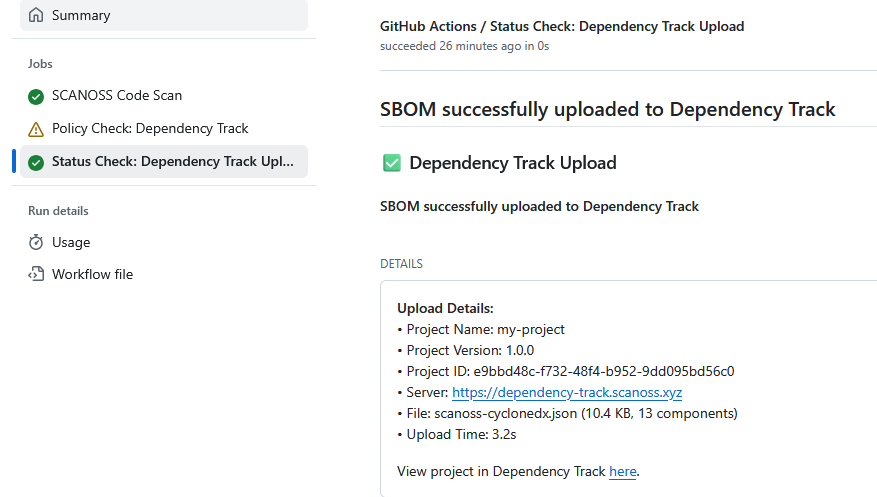
After the workflow completes, navigate to the workflow's **Summary** page and scroll to the
**Details** section. Click **More details** to view the Dependency Track upload status. If the
upload was successful, click **View project in Dependency Track** to open the project directly.
## Troubleshooting
### gRPC errors (403) when using older action versions
**Symptom:** The workflow fails with 403 errors during decoration service calls (dependencies,
vulnerabilities, etc.).
**Cause:** The gRPC endpoints have been decommissioned. All API communication now goes through
REST. `gha-code-scan` v1.5.0 and earlier shipped with `scanoss-py` v1.46.0, which still used
gRPC for some service calls, this causes 403 errors against the current API.
**Fix:** Update your workflow to use `gha-code-scan` v1.6.2 or later, which bundles
`scanoss-py` v1.52.1 (REST-only):
```yaml theme={null}
uses: scanoss/code-scan-action@v1.6.2
```
If you need to stay on an older action version, you can override the runtime container
explicitly:
```yaml theme={null}
uses: scanoss/code-scan-action@v1.5.0
with:
runtimeContainer: ghcr.io/scanoss/scanoss-py:v1.52.1
```
 ### Developer Workflow Overview
The diagram below shows a typical developer workflow when using SCANOSS within a pull request
cycle.
### Developer Workflow Overview
The diagram below shows a typical developer workflow when using SCANOSS within a pull request
cycle.
 ## Configuration
Navigate to your GitHub repository and add the following secret:
**Settings → Secrets and variables → Actions**
| Variable Name | Description | Value |
| ----------------- | --------------- | --------- |
| SCANOSS\_API\_KEY | SCANOSS API key | xyz789... |
## Full Scan on Pull Requests
Create a workflow file at `.github/workflows/scanoss.yml` and configure it to run SCANOSS:
```yaml theme={null}
name: SCANOSS Full Scan
on:
pull_request:
branches:
- "*"
permissions:
contents: write
pull-requests: write
checks: write
actions: read
jobs:
scanoss-code-scan:
name: SCANOSS Code Scan
runs-on: ubuntu-latest
steps:
- name: Checkout code
uses: actions/checkout@v6
- name: Run SCANOSS Code Scan
id: scanoss-code-scan-step
uses: scanoss/gha-code-scan@v1
with:
scanMode: full
api.key: ${{ secrets.SCANOSS_API_KEY }}
# api.url — only required if you are not using the SCANOSS SaaS endpoint
# api.url: ${{ secrets.SCANOSS_URL }}
```
For example workflow runs, refer to the
[SCANOSS Code Scan Action repository](https://github.com/scanoss/gha-code-scan).
## Action Input Parameters
The SCANOSS GitHub Action accepts the following input parameters to customise scanning
behaviour.
| Parameter | Description | Required | Default |
| ----------------------- | ------------------------------------------------------------------------------ | ---------- | ---------------------------------------------------------------------- |
| policies | Comma-separated list of active policies (`copyleft`, `undeclared`, `depTrack`) | Optional | — |
| api.url | SCANOSS API URL. Omit when using the SaaS endpoint. | Optional | [https://api.osskb.org/scan/direct](https://api.osskb.org/scan/direct) |
| api.key | SCANOSS API key | Optional | — |
| scanossSettings | Enable use of a settings file for scanning | Optional | true |
| settingsFilepath | Path to the SCANOSS settings file | Optional | scanoss.json |
| scanMode | Scan type: `delta` (changed files only) or `full` (entire repository) | Optional | full |
| deptrack.upload | Enable automatic upload to Dependency Track | Optional | false |
| deptrack.url | Dependency Track instance URL | Required\* | — |
| deptrack.apikey | Dependency Track API key | Required\* | — |
| deptrack.projectname | Dependency Track project name. Created automatically if it does not exist. | Optional | — |
| deptrack.projectversion | Dependency Track project version | Optional | — |
\* Required when `deptrack.upload` is set to `true`.
## Action Output Parameters
The action produces the following outputs, which can be referenced in subsequent workflow steps
or reporting tools.
| Parameter | Description |
| ------------------- | --------------------------------------- |
| result-filepath | Path to the generated scan results file |
| stdout-scan-command | Raw command output from the scanner |
## Policy Checks
The SCANOSS Code Scan Action supports the following configurable policy checks, which are
enforced automatically during CI runs:
* **Copyleft** (copyleft or cpl) – Detects Copyleft-licensed components or snippets. If found, the pull request is rejected. The default Copyleft license list is defined in the SCANOSS configuration. The copyleft determination is performed by [scanoss.py](https://github.com/scanoss/scanoss.py) (`scanoss-py inspect copyleft`), which uses the [OSADL copyleft checklist](https://www.osadl.org/fileadmin/checklists/copyleft.json) as the default list. Both strong (`Yes`) and weak/restricted (`Yes (restricted)`) copyleft entries are treated as copyleft, and this includes `-or-later` variants (e.g. `GPL-2.0-or-later`, `AGPL-3.0-or-later`). The default list can be customized with the `licenses.copyleft.include`, `licenses.copyleft.exclude`, and `licenses.copyleft.explicit` inputs.
* **Undeclared** (`undeclared` or `und`) — Compares detected components against those declared
in `scanoss.json` (configurable via `settingsFilepath`). Pull requests fail if undeclared
components are found.
* **Dependency Track** (`depTrack` or `dt`) — Integrates with Dependency Track to check for
vulnerabilities, licence violations, and compliance issues. Requires all `deptrack.*`
parameters to be configured.
When the `copyleft` policy is enabled, the workflow will fail if any copyleft-licensed
components are detected in the scan results.
## Configuration
Navigate to your GitHub repository and add the following secret:
**Settings → Secrets and variables → Actions**
| Variable Name | Description | Value |
| ----------------- | --------------- | --------- |
| SCANOSS\_API\_KEY | SCANOSS API key | xyz789... |
## Full Scan on Pull Requests
Create a workflow file at `.github/workflows/scanoss.yml` and configure it to run SCANOSS:
```yaml theme={null}
name: SCANOSS Full Scan
on:
pull_request:
branches:
- "*"
permissions:
contents: write
pull-requests: write
checks: write
actions: read
jobs:
scanoss-code-scan:
name: SCANOSS Code Scan
runs-on: ubuntu-latest
steps:
- name: Checkout code
uses: actions/checkout@v6
- name: Run SCANOSS Code Scan
id: scanoss-code-scan-step
uses: scanoss/gha-code-scan@v1
with:
scanMode: full
api.key: ${{ secrets.SCANOSS_API_KEY }}
# api.url — only required if you are not using the SCANOSS SaaS endpoint
# api.url: ${{ secrets.SCANOSS_URL }}
```
For example workflow runs, refer to the
[SCANOSS Code Scan Action repository](https://github.com/scanoss/gha-code-scan).
## Action Input Parameters
The SCANOSS GitHub Action accepts the following input parameters to customise scanning
behaviour.
| Parameter | Description | Required | Default |
| ----------------------- | ------------------------------------------------------------------------------ | ---------- | ---------------------------------------------------------------------- |
| policies | Comma-separated list of active policies (`copyleft`, `undeclared`, `depTrack`) | Optional | — |
| api.url | SCANOSS API URL. Omit when using the SaaS endpoint. | Optional | [https://api.osskb.org/scan/direct](https://api.osskb.org/scan/direct) |
| api.key | SCANOSS API key | Optional | — |
| scanossSettings | Enable use of a settings file for scanning | Optional | true |
| settingsFilepath | Path to the SCANOSS settings file | Optional | scanoss.json |
| scanMode | Scan type: `delta` (changed files only) or `full` (entire repository) | Optional | full |
| deptrack.upload | Enable automatic upload to Dependency Track | Optional | false |
| deptrack.url | Dependency Track instance URL | Required\* | — |
| deptrack.apikey | Dependency Track API key | Required\* | — |
| deptrack.projectname | Dependency Track project name. Created automatically if it does not exist. | Optional | — |
| deptrack.projectversion | Dependency Track project version | Optional | — |
\* Required when `deptrack.upload` is set to `true`.
## Action Output Parameters
The action produces the following outputs, which can be referenced in subsequent workflow steps
or reporting tools.
| Parameter | Description |
| ------------------- | --------------------------------------- |
| result-filepath | Path to the generated scan results file |
| stdout-scan-command | Raw command output from the scanner |
## Policy Checks
The SCANOSS Code Scan Action supports the following configurable policy checks, which are
enforced automatically during CI runs:
* **Copyleft** (copyleft or cpl) – Detects Copyleft-licensed components or snippets. If found, the pull request is rejected. The default Copyleft license list is defined in the SCANOSS configuration. The copyleft determination is performed by [scanoss.py](https://github.com/scanoss/scanoss.py) (`scanoss-py inspect copyleft`), which uses the [OSADL copyleft checklist](https://www.osadl.org/fileadmin/checklists/copyleft.json) as the default list. Both strong (`Yes`) and weak/restricted (`Yes (restricted)`) copyleft entries are treated as copyleft, and this includes `-or-later` variants (e.g. `GPL-2.0-or-later`, `AGPL-3.0-or-later`). The default list can be customized with the `licenses.copyleft.include`, `licenses.copyleft.exclude`, and `licenses.copyleft.explicit` inputs.
* **Undeclared** (`undeclared` or `und`) — Compares detected components against those declared
in `scanoss.json` (configurable via `settingsFilepath`). Pull requests fail if undeclared
components are found.
* **Dependency Track** (`depTrack` or `dt`) — Integrates with Dependency Track to check for
vulnerabilities, licence violations, and compliance issues. Requires all `deptrack.*`
parameters to be configured.
When the `copyleft` policy is enabled, the workflow will fail if any copyleft-licensed
components are detected in the scan results.
 For pull request triggers, a comment containing a summary of the scan report is automatically
posted to the pull request.
For pull request triggers, a comment containing a summary of the scan report is automatically
posted to the pull request.
 ## Delta Scan on Pull Requests
Use delta scan mode to scan only the files changed in a pull request. This avoids re-scanning
the entire repository on each run.
```yaml theme={null}
name: SCANOSS Delta Scan
on:
pull_request:
branches:
- "*"
permissions:
contents: write
pull-requests: write
checks: write
actions: read
jobs:
scanoss-code-scan:
name: SCANOSS Code Scan
runs-on: ubuntu-latest
steps:
- name: Checkout code
uses: actions/checkout@v6
with:
fetch-depth: 0
- name: Run SCANOSS Code Scan
id: scanoss-code-scan-step
uses: scanoss/gha-code-scan@v1
with:
scanMode: delta
api.key: ${{ secrets.SCANOSS_API_KEY }}
# api.url — only required if you are not using the SCANOSS SaaS endpoint
# api.url: ${{ secrets.SCANOSS_URL }}
```
> **Note:** Setting `fetch-depth: 0` is required. Without the full commit history, the action
> cannot determine which files have changed and the delta scan will not function correctly.
## Understanding the Scan Summary
After a successful scan, GitHub Actions displays a summary of the results in the workflow run
view.
The summary includes:
* **Scan Report** — Lists all detected licences, policy evaluation results, and the status of
any configured integrations.
* **Downloadable Artefacts** — Includes SBOM files and detailed scan data. These can be used
with external compliance and vulnerability management tools.
To download artefacts, navigate to your workflow run, locate the **Artefacts** section, and
click the file you wish to download.
## Delta Scan on Pull Requests
Use delta scan mode to scan only the files changed in a pull request. This avoids re-scanning
the entire repository on each run.
```yaml theme={null}
name: SCANOSS Delta Scan
on:
pull_request:
branches:
- "*"
permissions:
contents: write
pull-requests: write
checks: write
actions: read
jobs:
scanoss-code-scan:
name: SCANOSS Code Scan
runs-on: ubuntu-latest
steps:
- name: Checkout code
uses: actions/checkout@v6
with:
fetch-depth: 0
- name: Run SCANOSS Code Scan
id: scanoss-code-scan-step
uses: scanoss/gha-code-scan@v1
with:
scanMode: delta
api.key: ${{ secrets.SCANOSS_API_KEY }}
# api.url — only required if you are not using the SCANOSS SaaS endpoint
# api.url: ${{ secrets.SCANOSS_URL }}
```
> **Note:** Setting `fetch-depth: 0` is required. Without the full commit history, the action
> cannot determine which files have changed and the delta scan will not function correctly.
## Understanding the Scan Summary
After a successful scan, GitHub Actions displays a summary of the results in the workflow run
view.
The summary includes:
* **Scan Report** — Lists all detected licences, policy evaluation results, and the status of
any configured integrations.
* **Downloadable Artefacts** — Includes SBOM files and detailed scan data. These can be used
with external compliance and vulnerability management tools.
To download artefacts, navigate to your workflow run, locate the **Artefacts** section, and
click the file you wish to download.
 ### Simplified CI/CD Pipeline Sequence Flow
The diagram below shows a streamlined view of the workflow for a successful scan.
### Simplified CI/CD Pipeline Sequence Flow
The diagram below shows a streamlined view of the workflow for a successful scan.
 ## Managing Components with scanoss.json
The `scanoss.json` file manages your project's Software Bill of Materials (SBOM). It allows
you to declare approved components, record triage decisions, and customise scan behaviour to
enforce your organisation's policies.
This section covers how to set up and use `scanoss.json` in a GitHub Actions workflow.
### Recommended .gitignore Configuration
When working with SCANOSS in your repository, add the following entries to your `.gitignore`:
```gitignore theme={null}
# SCANOSS temporary files and cache
*.wfp
.scanoss/
```
**Important:** The `scanoss.json` file must be **committed to Git** and must not be added to
`.gitignore`. It contains your component declarations and governance decisions, which should be
version-controlled and shared across your team.
**Exclude from Git:**
* `*.wfp` — Winnowing fingerprint files generated during local scans
* `.scanoss/` — Local cache directory created by SCANOSS tools
**Commit to Git:**
* `scanoss.json` — Your project's SBOM declarations and scan settings
### File Structure and Location
Place `scanoss.json` in the root of your repository so that the SCANOSS action can detect it
automatically.
```
your-repository/
├── .github/
│ └── workflows/
│ └── scanoss.yml
├── src/
├── .gitignore ← Add SCANOSS exclusions here
├── scanoss.json ← Place here and commit to Git
└── README.md
```
The following example workflow uses `scanoss.json` and integrates with Dependency Track:
```yaml theme={null}
name: SCANOSS Analysis with scanoss.json
on:
pull_request:
branches:
- "*"
permissions:
contents: write
pull-requests: write
checks: write
actions: read
jobs:
scanoss-code-scan:
name: SCANOSS Code Scan
runs-on: ubuntu-latest
steps:
- name: Checkout code
uses: actions/checkout@v6
with:
fetch-depth: 0 # Required for delta scans
- name: Run SCANOSS Code Scan
uses: scanoss/gha-code-scan@v1
with:
# Scan mode for PRs/pushes
scanMode: delta
# Enable and specify the settings file
scanossSettings: true
settingsFilepath: scanoss.json
# Enforce policies for undeclared components and Dependency Track
policies: undeclared, dt
policies.halt_on_failure: false # Set to true to fail the build on violations
# Dependency Track integration
deptrack.upload: true
deptrack.url: ${{ secrets.DT_SERVER_URL }}
deptrack.apikey: ${{ secrets.DT_API_KEY }}
deptrack.projectname: "my-project"
deptrack.projectversion: "PR-${{ github.event.pull_request.number }}"
# SCANOSS API credentials
api.key: ${{ secrets.SCANOSS_API_KEY }}
# api.url — only required if you are not using the SCANOSS SaaS endpoint
# api.url: ${{ secrets.SCANOSS_URL }}
```
### Step-by-Step Guide to Populating scanoss.json
Follow these steps to create and populate your component declarations.
#### Step 1: Run an Initial Scan
Run the workflow without a `scanoss.json` file. The initial scan will identify all components
present in your repository and report them as undeclared.
```bash theme={null}
# Commit and push your code to trigger the workflow
git push
```
#### Step 2: Review Scan Results
Once the workflow completes, navigate to the run in the **Actions** tab of your repository.
* Review the **Annotations** on the summary page for an overview of component violations.
* Download the `scanoss-raw.json.zip` artefact, which contains the detailed SBOM data.
#### Step 3: Extract Component PURLs
Unzip the artefact and use a command-line tool such as `jq` to extract a unique list of Package
URLs (PURLs) from the `scanoss-raw.json` file.
```bash theme={null}
# Download and unzip the artefact from the workflow run
unzip scanoss-raw.json.zip
# View the PURLs
cat scanoss-raw.json
# Example output:
# pkg:github/axios/axios
# pkg:github/lodash/lodash
# pkg:npm/express@4.18.2
```
> **Tip:** `jq` is a command-line JSON processor useful for scripting and automation.
> Installation instructions are available at [jqlang.github.io/jq](https://jqlang.github.io/jq/).
#### Step 4: Create Your scanoss.json File
Create a `scanoss.json` file in your repository root. Use the PURLs from the previous step to
populate the `bom.include` section. Include comments to record the approval rationale for each
component.
```json theme={null}
{
"bom": {
"include": [
{
"purl": "pkg:github/lodash/lodash",
"comment": "Utility library — approved by Tech Lead on 2024-12-10"
},
{
"purl": "pkg:github/axios/axios",
"comment": "HTTP client — approved for API communication"
}
],
"remove": [
{
"purl": "pkg:npm/express@4.17.1",
"comment": "Old version with known vulnerabilities. Upgrade to 4.18.2+."
}
]
},
"settings": {
"scan": {
"ignore": ["**/test/**", "**/node_modules/**", "**/dist/**"]
}
}
}
```
* **bom.include** — Lists all approved components. The scan validates detected components
against this list.
* **bom.remove** — Specifies components that must not be present. The scan will flag any
matches.
* **settings.scan.ignore** — Defines file or directory paths to exclude from the scan.
#### Step 5: Commit and Push
Add `scanoss.json` to Git and push. This will trigger the workflow.
```bash theme={null}
git add scanoss.json
git commit -m "chore: Add component governance with scanoss.json"
git push
```
#### Step 6: Verify the Results
After the workflow run completes, check the job logs for the **Run SCANOSS Code Scan** step.
The output should confirm that all components are declared and no undeclared components remain.
```json theme={null}
{
"totalComponents": 3,
"undeclaredComponents": 0, // ← Should be 0 after triage
"declaredComponents": 3, // ← Should match totalComponents
"totalFilesDetected": 15,
"totalFilesUndeclared": 0,
"totalFilesDeclared": 15
}
```
## SBOM Export to Dependency Track
The SCANOSS GitHub Action can be configured to automatically export your SBOM to Dependency
Track for vulnerability and licence management.
Add the following Dependency Track configuration to the SCANOSS step in your workflow file
(`.github/workflows/scanoss.yml`):
```yaml theme={null}
with:
policies: dt
scanMode: full
deptrack.upload: true
deptrack.url: ${{ secrets.DT_SERVER_URL }}
deptrack.apikey: ${{ secrets.DT_API_KEY }}
deptrack.projectname: "my-project"
deptrack.projectversion: "1.0.0"
api.url: ${{ secrets.SCANOSS_URL }}
api.key: ${{ secrets.SCANOSS_API_KEY }}
```
After the workflow completes, navigate to the workflow's **Summary** page and scroll to the
**Details** section. Click **More details** to view the Dependency Track upload status. If the
upload was successful, click **View project in Dependency Track** to open the project directly.
## Managing Components with scanoss.json
The `scanoss.json` file manages your project's Software Bill of Materials (SBOM). It allows
you to declare approved components, record triage decisions, and customise scan behaviour to
enforce your organisation's policies.
This section covers how to set up and use `scanoss.json` in a GitHub Actions workflow.
### Recommended .gitignore Configuration
When working with SCANOSS in your repository, add the following entries to your `.gitignore`:
```gitignore theme={null}
# SCANOSS temporary files and cache
*.wfp
.scanoss/
```
**Important:** The `scanoss.json` file must be **committed to Git** and must not be added to
`.gitignore`. It contains your component declarations and governance decisions, which should be
version-controlled and shared across your team.
**Exclude from Git:**
* `*.wfp` — Winnowing fingerprint files generated during local scans
* `.scanoss/` — Local cache directory created by SCANOSS tools
**Commit to Git:**
* `scanoss.json` — Your project's SBOM declarations and scan settings
### File Structure and Location
Place `scanoss.json` in the root of your repository so that the SCANOSS action can detect it
automatically.
```
your-repository/
├── .github/
│ └── workflows/
│ └── scanoss.yml
├── src/
├── .gitignore ← Add SCANOSS exclusions here
├── scanoss.json ← Place here and commit to Git
└── README.md
```
The following example workflow uses `scanoss.json` and integrates with Dependency Track:
```yaml theme={null}
name: SCANOSS Analysis with scanoss.json
on:
pull_request:
branches:
- "*"
permissions:
contents: write
pull-requests: write
checks: write
actions: read
jobs:
scanoss-code-scan:
name: SCANOSS Code Scan
runs-on: ubuntu-latest
steps:
- name: Checkout code
uses: actions/checkout@v6
with:
fetch-depth: 0 # Required for delta scans
- name: Run SCANOSS Code Scan
uses: scanoss/gha-code-scan@v1
with:
# Scan mode for PRs/pushes
scanMode: delta
# Enable and specify the settings file
scanossSettings: true
settingsFilepath: scanoss.json
# Enforce policies for undeclared components and Dependency Track
policies: undeclared, dt
policies.halt_on_failure: false # Set to true to fail the build on violations
# Dependency Track integration
deptrack.upload: true
deptrack.url: ${{ secrets.DT_SERVER_URL }}
deptrack.apikey: ${{ secrets.DT_API_KEY }}
deptrack.projectname: "my-project"
deptrack.projectversion: "PR-${{ github.event.pull_request.number }}"
# SCANOSS API credentials
api.key: ${{ secrets.SCANOSS_API_KEY }}
# api.url — only required if you are not using the SCANOSS SaaS endpoint
# api.url: ${{ secrets.SCANOSS_URL }}
```
### Step-by-Step Guide to Populating scanoss.json
Follow these steps to create and populate your component declarations.
#### Step 1: Run an Initial Scan
Run the workflow without a `scanoss.json` file. The initial scan will identify all components
present in your repository and report them as undeclared.
```bash theme={null}
# Commit and push your code to trigger the workflow
git push
```
#### Step 2: Review Scan Results
Once the workflow completes, navigate to the run in the **Actions** tab of your repository.
* Review the **Annotations** on the summary page for an overview of component violations.
* Download the `scanoss-raw.json.zip` artefact, which contains the detailed SBOM data.
#### Step 3: Extract Component PURLs
Unzip the artefact and use a command-line tool such as `jq` to extract a unique list of Package
URLs (PURLs) from the `scanoss-raw.json` file.
```bash theme={null}
# Download and unzip the artefact from the workflow run
unzip scanoss-raw.json.zip
# View the PURLs
cat scanoss-raw.json
# Example output:
# pkg:github/axios/axios
# pkg:github/lodash/lodash
# pkg:npm/express@4.18.2
```
> **Tip:** `jq` is a command-line JSON processor useful for scripting and automation.
> Installation instructions are available at [jqlang.github.io/jq](https://jqlang.github.io/jq/).
#### Step 4: Create Your scanoss.json File
Create a `scanoss.json` file in your repository root. Use the PURLs from the previous step to
populate the `bom.include` section. Include comments to record the approval rationale for each
component.
```json theme={null}
{
"bom": {
"include": [
{
"purl": "pkg:github/lodash/lodash",
"comment": "Utility library — approved by Tech Lead on 2024-12-10"
},
{
"purl": "pkg:github/axios/axios",
"comment": "HTTP client — approved for API communication"
}
],
"remove": [
{
"purl": "pkg:npm/express@4.17.1",
"comment": "Old version with known vulnerabilities. Upgrade to 4.18.2+."
}
]
},
"settings": {
"scan": {
"ignore": ["**/test/**", "**/node_modules/**", "**/dist/**"]
}
}
}
```
* **bom.include** — Lists all approved components. The scan validates detected components
against this list.
* **bom.remove** — Specifies components that must not be present. The scan will flag any
matches.
* **settings.scan.ignore** — Defines file or directory paths to exclude from the scan.
#### Step 5: Commit and Push
Add `scanoss.json` to Git and push. This will trigger the workflow.
```bash theme={null}
git add scanoss.json
git commit -m "chore: Add component governance with scanoss.json"
git push
```
#### Step 6: Verify the Results
After the workflow run completes, check the job logs for the **Run SCANOSS Code Scan** step.
The output should confirm that all components are declared and no undeclared components remain.
```json theme={null}
{
"totalComponents": 3,
"undeclaredComponents": 0, // ← Should be 0 after triage
"declaredComponents": 3, // ← Should match totalComponents
"totalFilesDetected": 15,
"totalFilesUndeclared": 0,
"totalFilesDeclared": 15
}
```
## SBOM Export to Dependency Track
The SCANOSS GitHub Action can be configured to automatically export your SBOM to Dependency
Track for vulnerability and licence management.
Add the following Dependency Track configuration to the SCANOSS step in your workflow file
(`.github/workflows/scanoss.yml`):
```yaml theme={null}
with:
policies: dt
scanMode: full
deptrack.upload: true
deptrack.url: ${{ secrets.DT_SERVER_URL }}
deptrack.apikey: ${{ secrets.DT_API_KEY }}
deptrack.projectname: "my-project"
deptrack.projectversion: "1.0.0"
api.url: ${{ secrets.SCANOSS_URL }}
api.key: ${{ secrets.SCANOSS_API_KEY }}
```
After the workflow completes, navigate to the workflow's **Summary** page and scroll to the
**Details** section. Click **More details** to view the Dependency Track upload status. If the
upload was successful, click **View project in Dependency Track** to open the project directly.
 ## Troubleshooting
### gRPC errors (403) when using older action versions
**Symptom:** The workflow fails with 403 errors during decoration service calls (dependencies,
vulnerabilities, etc.).
**Cause:** The gRPC endpoints have been decommissioned. All API communication now goes through
REST. `gha-code-scan` v1.5.0 and earlier shipped with `scanoss-py` v1.46.0, which still used
gRPC for some service calls, this causes 403 errors against the current API.
**Fix:** Update your workflow to use `gha-code-scan` v1.6.2 or later, which bundles
`scanoss-py` v1.52.1 (REST-only):
```yaml theme={null}
uses: scanoss/code-scan-action@v1.6.2
```
If you need to stay on an older action version, you can override the runtime container
explicitly:
```yaml theme={null}
uses: scanoss/code-scan-action@v1.5.0
with:
runtimeContainer: ghcr.io/scanoss/scanoss-py:v1.52.1
```
## Troubleshooting
### gRPC errors (403) when using older action versions
**Symptom:** The workflow fails with 403 errors during decoration service calls (dependencies,
vulnerabilities, etc.).
**Cause:** The gRPC endpoints have been decommissioned. All API communication now goes through
REST. `gha-code-scan` v1.5.0 and earlier shipped with `scanoss-py` v1.46.0, which still used
gRPC for some service calls, this causes 403 errors against the current API.
**Fix:** Update your workflow to use `gha-code-scan` v1.6.2 or later, which bundles
`scanoss-py` v1.52.1 (REST-only):
```yaml theme={null}
uses: scanoss/code-scan-action@v1.6.2
```
If you need to stay on an older action version, you can override the runtime container
explicitly:
```yaml theme={null}
uses: scanoss/code-scan-action@v1.5.0
with:
runtimeContainer: ghcr.io/scanoss/scanoss-py:v1.52.1
```