> ## Documentation Index
> Fetch the complete documentation index at: https://docs.scanoss.com/llms.txt
> Use this file to discover all available pages before exploring further.
# GitLab
> Leverage SCANOSS in different development scenarios via GitLab CI/CD.
## Prerequisites
Before you begin, make sure you have:
* An existing GitLab repository
* A valid SCANOSS API key (required only for enterprise features)
## How It Works
This section describes how SCANOSS integrates with your GitLab CI/CD pipeline to
perform automated code scanning and licence compliance checks.
The SCANOSS GitLab component runs inside your GitLab pipeline and automatically
scans your code for security vulnerabilities and licence compliance. On merge
requests (MRs), it posts a summary comment and creates pipeline status checks
directly on the MR. When triggered manually or on a schedule, results are
uploaded as pipeline artifacts.
## Configuration
### GitLab Access Token Setup
Before configuring CI/CD variables, you need to create a GitLab access token
with the appropriate permissions. You can create one of three token types:
* **Project Access Token** — Scoped to a single project
* **Group Access Token** — Scoped to all projects within a group
* **Personal Access Token** — Scoped to all projects you have access to
**Token Requirements:**
* **Role**: Developer or higher (must not be Guest)
* **Scopes**: Both `api` and `read_api` are required
* **Configuration**: The token should be masked and hidden, but **not** protected
### CI/CD Variables
Navigate to your GitLab repository and add the following CI/CD variables:
**Settings → CI/CD → Variables**
| Variable Name | Description | Value |
| --------------- | ----------------------------------------------------------- | --------------------------------------- |
| `SCANOSS_TOKEN` | SCANOSS API key (required for enterprise features) | `xyz789…` |
| `GITLAB_TOKEN` | GitLab API token used to post MR comments and status checks | Your GitLab PAT or project access token |
> The `GITLAB_TOKEN` requires both the `api` and `read_api` scopes to post
> comments and update merge request statuses.
## Basic Pipeline Setup
Add the SCANOSS component to your `.gitlab-ci.yml` using the `include` keyword
with `$CI_SERVER_FQDN` to reference your GitLab instance:
```yaml theme={null}
include:
- component: $CI_SERVER_FQDN/scanoss/glc-code-scan/scanoss@1
inputs:
stage: test
policies: undeclared,copyleft
dependencies_enabled: true
rules:
- if: $CI_PIPELINE_SOURCE == "schedule"
- if: $CI_MERGE_REQUEST_IID
stages: [run, test, build]
```
> The version suffix `@1` pins to the latest `1.x` release. You can pin to an
> exact version by specifying the full tag (e.g., `scanoss@1.3.0`).
## Component Input Parameters
The SCANOSS GitLab component accepts the following input parameters to customise
scanning behaviour.
| Parameter | Description | Required | Default |
| ---------------------------- | ----------------------------------------------------------------------------------------------------------- | ---------- | ------------------------------------ |
| `dependencies_enabled` | Enable or disable dependency scanning | Optional | `false` |
| `dependency_scope` | Dependency scope to scan (`dev` or `prod`) | Optional | — |
| `dependency_scope_include` | Comma-separated list of dependency scopes to include | Optional | — |
| `dependency_scope_exclude` | Comma-separated list of dependency scopes to exclude | Optional | — |
| `policies` | Comma-separated list of active policies (`copyleft`, `undeclared`, `deptrack`) | Optional | `copyleft,undeclared` |
| `policies_halt_on_failure` | Halt pipeline execution on policy failure. Set to `false` to report violations without failing the pipeline | Optional | `true` |
| `api_url` | SCANOSS API URL | Optional | `https://api.osskb.org/scan/direct` |
| `api_key` | SCANOSS API key | Optional | — |
| `licenses_copyleft_include` | Copyleft licences to append to the default list (comma-separated) | Optional | — |
| `licenses_copyleft_exclude` | Copyleft licences to remove from the default list (comma-separated) | Optional | — |
| `licenses_copyleft_explicit` | Explicit list of copyleft licences to evaluate (comma-separated); replaces the default list entirely | Optional | — |
| `runtime_container` | Runtime container image URL | Optional | `ghcr.io/scanoss/scanoss-py:v1.46.0` |
| `skip_snippets` | Skip snippet generation. Only takes effect when `scan_files` is enabled | Optional | `false` |
| `scan_files` | Enable or disable file and snippet scanning | Optional | `true` |
| `scanoss_settings` | Load scan configuration from a `scanoss.json` settings file, if present | Optional | `true` |
| `scanoss_settings_filepath` | Path to the SCANOSS settings file | Optional | `scanoss.json` |
| `scan_mode` | Scan type (`delta` or `full`) | Optional | `full` |
| `scan_path` | Relative path within the repository to scan (e.g., `src` or `packages/api`) | Optional | `.` |
| `debug` | Enable debug logging | Optional | `false` |
| `deptrack_upload` | Enable automatic upload of scan results to Dependency Track | Optional | `false` |
| `deptrack_url` | Dependency Track instance URL. Required when Dependency Track is enabled | Required\* | — |
| `deptrack_api_key` | Dependency Track API key. Required when Dependency Track is enabled | Required\* | — |
| `deptrack_project_id` | UUID of an existing Dependency Track project. Required when project name and version are not provided | Required\* | — |
| `deptrack_project_name` | Dependency Track project name (created if it does not exist). Required when project ID is not provided | Optional | — |
| `deptrack_project_version` | Dependency Track project version. Required when project ID is not provided | Optional | — |
| `deptrack_token` | Bearer token returned by Dependency Track after a successful SBOM upload | Optional | — |
> **Note:** The `scan_path` parameter was previously named `scanPath` in older
> versions of the component. Use `scan_path` (snake\_case) for consistency with
> all other parameters.
## Policy Checks
The SCANOSS GitLab component supports three configurable policies to enforce
compliance automatically on merge requests:
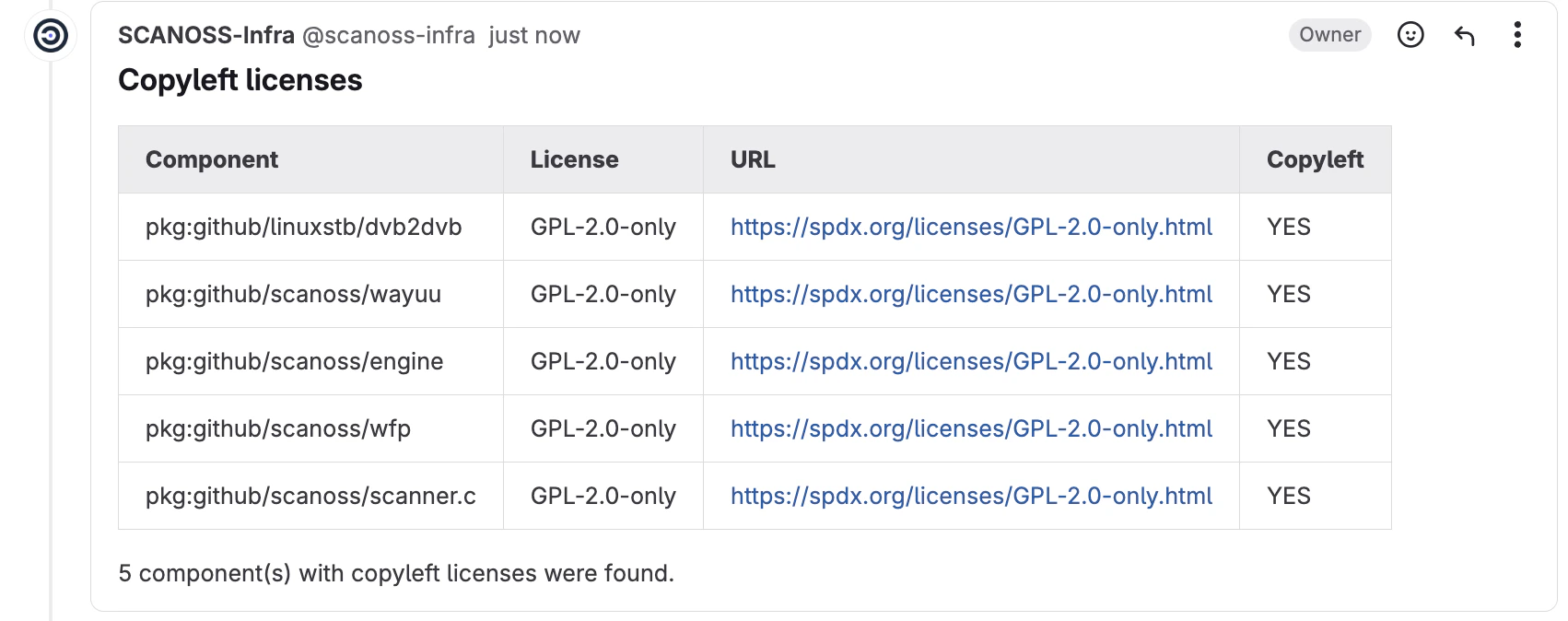
* **Copyleft** (`copyleft`) — Detects components or code snippets associated
with copyleft licences. If found, the merge request is rejected. The default
copyleft licence list is defined in the
[SCANOSS glc-code-scan repository](https://gitlab.com/scanoss/glc-code-scan).
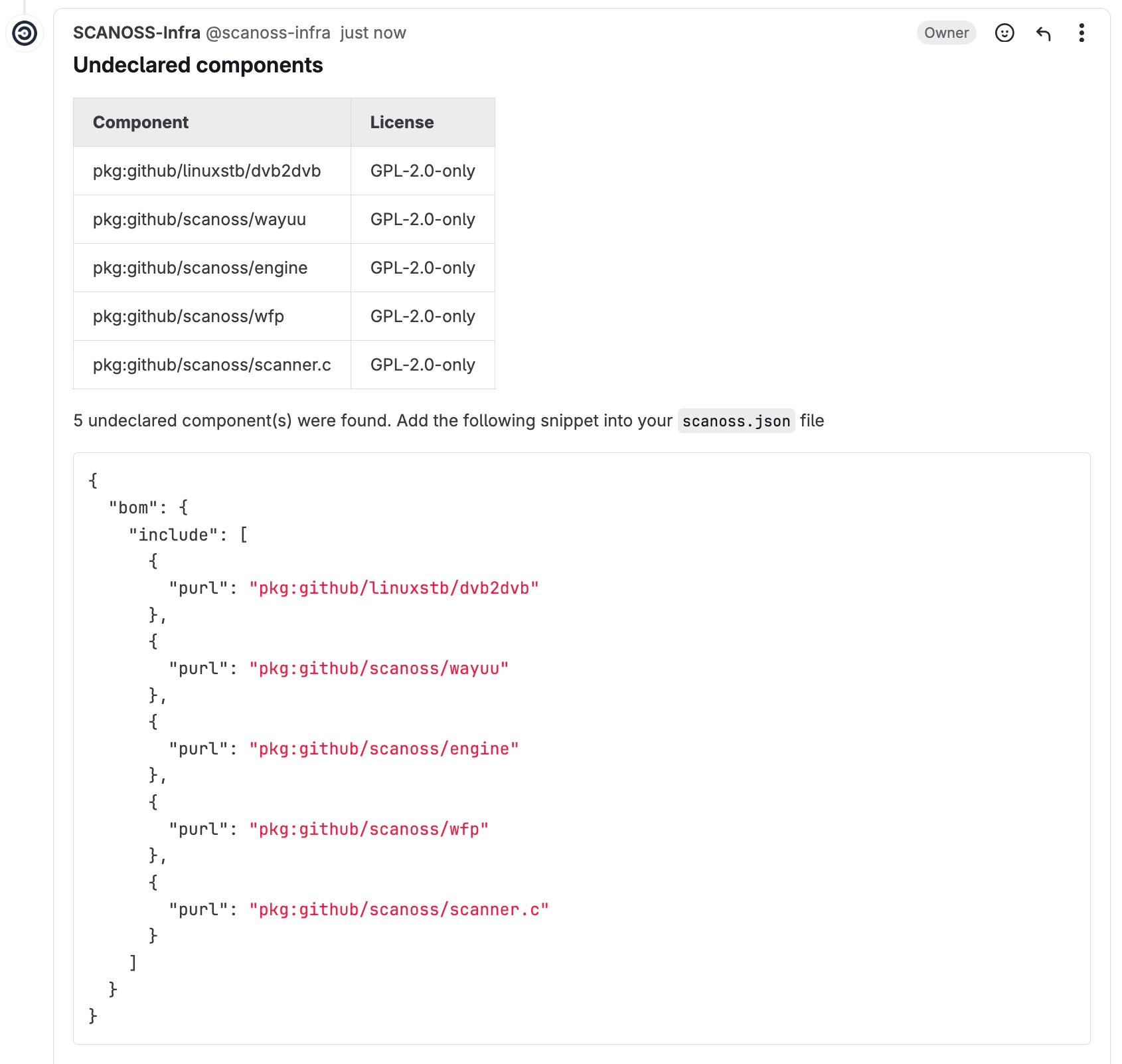
* **Undeclared** (`undeclared`) — Compares detected components against those
declared in your `scanoss.json` file. If undeclared components are found, the
MR is rejected.
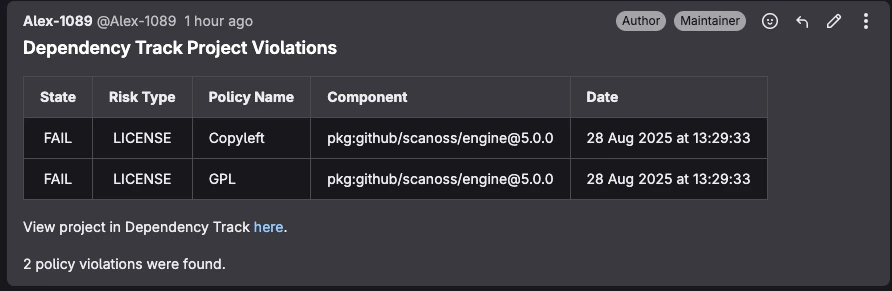
* **Dependency Track** (`deptrack`) — Integrates with a Dependency Track server
to check for policy violations including security vulnerabilities, licence
violations, and compliance issues. The policy check queries an existing
Dependency Track project for violations and reports them in the pipeline.
**Requirements:**
* Dependency Track server URL and API key
* Either a project UUID or project name and version
* The policy check runs even if SBOM upload is disabled; however, if the
Dependency Track project has not been updated recently, results may reflect
an outdated component inventory
When an MR is scanned, a comment summarising the results is automatically posted
to the merge request.
 ## Pipeline Triggers
In addition to merge request triggers, pipelines can be run manually or on a
schedule.
Example triggers:
```yaml theme={null}
scanoss-scan:
stage: scan
rules:
- if: '$CI_PIPELINE_SOURCE == "merge_request_event" || $CI_PIPELINE_SOURCE == "schedule" || $CI_COMMIT_BRANCH == $CI_DEFAULT_BRANCH'
```
## Scan Tuning Parameters
The SCANOSS scan engine supports
[scan tuning parameters](https://github.com/scanoss/scanoss.py/blob/main/docs/source/scanoss_settings_schema.rst#scan-tuning-parameters)
for snippet matching.
> Scan tuning parameters must be configured through `scanoss.json`. They are
> **not** configured as component input parameters.
## Manage Components with scanoss.json
The `scanoss.json` file is used to manage your project's Software Bill of
Materials (SBOM). It lets you declare approved components, document triage
decisions, and customise scan behaviour to enforce your organisation's policies.
### File Structure and Location
Place `scanoss.json` in the root of your repository so the SCANOSS component can
detect it automatically:
```
your-repository/
├── .gitlab-ci.yml
├── src/
├── scanoss.json ← Place here and commit to Git
└── README.md
```
> The `scanoss.json` file should be **committed to Git**. It contains your
> component declarations and governance decisions that should be
> version-controlled and shared across your team.
### Recommended .gitignore Configuration
```
# SCANOSS temporary files and cache
*.wfp
.scanoss/
```
**What to ignore:**
* `*.wfp` — Winnowing fingerprint files generated during local scans
* `.scanoss/` — Local cache directory created by SCANOSS tools
**What to commit:**
* `scanoss.json` — Your project's SBOM declarations and scan settings
### scanoss.json Format
```json theme={null}
{
"bom": {
"include": [
{
"purl": "pkg:github/scanoss/scanner.c",
"comment": "Core scanner — approved by Tech Lead on 2024-12-10"
}
],
"remove": [
{
"purl": "pkg:npm/express@4.17.1",
"comment": "Old version with known vulnerabilities. Upgrade to 4.18.2+."
}
]
},
"settings": {
"scan": {
"ignore": ["**/test/**", "**/node_modules/**", "**/dist/**"]
}
}
}
```
* **`bom.include`** — Lists all approved components. The scan verifies detected
components against this list.
* **`bom.remove`** — Specifies components that must not be present. The scan
flags them if found.
* **`settings.scan.ignore`** — Defines file or directory paths to exclude from
the scan.
> **Migration Note for v1.0.0+**: If you are migrating from an older version
> that used `sbom.json`, you need to:
>
> 1. Rename the file from `sbom.json` to `scanoss.json`
> 2. Update the format to wrap components within a `bom.include` structure (as
> shown above) rather than a direct `components` array
> 3. Note that SBOM-related parameters (`sbom_enabled`, `sbom_file_path`,
> `sbom_type`) have been removed from the component inputs
> 4. The runtime container has been updated to `ghcr.io/scanoss/scanoss-py:v1.46.0`
> or later
### Step-by-Step Guide to Populating scanoss.json
#### Step 1: Run an Initial Scan
Trigger the pipeline without a `scanoss.json` file. The initial scan will
discover all components in your repository and report them as undeclared.
#### Step 2: Review Scan Results
Once the pipeline run completes, navigate to the run in GitLab CI/CD and
download the scan results from the **Artifacts** section (`scanoss-raw.json` by
default).
#### Step 3: Extract Component PURLs
Review the results file to identify the component PURLs detected in your
codebase. These will be used to populate the `bom.include` section of your
`scanoss.json`.
#### Step 4: Create Your scanoss.json File
Create a `scanoss.json` file in your repository root using the PURLs from the
previous step:
```json theme={null}
{
"bom": {
"include": [
{
"purl": "pkg:github/scanoss/scanner.c",
"comment": "Approved component"
}
]
}
}
```
#### Step 5: Commit and Push
Add the `scanoss.json` file to version control and push to trigger the pipeline
again.
#### Step 6: Verify the Results
After the pipeline run completes, the scan should show all previously undeclared
components as declared, and no policy violations should be reported.
## Artifacts
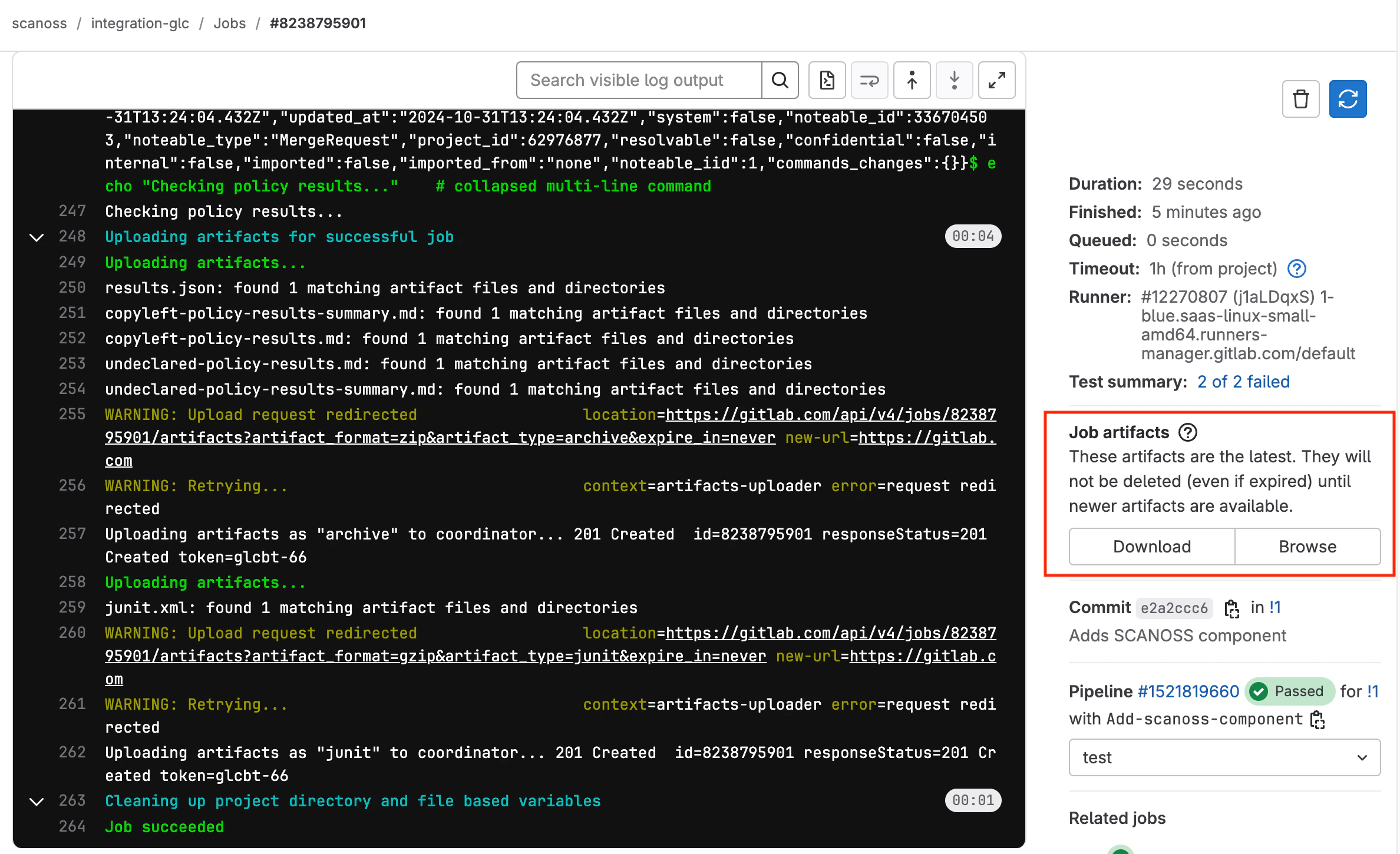
Scan results and policy check outcomes are uploaded to the artifacts of each
pipeline run, regardless of how the pipeline was triggered. To access them,
navigate to your pipeline run in GitLab CI/CD and open the **Artifacts** section.
| Artifact | Description |
| ------------------------------ | -------------------------------------------------------------------------------------------------- |
| `scanoss-raw.json` | Raw scan results from the SCANOSS API, containing detailed component and snippet match information |
| `copyleft-policy-results.md` | Copyleft policy check results in Markdown format |
| `undeclared-policy-results.md` | Undeclared components policy check results in Markdown format |
| `cyclonedx.json` | CycloneDX 1.4 SBOM (Software Bill of Materials) |
| `scanoss-scan-summary.json` | Summary of scan results including statistics and key findings |
| `code-quality-report.json` | Code quality analysis report with file and snippet match information |
| `scanoss-spdxlite.json` | SPDXLite 2.2 format SBOM |
| `scanoss-sbom.csv` | Software Bill of Materials in CSV format |
## Pipeline Triggers
In addition to merge request triggers, pipelines can be run manually or on a
schedule.
Example triggers:
```yaml theme={null}
scanoss-scan:
stage: scan
rules:
- if: '$CI_PIPELINE_SOURCE == "merge_request_event" || $CI_PIPELINE_SOURCE == "schedule" || $CI_COMMIT_BRANCH == $CI_DEFAULT_BRANCH'
```
## Scan Tuning Parameters
The SCANOSS scan engine supports
[scan tuning parameters](https://github.com/scanoss/scanoss.py/blob/main/docs/source/scanoss_settings_schema.rst#scan-tuning-parameters)
for snippet matching.
> Scan tuning parameters must be configured through `scanoss.json`. They are
> **not** configured as component input parameters.
## Manage Components with scanoss.json
The `scanoss.json` file is used to manage your project's Software Bill of
Materials (SBOM). It lets you declare approved components, document triage
decisions, and customise scan behaviour to enforce your organisation's policies.
### File Structure and Location
Place `scanoss.json` in the root of your repository so the SCANOSS component can
detect it automatically:
```
your-repository/
├── .gitlab-ci.yml
├── src/
├── scanoss.json ← Place here and commit to Git
└── README.md
```
> The `scanoss.json` file should be **committed to Git**. It contains your
> component declarations and governance decisions that should be
> version-controlled and shared across your team.
### Recommended .gitignore Configuration
```
# SCANOSS temporary files and cache
*.wfp
.scanoss/
```
**What to ignore:**
* `*.wfp` — Winnowing fingerprint files generated during local scans
* `.scanoss/` — Local cache directory created by SCANOSS tools
**What to commit:**
* `scanoss.json` — Your project's SBOM declarations and scan settings
### scanoss.json Format
```json theme={null}
{
"bom": {
"include": [
{
"purl": "pkg:github/scanoss/scanner.c",
"comment": "Core scanner — approved by Tech Lead on 2024-12-10"
}
],
"remove": [
{
"purl": "pkg:npm/express@4.17.1",
"comment": "Old version with known vulnerabilities. Upgrade to 4.18.2+."
}
]
},
"settings": {
"scan": {
"ignore": ["**/test/**", "**/node_modules/**", "**/dist/**"]
}
}
}
```
* **`bom.include`** — Lists all approved components. The scan verifies detected
components against this list.
* **`bom.remove`** — Specifies components that must not be present. The scan
flags them if found.
* **`settings.scan.ignore`** — Defines file or directory paths to exclude from
the scan.
> **Migration Note for v1.0.0+**: If you are migrating from an older version
> that used `sbom.json`, you need to:
>
> 1. Rename the file from `sbom.json` to `scanoss.json`
> 2. Update the format to wrap components within a `bom.include` structure (as
> shown above) rather than a direct `components` array
> 3. Note that SBOM-related parameters (`sbom_enabled`, `sbom_file_path`,
> `sbom_type`) have been removed from the component inputs
> 4. The runtime container has been updated to `ghcr.io/scanoss/scanoss-py:v1.46.0`
> or later
### Step-by-Step Guide to Populating scanoss.json
#### Step 1: Run an Initial Scan
Trigger the pipeline without a `scanoss.json` file. The initial scan will
discover all components in your repository and report them as undeclared.
#### Step 2: Review Scan Results
Once the pipeline run completes, navigate to the run in GitLab CI/CD and
download the scan results from the **Artifacts** section (`scanoss-raw.json` by
default).
#### Step 3: Extract Component PURLs
Review the results file to identify the component PURLs detected in your
codebase. These will be used to populate the `bom.include` section of your
`scanoss.json`.
#### Step 4: Create Your scanoss.json File
Create a `scanoss.json` file in your repository root using the PURLs from the
previous step:
```json theme={null}
{
"bom": {
"include": [
{
"purl": "pkg:github/scanoss/scanner.c",
"comment": "Approved component"
}
]
}
}
```
#### Step 5: Commit and Push
Add the `scanoss.json` file to version control and push to trigger the pipeline
again.
#### Step 6: Verify the Results
After the pipeline run completes, the scan should show all previously undeclared
components as declared, and no policy violations should be reported.
## Artifacts
Scan results and policy check outcomes are uploaded to the artifacts of each
pipeline run, regardless of how the pipeline was triggered. To access them,
navigate to your pipeline run in GitLab CI/CD and open the **Artifacts** section.
| Artifact | Description |
| ------------------------------ | -------------------------------------------------------------------------------------------------- |
| `scanoss-raw.json` | Raw scan results from the SCANOSS API, containing detailed component and snippet match information |
| `copyleft-policy-results.md` | Copyleft policy check results in Markdown format |
| `undeclared-policy-results.md` | Undeclared components policy check results in Markdown format |
| `cyclonedx.json` | CycloneDX 1.4 SBOM (Software Bill of Materials) |
| `scanoss-scan-summary.json` | Summary of scan results including statistics and key findings |
| `code-quality-report.json` | Code quality analysis report with file and snippet match information |
| `scanoss-spdxlite.json` | SPDXLite 2.2 format SBOM |
| `scanoss-sbom.csv` | Software Bill of Materials in CSV format |
 An example pipeline can be found in the
[SCANOSS GitLab Integration Demo](https://gitlab.com/scanoss/integration-glc).
An example pipeline can be found in the
[SCANOSS GitLab Integration Demo](https://gitlab.com/scanoss/integration-glc).