> ## Documentation Index
> Fetch the complete documentation index at: https://docs.scanoss.com/llms.txt
> Use this file to discover all available pages before exploring further.
# Jenkins
> Use SCANOSS in different development scenarios via Jenkins Pipelines.
## Prerequisites
Before you begin, make sure you have:
* An existing Jenkins installation
* A valid SCANOSS API key (required only for enterprise features)
* The following Jenkins plugins installed:
* **Docker Pipeline** — runs pipeline stages inside Docker containers
* **Pipeline Utility Steps** — provides file reading and utility functions
* **Generic Webhook Trigger** — enables GitHub webhook-based pipeline triggers
* **Pipeline** — core Jenkins pipeline support
* **GitHub Plugin** — GitHub repository integration
## Configuration
### Jenkins Credentials
Credentials should be stored in the Jenkins credentials store rather than hardcoded in your pipeline. Navigate to:
**Dashboard → Manage Jenkins → Credentials → (global) → Add Credentials**
Create the following credentials:
| Credential ID | Type | Description |
| ------------------ | ----------------- | ----------------------------------------------------- |
| `scanoss-token` | Secret text | SCANOSS API key for premium/enterprise features |
| `gh-token` | Username/password | GitHub credentials for accessing private repositories |
| `jira-credentials` | Username/password | Jira username and API token for creating issues |
> Use the exact credential IDs shown above — they are referenced by name in the Jenkinsfile.
## Pipeline Setup
### Step 1: Create a New Pipeline Job
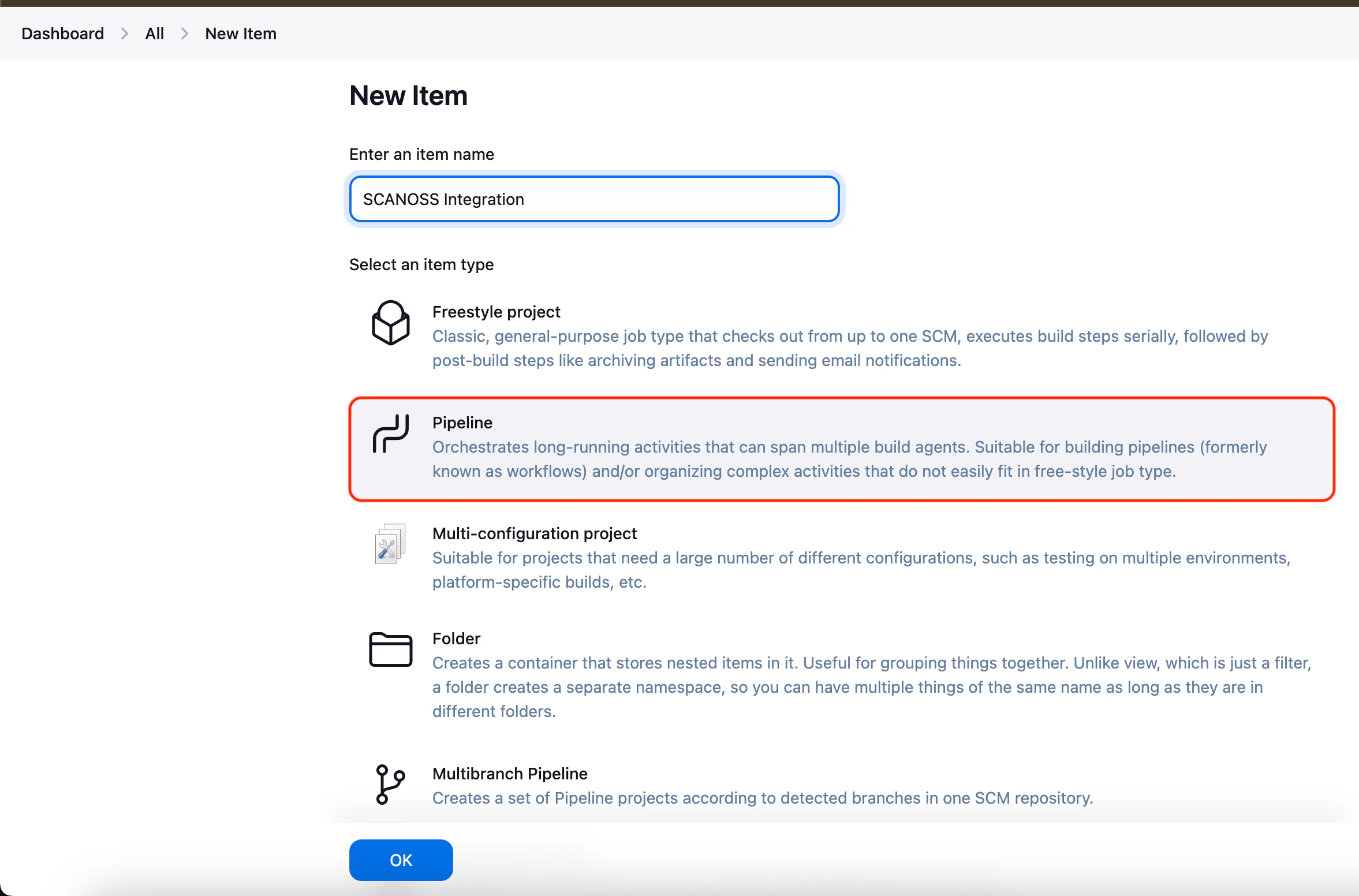
* Open the Jenkins Dashboard
* Click **New Item**
* Enter a job name (e.g. `scanoss-scan`)
* Select **Pipeline** as the job type
* Click **OK** to create the job
 ### Step 2: Configure the Pipeline Definition
* Navigate to the **Pipeline** section in the job configuration
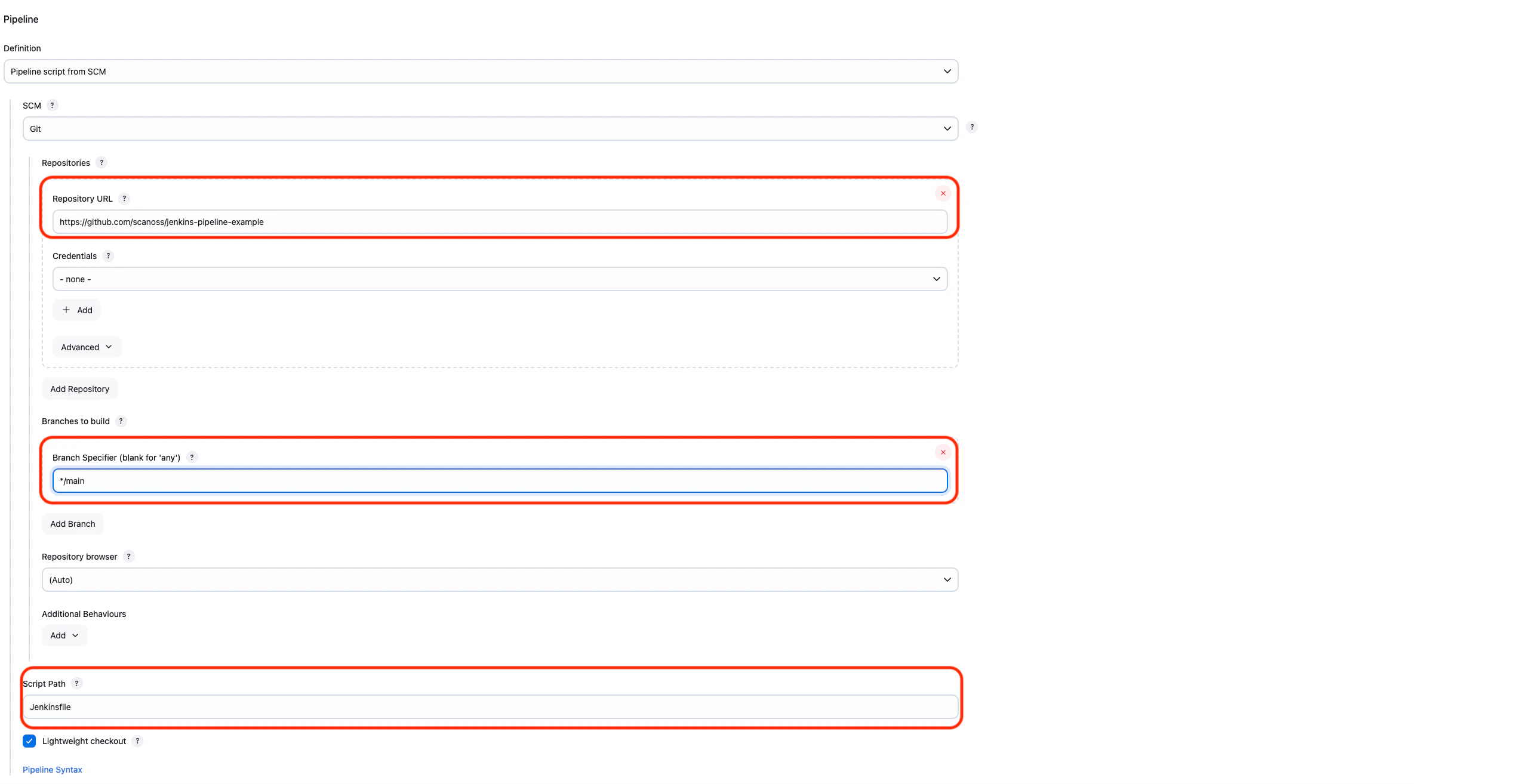
* Set **Definition** to `Pipeline script from SCM`
* Select **Git** as the **SCM**
* Enter the repository URL (e.g. `https://github.com/your-org/your-repo`)
* Set **Credentials**:
* `- none -` for public repositories
* `gh-token` for private repositories
* Set **Branch Specifier** to `*/main` (or `*/master` depending on your default branch)
* Set **Script Path** to `Jenkinsfile`
* Click **Save** to apply the configuration
### Step 3: Add the Jenkinsfile
Copy the SCANOSS Jenkins pipeline from the [official integration repository](https://github.com/scanoss/integration-jenkins/blob/main/SCANOSS-Jenkins-pipeline) and save it as `Jenkinsfile` (no extension) in the **root of your repository**.
### Step 4: Run the Pipeline
* Go to the pipeline job page in Jenkins
* Click **Build Now** to start a new build
* Open **Build History** and select the latest build number
* Click **Console Output** to monitor the scan execution in real time
### Step 5: Review the Results
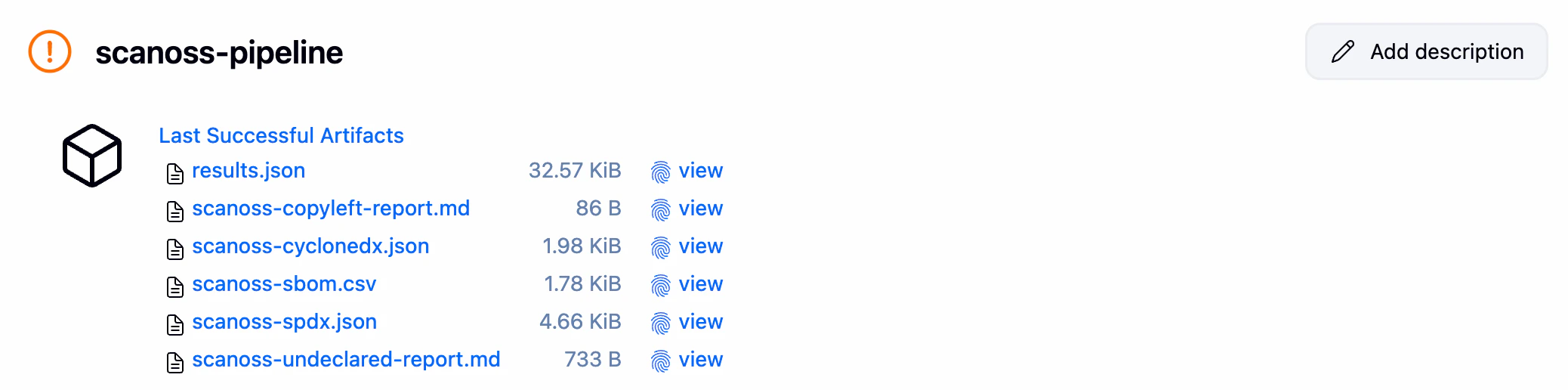
After the build completes, click **Artifacts** in the build to access the scan results:
| File | Description |
| ----------------------------------------- | ---------------------------------------------------------------------------- |
| `results.json` | Raw scan results from the SCANOSS API |
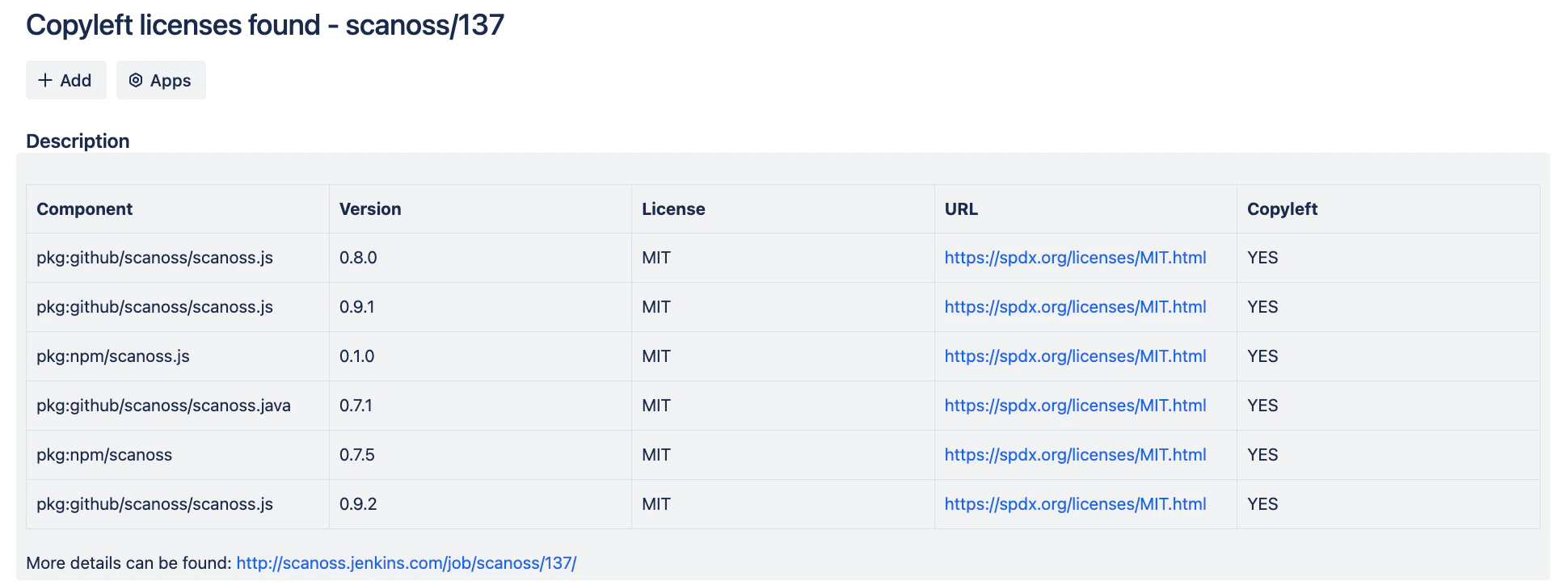
| `scanoss-copyleft-report.md` | Copyleft licence violations (generated only when violations are found) |
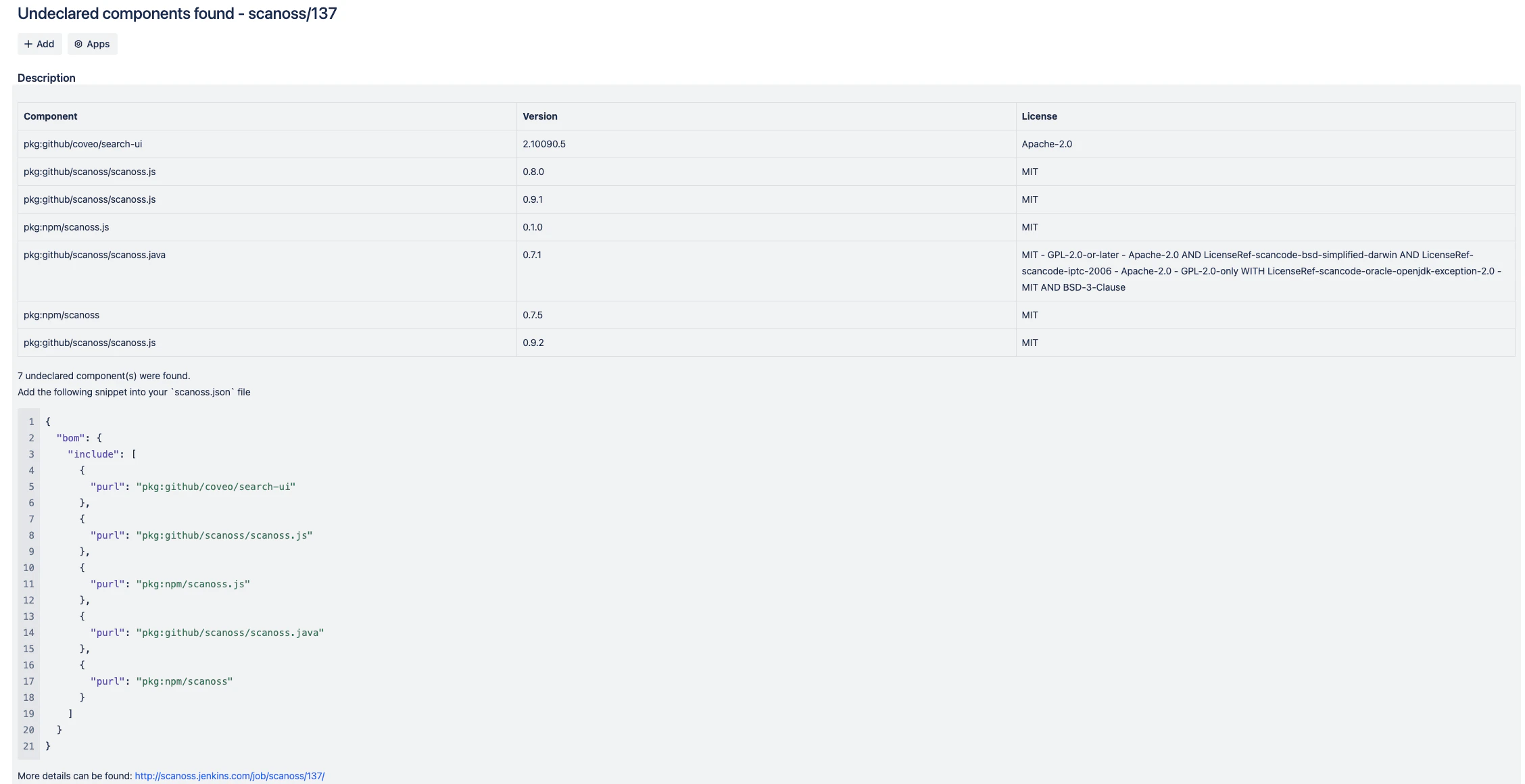
| `scanoss-undeclared-components-report.md` | Undeclared open source components (generated only when violations are found) |
| `scanoss-cyclonedx.json` | CycloneDX 1.4 SBOM |
| `scanoss-spdx.json` | SPDXLite 2.2 SBOM |
| `scanoss-sbom.csv` | SBOM in CSV format |
### Step 2: Configure the Pipeline Definition
* Navigate to the **Pipeline** section in the job configuration
* Set **Definition** to `Pipeline script from SCM`
* Select **Git** as the **SCM**
* Enter the repository URL (e.g. `https://github.com/your-org/your-repo`)
* Set **Credentials**:
* `- none -` for public repositories
* `gh-token` for private repositories
* Set **Branch Specifier** to `*/main` (or `*/master` depending on your default branch)
* Set **Script Path** to `Jenkinsfile`
* Click **Save** to apply the configuration
### Step 3: Add the Jenkinsfile
Copy the SCANOSS Jenkins pipeline from the [official integration repository](https://github.com/scanoss/integration-jenkins/blob/main/SCANOSS-Jenkins-pipeline) and save it as `Jenkinsfile` (no extension) in the **root of your repository**.
### Step 4: Run the Pipeline
* Go to the pipeline job page in Jenkins
* Click **Build Now** to start a new build
* Open **Build History** and select the latest build number
* Click **Console Output** to monitor the scan execution in real time
### Step 5: Review the Results
After the build completes, click **Artifacts** in the build to access the scan results:
| File | Description |
| ----------------------------------------- | ---------------------------------------------------------------------------- |
| `results.json` | Raw scan results from the SCANOSS API |
| `scanoss-copyleft-report.md` | Copyleft licence violations (generated only when violations are found) |
| `scanoss-undeclared-components-report.md` | Undeclared open source components (generated only when violations are found) |
| `scanoss-cyclonedx.json` | CycloneDX 1.4 SBOM |
| `scanoss-spdx.json` | SPDXLite 2.2 SBOM |
| `scanoss-sbom.csv` | SBOM in CSV format |
 ### Step 6: (Optional) Set Up GitHub Webhook Auto-Trigger
To automatically trigger the pipeline on every push to GitHub:
**In Jenkins:**
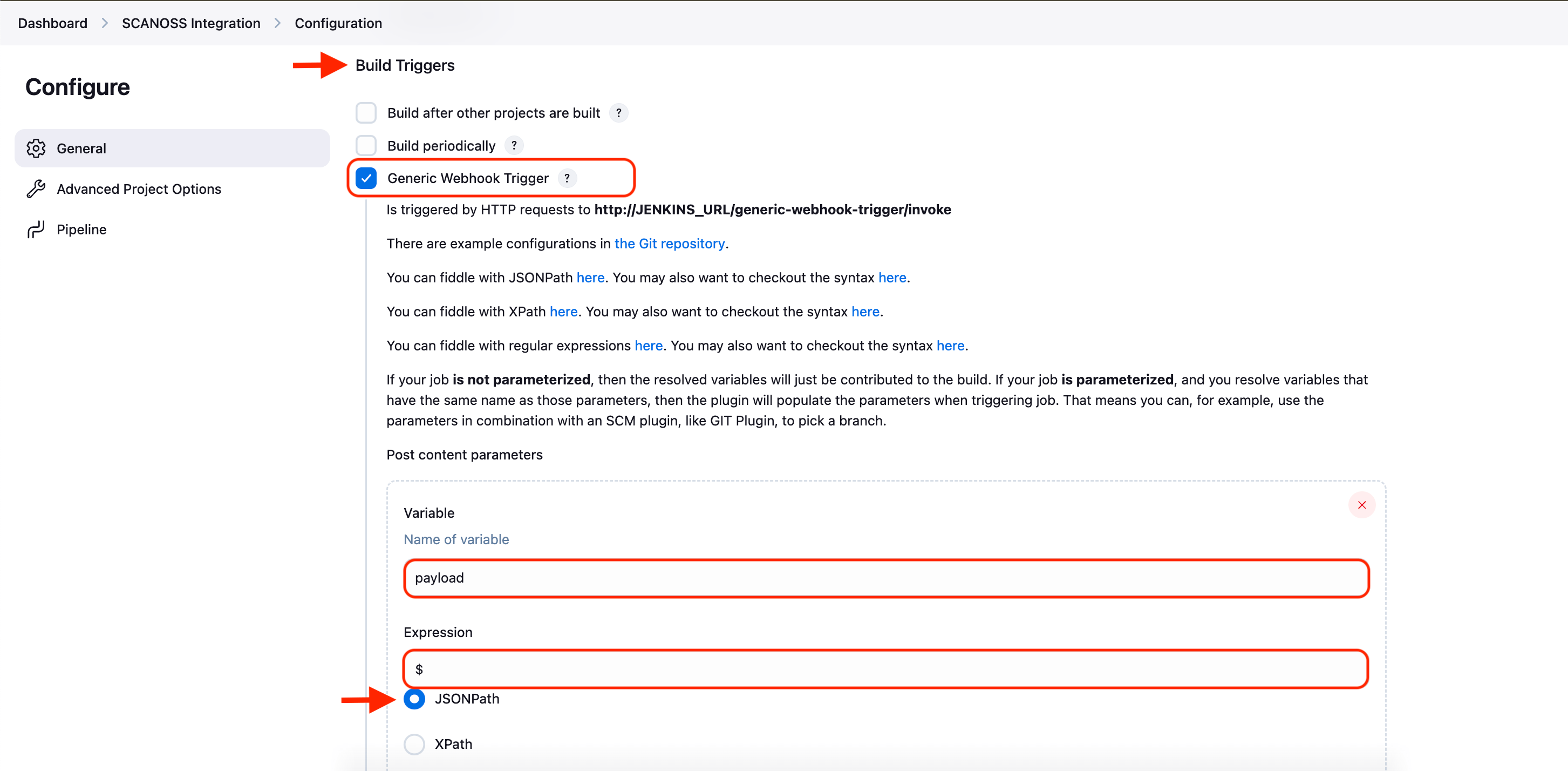
1. Go to your pipeline → **Configure → Build Triggers**
2. Check **Generic Webhook Trigger**
3. Under **Post content parameters**, add:
* Variable: `payload`
* Value: `$`
* Expression type: `JSONPath`
4. Note your webhook URL: `http://YOUR_JENKINS_URL/generic-webhook-trigger/invoke?token=YOUR_TOKEN`
### Step 6: (Optional) Set Up GitHub Webhook Auto-Trigger
To automatically trigger the pipeline on every push to GitHub:
**In Jenkins:**
1. Go to your pipeline → **Configure → Build Triggers**
2. Check **Generic Webhook Trigger**
3. Under **Post content parameters**, add:
* Variable: `payload`
* Value: `$`
* Expression type: `JSONPath`
4. Note your webhook URL: `http://YOUR_JENKINS_URL/generic-webhook-trigger/invoke?token=YOUR_TOKEN`
 **In GitHub:**
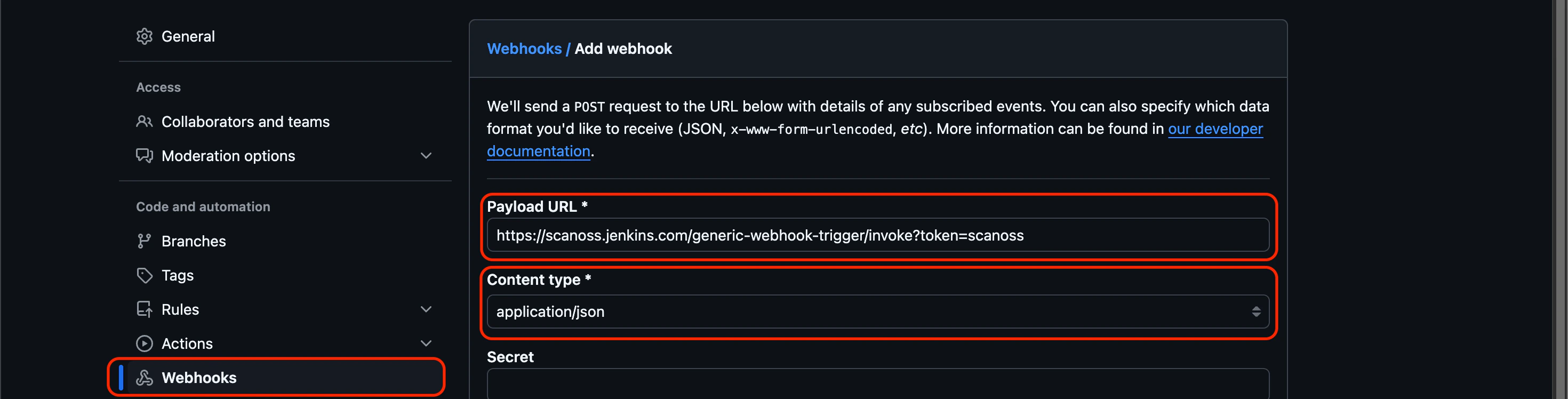
1. Go to your repo → **Settings → Webhooks → Add webhook**
2. Paste the Jenkins webhook URL
3. Set content type to `application/json`
4. Click **Add webhook**
**In GitHub:**
1. Go to your repo → **Settings → Webhooks → Add webhook**
2. Paste the Jenkins webhook URL
3. Set content type to `application/json`
4. Click **Add webhook**
 For detailed webhook setup instructions, refer to the [GitHub webhook documentation](https://docs.github.com/en/webhooks/using-webhooks/creating-webhooks).
## Multibranch Pipeline
For repositories with multiple branches, use a **Multibranch Pipeline** to automatically detect and build all branches containing a `Jenkinsfile`.
### Setup Steps
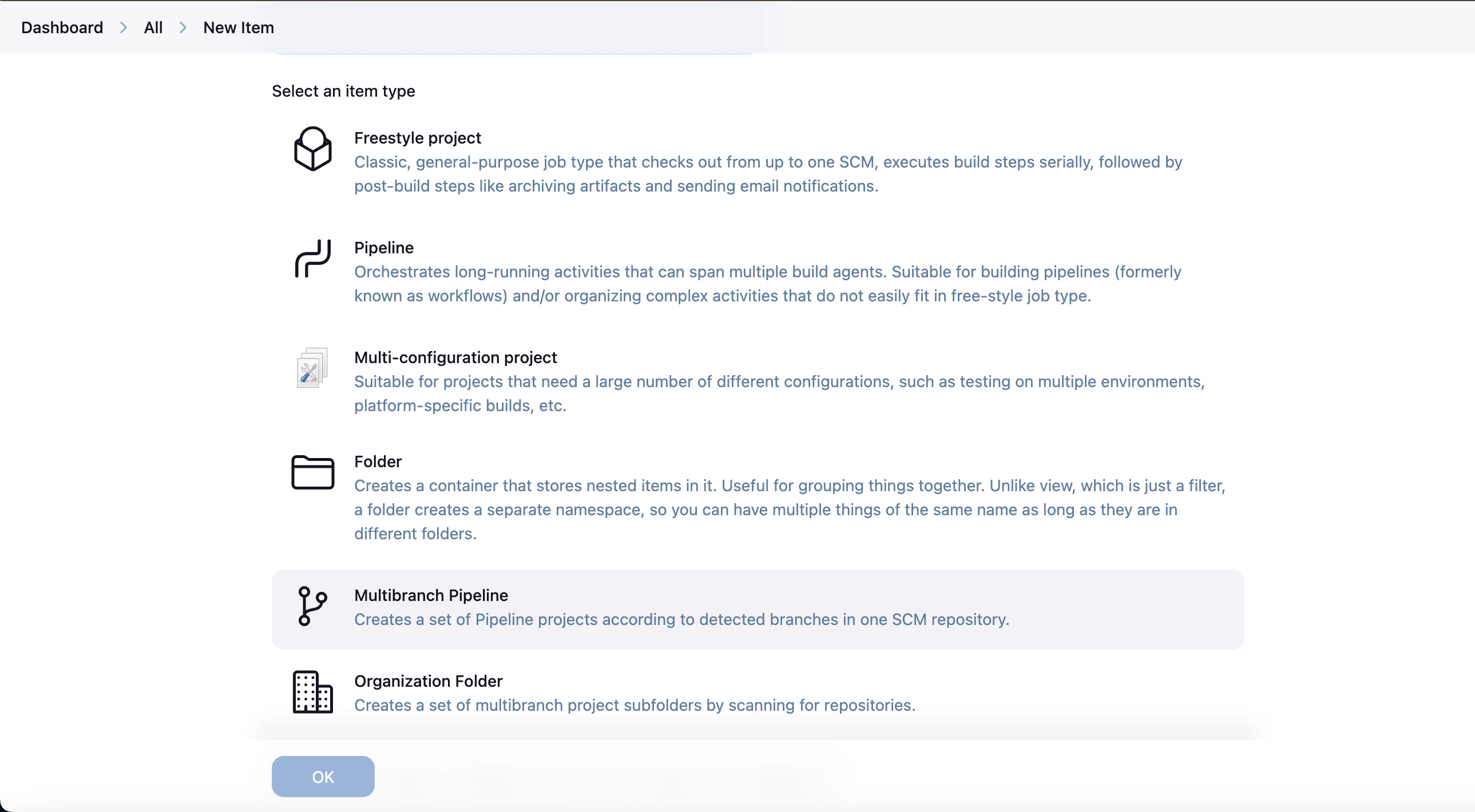
1. From the Jenkins Dashboard, create a new **Multibranch Pipeline**
For detailed webhook setup instructions, refer to the [GitHub webhook documentation](https://docs.github.com/en/webhooks/using-webhooks/creating-webhooks).
## Multibranch Pipeline
For repositories with multiple branches, use a **Multibranch Pipeline** to automatically detect and build all branches containing a `Jenkinsfile`.
### Setup Steps
1. From the Jenkins Dashboard, create a new **Multibranch Pipeline**
 2. Under **Branch Sources**, add your repository URL and credentials
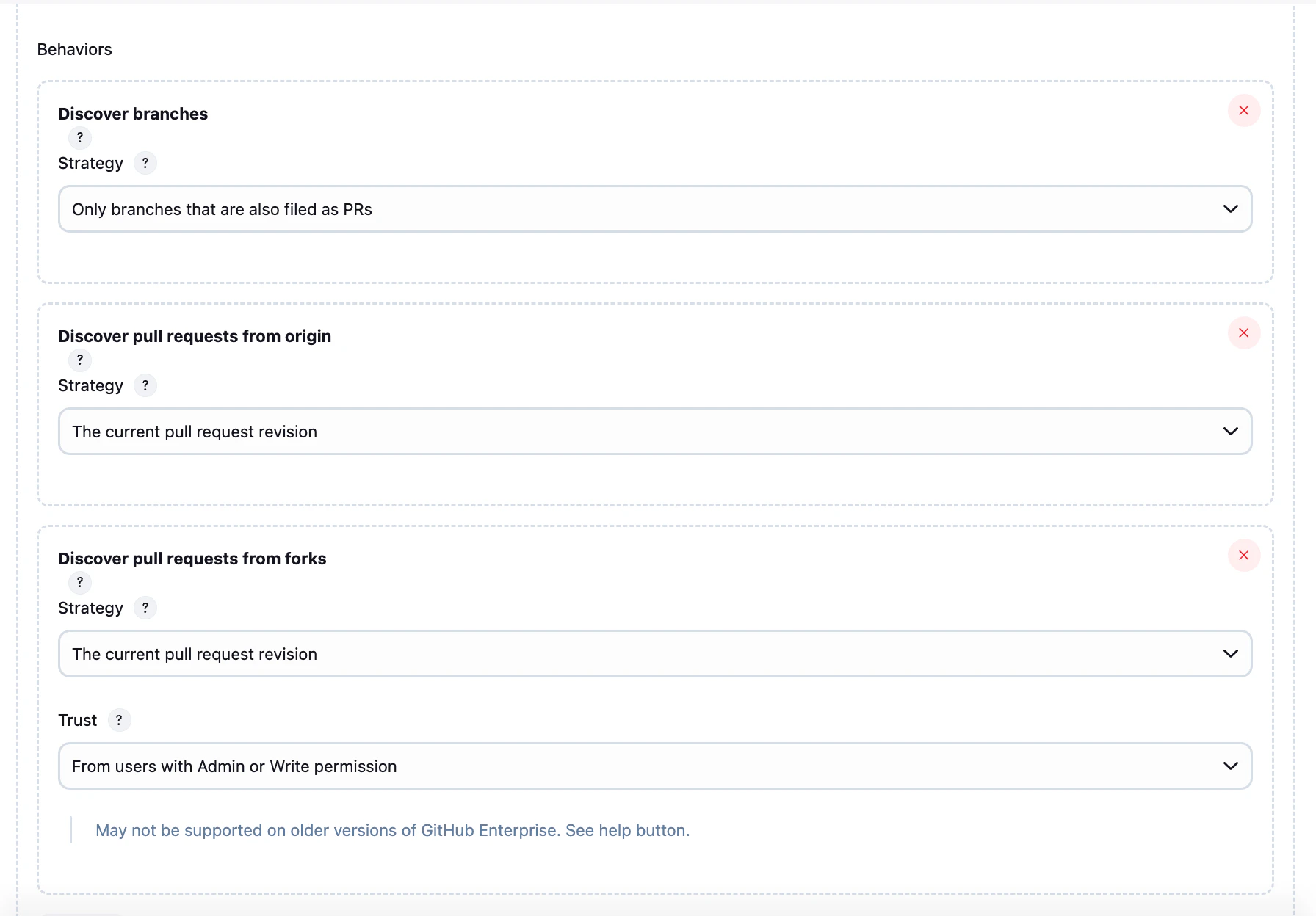
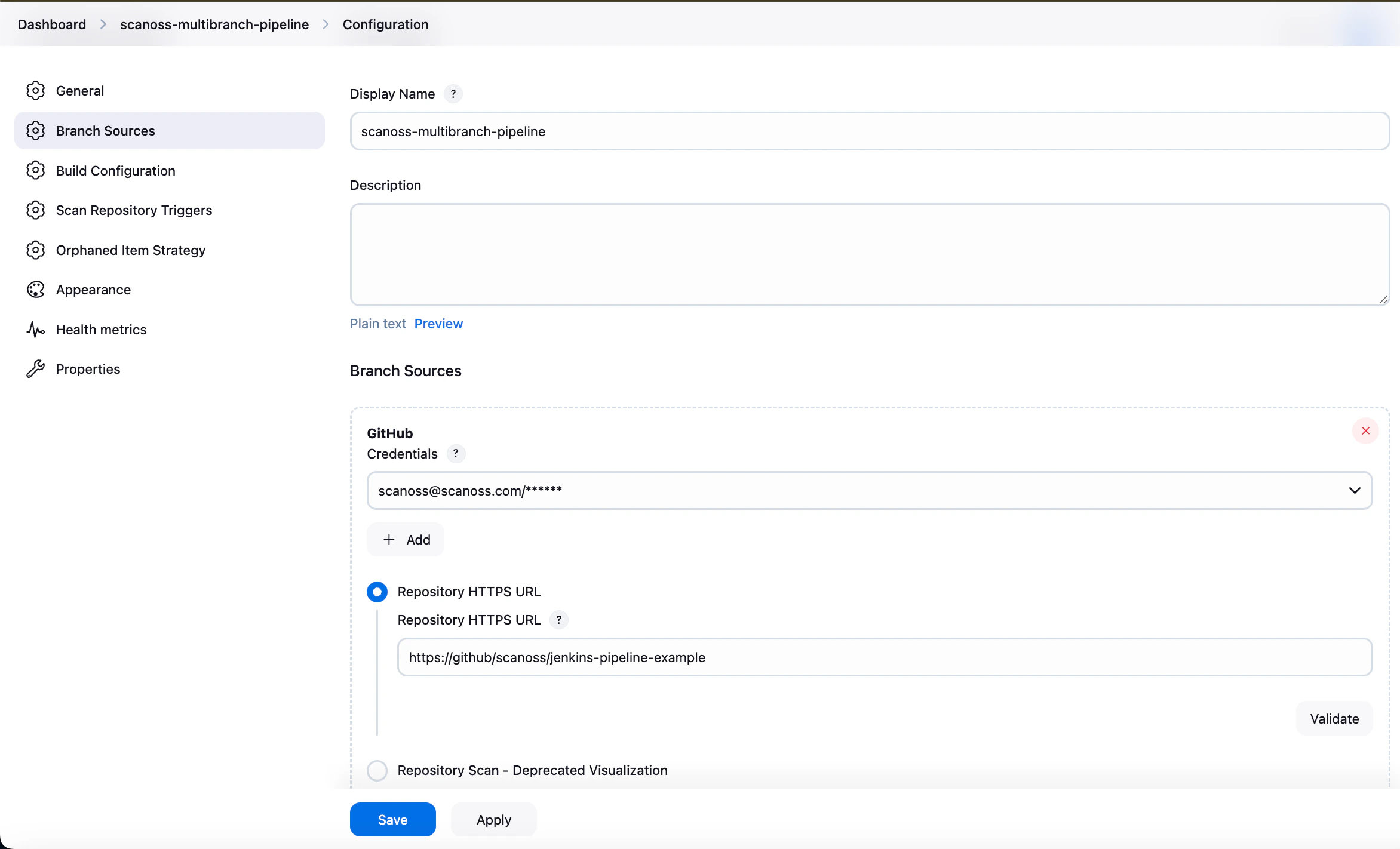 3. Select your desired pipeline behaviours (branch discovery strategy, build triggers)
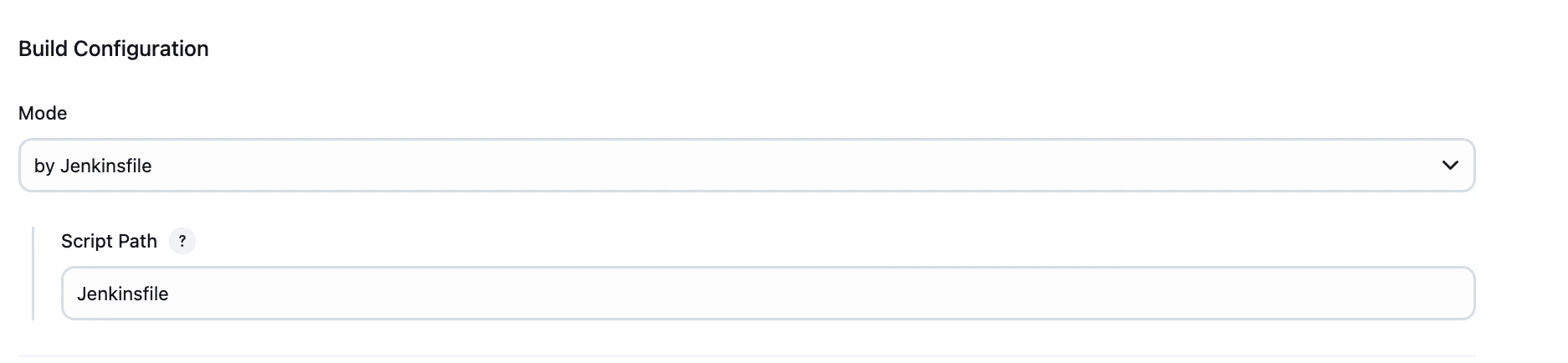
 4. Under **Build Configuration**, set:
* **Mode:** by Jenkinsfile
* **Script Path:** `Jenkinsfile`
4. Under **Build Configuration**, set:
* **Mode:** by Jenkinsfile
* **Script Path:** `Jenkinsfile`
 5. Apply and save
### Private GitHub Integration
For private repositories, authentication is required. Configure appropriate credentials (such as a personal access token) in Jenkins.
Refer to the [GitHub documentation](https://docs.github.com/en/authentication/keeping-your-account-and-data-secure/managing-your-personal-access-tokens) for guidance on creating and managing tokens.
5. Apply and save
### Private GitHub Integration
For private repositories, authentication is required. Configure appropriate credentials (such as a personal access token) in Jenkins.
Refer to the [GitHub documentation](https://docs.github.com/en/authentication/keeping-your-account-and-data-secure/managing-your-personal-access-tokens) for guidance on creating and managing tokens.
 ## Pipeline Parameters
All parameters are configured directly in the `Jenkinsfile` and can be overridden at build time via **Build with Parameters**.
| Parameter | Description | Default | Type |
| ---------------------------- | -------------------------------------------------------------------------------------------------------------------------------------------------------- | ---------------------------------------------------------------------------------------------------------------- | -------- |
| SCANOSS\_CLI\_DOCKER\_IMAGE | SCANOSS CLI Docker Image. | [https://ghcr.io/scanoss/scanoss-py-jenkins:v1.46.0](https://github.com/scanoss/scanoss.py/releases/tag/v1.46.0) | Pipeline |
| ABORT\_ON\_POLICY\_FAILURE | Abort pipeline on pipeline failure. | `false` | Pipeline |
| SCANOSS\_API\_URL | SCANOSS API endpoint. | [https://api.osskb.org/scan/direct](https://api.osskb.org/scan/direct) | Pipeline |
| SCANOSS\_API\_TOKEN\_ID | SCANOSS API Token ID. | scanoss-token | Pipeline |
| SCAN\_PATH | Relative path within the repository to scan (e.g., `src` or `packages/api`). Must be relative, no parent directory references (`..`) allowed. | `.` | Pipeline |
| SKIP\_SNIPPET | Skip the generation of snippets. | `false` | Pipeline |
| SCANOSS\_SETTINGS | Settings file to use for scanning. See the SCANOSS settings [documentation](https://scanoss.readthedocs.io/projects/scanoss-py/en/latest/#settings-file) | `true` | Pipeline |
| SETTINGS\_FILE\_PATH | SCANOSS settings file path. | scanoss.json | Pipeline |
| DEPENDENCY\_ENABLED | Scan dependencies (optional - default false). | `false` | Pipeline |
| DEPENDENCY\_SCOPE | Gets development or production dependencies (scopes: 'prod' - 'dev'). | '' | Pipeline |
| DEPENDENCY\_SCOPE\_INCLUDE | Custom list of dependency scopes to be included. Provide scopes as a comma-separated list. | '' | Pipeline |
| DEPENDENCY\_SCOPE\_EXCLUDE | Custom list of dependency scopes to be EXCLUDED. Provide scopes as a comma-separated list. | '' | Pipeline |
| LICENSES\_COPYLEFT\_INCLUDE | List of Copyleft licenses to append to the default list. Provide licenses as a comma-separated list. | '' | Pipeline |
| LICENSES\_COPYLEFT\_EXCLUDE | List of Copyleft licenses to remove from default list. Provide licenses as a comma-separated list. | '' | Pipeline |
| LICENSES\_COPYLEFT\_EXPLICIT | Explicit list of Copyleft licenses to consider. Provide licenses as a comma-separated list. | '' | Pipeline |
| CREATE\_JIRA\_ISSUE | Enables JIRA reporting | `false` | Pipeline |
| JIRA\_URL | JIRA URL | '' | Pipeline |
| JIRA\_PROJECT\_KEY | JIRA Project Key | '' | Pipeline |
| JIRA\_CREDENTIALS | JIRA credentials ID | jira-credentials | Pipeline |
## Policy Checks
The SCANOSS Jenkins integration includes two built-in policies designed to enforce compliance and improve visibility into open source usage:
* **Copyleft**\
This policy detects components or code snippets associated with copyleft licenses. If any such licenses are identified, the pull request (PR) is automatically rejected. The default list of copyleft licenses is defined in the following [file](https://github.com/scanoss/ado-code-scan/blob/1218c4fe2dcda5f807b505e271096b1ec0afd8a9/codescantask/utils/license.utils.ts#L4), and can be reviewed or extended as needed.
* **Undeclared**\
This policy compares detected components in the repository against those declared in the `scanoss.json` file (the path can be customized via configuration). If any components are found that are not declared, the pipeline fails, ensuring full dependency transparency.
### JIRA Integration
When policy checks fail and JIRA integration is configured, issues are automatically created to track and remediate violations.
To enable this functionality, you must provide valid JIRA credentials. Issues will be created on behalf of the configured user.
An API token is required for authentication. For more details on generating and managing tokens, refer to the [JIRA documentation](https://support.atlassian.com/atlassian-account/docs/manage-api-tokens-for-your-atlassian-account/).
## Pipeline Parameters
All parameters are configured directly in the `Jenkinsfile` and can be overridden at build time via **Build with Parameters**.
| Parameter | Description | Default | Type |
| ---------------------------- | -------------------------------------------------------------------------------------------------------------------------------------------------------- | ---------------------------------------------------------------------------------------------------------------- | -------- |
| SCANOSS\_CLI\_DOCKER\_IMAGE | SCANOSS CLI Docker Image. | [https://ghcr.io/scanoss/scanoss-py-jenkins:v1.46.0](https://github.com/scanoss/scanoss.py/releases/tag/v1.46.0) | Pipeline |
| ABORT\_ON\_POLICY\_FAILURE | Abort pipeline on pipeline failure. | `false` | Pipeline |
| SCANOSS\_API\_URL | SCANOSS API endpoint. | [https://api.osskb.org/scan/direct](https://api.osskb.org/scan/direct) | Pipeline |
| SCANOSS\_API\_TOKEN\_ID | SCANOSS API Token ID. | scanoss-token | Pipeline |
| SCAN\_PATH | Relative path within the repository to scan (e.g., `src` or `packages/api`). Must be relative, no parent directory references (`..`) allowed. | `.` | Pipeline |
| SKIP\_SNIPPET | Skip the generation of snippets. | `false` | Pipeline |
| SCANOSS\_SETTINGS | Settings file to use for scanning. See the SCANOSS settings [documentation](https://scanoss.readthedocs.io/projects/scanoss-py/en/latest/#settings-file) | `true` | Pipeline |
| SETTINGS\_FILE\_PATH | SCANOSS settings file path. | scanoss.json | Pipeline |
| DEPENDENCY\_ENABLED | Scan dependencies (optional - default false). | `false` | Pipeline |
| DEPENDENCY\_SCOPE | Gets development or production dependencies (scopes: 'prod' - 'dev'). | '' | Pipeline |
| DEPENDENCY\_SCOPE\_INCLUDE | Custom list of dependency scopes to be included. Provide scopes as a comma-separated list. | '' | Pipeline |
| DEPENDENCY\_SCOPE\_EXCLUDE | Custom list of dependency scopes to be EXCLUDED. Provide scopes as a comma-separated list. | '' | Pipeline |
| LICENSES\_COPYLEFT\_INCLUDE | List of Copyleft licenses to append to the default list. Provide licenses as a comma-separated list. | '' | Pipeline |
| LICENSES\_COPYLEFT\_EXCLUDE | List of Copyleft licenses to remove from default list. Provide licenses as a comma-separated list. | '' | Pipeline |
| LICENSES\_COPYLEFT\_EXPLICIT | Explicit list of Copyleft licenses to consider. Provide licenses as a comma-separated list. | '' | Pipeline |
| CREATE\_JIRA\_ISSUE | Enables JIRA reporting | `false` | Pipeline |
| JIRA\_URL | JIRA URL | '' | Pipeline |
| JIRA\_PROJECT\_KEY | JIRA Project Key | '' | Pipeline |
| JIRA\_CREDENTIALS | JIRA credentials ID | jira-credentials | Pipeline |
## Policy Checks
The SCANOSS Jenkins integration includes two built-in policies designed to enforce compliance and improve visibility into open source usage:
* **Copyleft**\
This policy detects components or code snippets associated with copyleft licenses. If any such licenses are identified, the pull request (PR) is automatically rejected. The default list of copyleft licenses is defined in the following [file](https://github.com/scanoss/ado-code-scan/blob/1218c4fe2dcda5f807b505e271096b1ec0afd8a9/codescantask/utils/license.utils.ts#L4), and can be reviewed or extended as needed.
* **Undeclared**\
This policy compares detected components in the repository against those declared in the `scanoss.json` file (the path can be customized via configuration). If any components are found that are not declared, the pipeline fails, ensuring full dependency transparency.
### JIRA Integration
When policy checks fail and JIRA integration is configured, issues are automatically created to track and remediate violations.
To enable this functionality, you must provide valid JIRA credentials. Issues will be created on behalf of the configured user.
An API token is required for authentication. For more details on generating and managing tokens, refer to the [JIRA documentation](https://support.atlassian.com/atlassian-account/docs/manage-api-tokens-for-your-atlassian-account/).