> ## Documentation Index
> Fetch the complete documentation index at: https://docs.scanoss.com/llms.txt
> Use this file to discover all available pages before exploring further.
# SCANOSS-PY
> Detect and analyse cryptographic algorithms used in open source components with [SCANOSS Python CLI](https://github.com/scanoss/scanoss.py).
## Sample Workflow
### Scan for Components
First, scan your codebase to detect all software components and their cryptographic usage:
```bash theme={null}
# Scan directory with dependency detection
scanoss-py scan /path/to/your/code \
--dependencies \
--output results.json \
--key "$SCANOSS_API_KEY"
```
### View Scan Results
Examine the scan results to see detected cryptography:
```bash theme={null}
# View complete scan results
cat results.json | jq '.'
# View cryptography information for all files
cat results.json | jq '.[].[] | select(.cryptography != null) | {file: .file, component: .component, crypto: .cryptography}'
```
**Sample Output:**
```bash theme={null}
{
"file": "src/copyright.c",
"component": "engine",
"crypto": [
{
"algorithm": "md5",
"strength": "128"
}
]
}
{
"file": "src/scanoss/scanner.py",
"component": "scanoss.py",
"crypto": [
{
"algorithm": "sha2",
"strength": "224-512"
}
]
}
```
### Extract Component PURLs
Extract Package URLs (PURLs) from the scan results for further analysis:
```bash theme={null}
# Extract all PURLs with versions
jq -r '.[].[] | select(.purl != null) | .purl[] as $purl | "\($purl)@\(.version)"' results.json
# Extract unique PURLs
jq -r '.[].[] | select(.purl != null) | .purl[]' results.json | sort -u
# Save PURLs to file for batch processing
jq -r '.[].[] | select(.purl != null) | .purl[] as $purl | "\($purl)@\(.version)"' results.json > purls.txt
```
**Sample Output:**
```bash theme={null}
pkg:github/scanoss/engine@5.0.0
pkg:github/scanoss/scanoss.py@v1.3.6
pkg:pypi/scanoss@v1.3.6
```
## Local Crypto Scan Modes
### Online Scan Path
 ### Offline Scan Path
 ### Crypto Finder Analyzer Architecture
 ## Querying Cryptographic Information
### Query Single Component
Get specific algorithm details for a single component:
```bash theme={null}
scanoss-py crypto algorithms \
--purl "pkg:github/scanoss/scanoss.py@>v1.3.5" \
--key "$SCANOSS_API_KEY"
```
**Sample Output:**
```json theme={null}
{
"components": [
{
"purl": "pkg:github/scanoss/scanoss.py",
"version": "v1.41.0",
"requirement": ">v1.3.5",
"algorithms": [
{
"algorithm": "fnv1",
"strength": "1024"
},
{
"algorithm": "md5",
"strength": "128"
},
{
"algorithm": "sha2",
"strength": "224-512"
}
]
}
],
"status": {
"status": "SUCCESS",
"message": "Algorithms retrieved successfully."
}
}
```
### Query Multiple Components
Process multiple PURLs using a file input:
```bash theme={null}
# Create PURL input file
cat > purl-list.json << 'EOF'
{
"purls": [
{
"purl": "pkg:npm/crypto-js@4.1.1"
},
{
"purl": "pkg:pypi/cryptography@40.0.2"
},
{
"purl": "pkg:maven/org.bouncycastle/bcprov-jdk15on@1.70"
}
]
}
EOF
```
```bash theme={null}
# Query all components
scanoss-py crypto algorithms \
--input purl-list.json \
--key "$SCANOSS_API_KEY"
```
### Query Cryptographic Hints
Retrieve encryption hints for a single component.
```bash theme={null}
# Query hints for one component
scanoss-py crypto hints \
--purl "pkg:github/scanoss/scanoss.py@>v1.3.5" \
--key "$SCANOSS_API_KEY"
```
**Sample output:**
```json theme={null}
{
"components": [
{
"purl": "pkg:github/scanoss/scanoss.py",
"version": "v1.41.0",
"requirement": ">v1.3.5",
"hints": [
{
"id": "library/openssl",
"name": "OpenSSL",
"description": "A robust, full-featured open-source toolkit implementing the Secure Sockets Layer (SSL) and Transport Layer Security (TLS) protocols.",
"category": "library",
"url": "https://www.openssl.org/docs/",
"purl": "pkg:github/openssl/openssl"
},
{
"id": "package/pycryptodome",
"name": "PyCryptodome",
"description": "A self-contained Python package of low-level cryptographic primitives.",
"category": "package",
"url": "https://pycryptodome.readthedocs.io/en/latest/",
"purl": "pkg:github/Legrandin/pycryptodome"
},
{
"id": "protocol/tls",
"name": "TLS",
"description": "TLS (Transport Layer Security) is a cryptographic protocol designed to provide secure communication over computer networks.",
"category": "protocol"
},
{
"id": "protocol/https",
"name": "HTTPS",
"description": "HTTPS (Hypertext Transfer Protocol Secure) is a protocol for secure communication over a computer network",
"category": "library"
},
{
"id": "protocol/OAuth",
"name": "Open Authorization",
"description": "N/A",
"category": "protocol"
}
]
}
],
"status": {
"status": "SUCCESS",
"message": "Encryption's hints retrieved successfully."
}
}
```
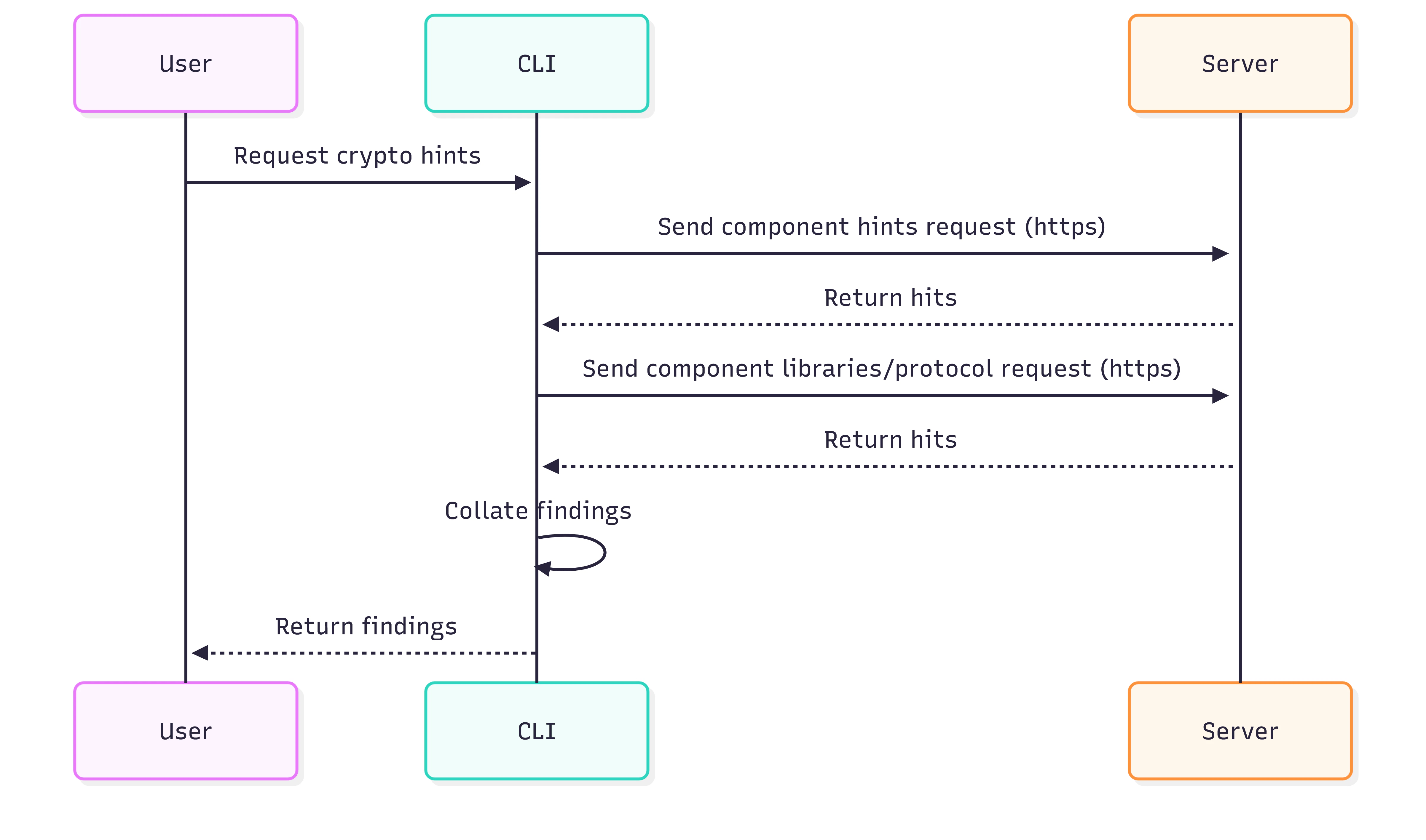
### Interaction flow for crypto hints
## Querying Cryptographic Information
### Query Single Component
Get specific algorithm details for a single component:
```bash theme={null}
scanoss-py crypto algorithms \
--purl "pkg:github/scanoss/scanoss.py@>v1.3.5" \
--key "$SCANOSS_API_KEY"
```
**Sample Output:**
```json theme={null}
{
"components": [
{
"purl": "pkg:github/scanoss/scanoss.py",
"version": "v1.41.0",
"requirement": ">v1.3.5",
"algorithms": [
{
"algorithm": "fnv1",
"strength": "1024"
},
{
"algorithm": "md5",
"strength": "128"
},
{
"algorithm": "sha2",
"strength": "224-512"
}
]
}
],
"status": {
"status": "SUCCESS",
"message": "Algorithms retrieved successfully."
}
}
```
### Query Multiple Components
Process multiple PURLs using a file input:
```bash theme={null}
# Create PURL input file
cat > purl-list.json << 'EOF'
{
"purls": [
{
"purl": "pkg:npm/crypto-js@4.1.1"
},
{
"purl": "pkg:pypi/cryptography@40.0.2"
},
{
"purl": "pkg:maven/org.bouncycastle/bcprov-jdk15on@1.70"
}
]
}
EOF
```
```bash theme={null}
# Query all components
scanoss-py crypto algorithms \
--input purl-list.json \
--key "$SCANOSS_API_KEY"
```
### Query Cryptographic Hints
Retrieve encryption hints for a single component.
```bash theme={null}
# Query hints for one component
scanoss-py crypto hints \
--purl "pkg:github/scanoss/scanoss.py@>v1.3.5" \
--key "$SCANOSS_API_KEY"
```
**Sample output:**
```json theme={null}
{
"components": [
{
"purl": "pkg:github/scanoss/scanoss.py",
"version": "v1.41.0",
"requirement": ">v1.3.5",
"hints": [
{
"id": "library/openssl",
"name": "OpenSSL",
"description": "A robust, full-featured open-source toolkit implementing the Secure Sockets Layer (SSL) and Transport Layer Security (TLS) protocols.",
"category": "library",
"url": "https://www.openssl.org/docs/",
"purl": "pkg:github/openssl/openssl"
},
{
"id": "package/pycryptodome",
"name": "PyCryptodome",
"description": "A self-contained Python package of low-level cryptographic primitives.",
"category": "package",
"url": "https://pycryptodome.readthedocs.io/en/latest/",
"purl": "pkg:github/Legrandin/pycryptodome"
},
{
"id": "protocol/tls",
"name": "TLS",
"description": "TLS (Transport Layer Security) is a cryptographic protocol designed to provide secure communication over computer networks.",
"category": "protocol"
},
{
"id": "protocol/https",
"name": "HTTPS",
"description": "HTTPS (Hypertext Transfer Protocol Secure) is a protocol for secure communication over a computer network",
"category": "library"
},
{
"id": "protocol/OAuth",
"name": "Open Authorization",
"description": "N/A",
"category": "protocol"
}
]
}
],
"status": {
"status": "SUCCESS",
"message": "Encryption's hints retrieved successfully."
}
}
```
### Interaction flow for crypto hints