> ## Documentation Index
> Fetch the complete documentation index at: https://docs.scanoss.com/llms.txt
> Use this file to discover all available pages before exploring further.
# Continuous Monitoring
> This guide walks you through establishing ongoing monitoring and compliance for your open source dependencies.
This is the last step in the Evaluation Path: turning the one-time scans from earlier steps into ongoing monitoring, so new vulnerabilities and policy violations are caught automatically as your dependencies evolve. It covers two independent approaches, pick whichever fits how your team already works, or use both.
```mermaid theme={null}
graph TD
Start{Choose an Approach}
Start -->|Real-time Monitoring| DT[Dependency Track]
Start -->|Compliance Reports| ORT[ORT Integration]
style Start fill:#42A5F5,stroke:#1976D2,stroke-width:3px,color:#fff
style DT fill:#66BB6A,stroke:#43A047,stroke-width:3px,color:#fff
style ORT fill:#AB47BC,stroke:#8E24AA,stroke-width:3px,color:#fff
click DT "#dependency-track-integration" "Jump to Dependency Track"
click ORT "#ort-integration" "Jump to ORT Integration"
```
## Dependency Track Integration
[Dependency Track](https://dependencytrack.org/) provides continuous monitoring of your Software Bill of Materials (SBOM) for vulnerabilities, license risks and policy violations.
### Prerequisites
Before you begin, ensure you have:
* A running Dependency Track instance
* GitHub repository with Actions enabled
* SCANOSS API key
* Dependency Track API key (from Administration → Access Management → Teams → API Keys)
> New to GitHub Actions workflows? [CI/CD Integration](/en/latest/poc/evaluation/cicd-integration) covers the basics this builds on, useful background, but not required, since the complete workflow is given below.
### Configure GitHub Secrets
Navigate to your GitHub repository and add the required secrets:
**Settings → Secrets and variables → Actions**
Click **New repository secret** and add each of the following:
| Secret Name | Description | Example |
| ----------------- | ------------------------- | ---------------------------------------------------------------------------- |
| `DT_API_KEY` | Dependency Track API key | abc123... |
| `DT_SERVER_URL` | Dependency Track base URL | [https://your-dependencytrack-url.com](https://your-dependencytrack-url.com) |
| `SCANOSS_API_KEY` | SCANOSS API key | xyz789... |
### Create Monitoring Workflow
Open your project in your IDE (for example, [VS Code](https://code.visualstudio.com/)), then open the terminal in your project folder.
If you haven't already created the `.github/workflows` directory from the [CI/CD Integration](/en/latest/poc/evaluation/cicd-integration) guide, create it now:
```bash theme={null}
your-project/
└── .github/
└── workflows/
```
Create a workflow file at `.github/workflows/scanoss-monitoring.yml`:
```yaml theme={null}
name: SCANOSS with Dependency Track
on:
push:
branches:
- "main"
pull_request:
branches:
- "*"
permissions:
contents: read
pull-requests: write
checks: write
actions: read
jobs:
scanoss-code-scan:
name: SCANOSS Code Scan
runs-on: ubuntu-latest
steps:
- name: Checkout code
uses: actions/checkout@v6
- name: Run SCANOSS Code Scan
id: scanoss-code-scan-step
uses: scanoss/gha-code-scan@v1
with:
policies: copyleft, undeclared, dt
scanMode: "full"
dependencies.enabled: true
deptrack.upload: true
deptrack.url: ${{ secrets.DT_SERVER_URL }}
deptrack.apikey: ${{ secrets.DT_API_KEY }}
deptrack.projectname: "my-project"
deptrack.projectversion: "1.0.0"
api.key: ${{ secrets.SCANOSS_API_KEY }}
- name: Print stdout scan command
run: echo "${{ steps.scanoss-code-scan-step.outputs.stdout-scan-command }}"
- name: Print Results
run: cat "${{ steps.scanoss-code-scan-step.outputs.result-filepath }}"
```
**Key Workflow Features:**
* **Event Triggers**: Executes on pushes and pull requests for continuous validation
* **Automatic Upload**: Sends SBOM to Dependency Track for ongoing monitoring
* **Policy Enforcement**: Validates copyleft, undeclared components, and Dependency Track policies
### Commit and Push Workflow
Open your terminal and execute these commands:
```bash theme={null}
# Stage the workflow file
git add .github/workflows/scanoss-monitoring.yml
# Commit the workflow
git commit -m "Add SCANOSS continuous monitoring workflow"
# Push to your repository
git push origin main
```
### Monitor Your Scan
1. Go to your GitHub repository
2. Click **Actions** tab
3. Select your **SCANOSS with Dependency Track** workflow
4. Monitor the execution
### Review Pipeline Summary
After the workflow completes, navigate to the **Summary** page to review results.
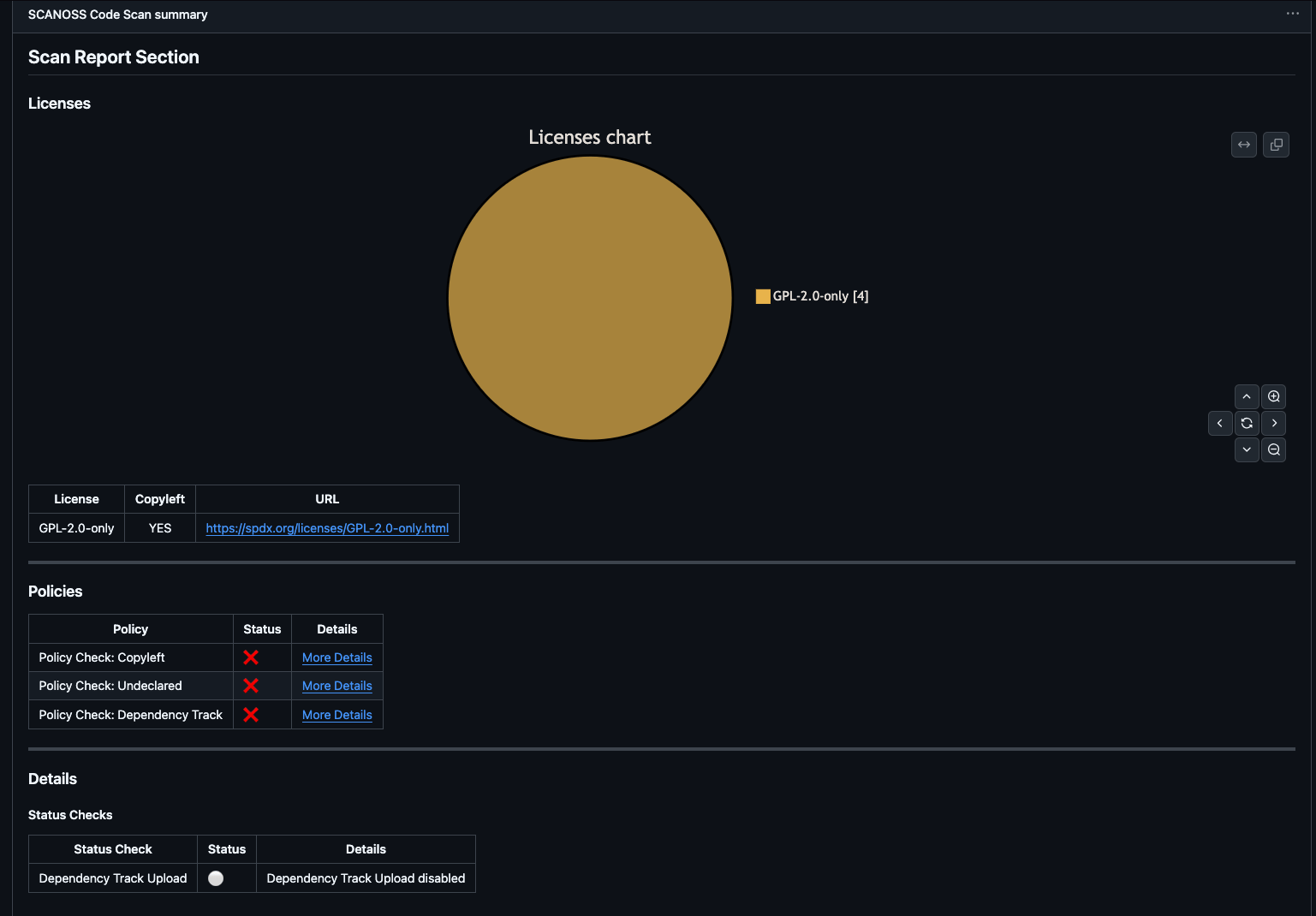 **Understanding the Summary:**
* **Scan Report**: License distribution pie chart and detailed license table
* **Policies**: Compliance check results (copyleft, undeclared, Dependency Track)
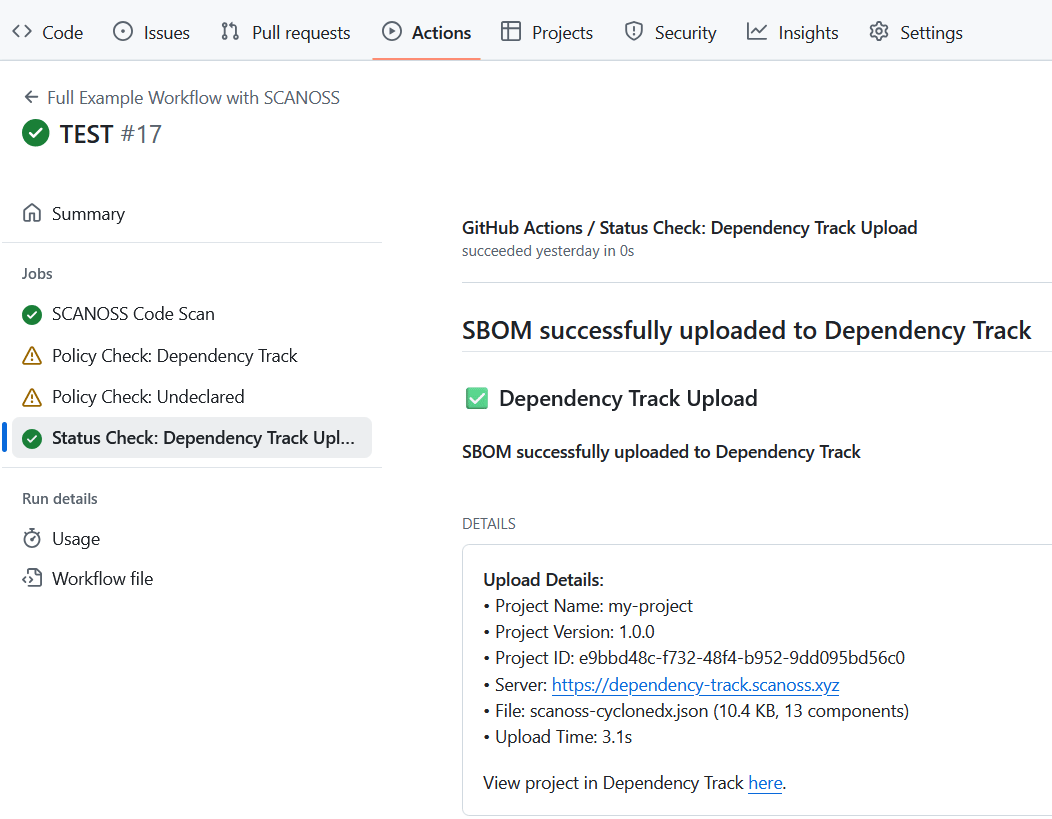
* **Details**: Upload status with direct link to Dependency Track project
* **Artifacts**: Downloadable reports, SBOMs, and policy results
### Access Dependency Track Dashboard
Once the scan uploads to Dependency Track, access the full dashboard for deeper analysis.
In the pipeline summary's **Details** section, click the **View Project** link to open your project in Dependency Track.
**Understanding the Summary:**
* **Scan Report**: License distribution pie chart and detailed license table
* **Policies**: Compliance check results (copyleft, undeclared, Dependency Track)
* **Details**: Upload status with direct link to Dependency Track project
* **Artifacts**: Downloadable reports, SBOMs, and policy results
### Access Dependency Track Dashboard
Once the scan uploads to Dependency Track, access the full dashboard for deeper analysis.
In the pipeline summary's **Details** section, click the **View Project** link to open your project in Dependency Track.
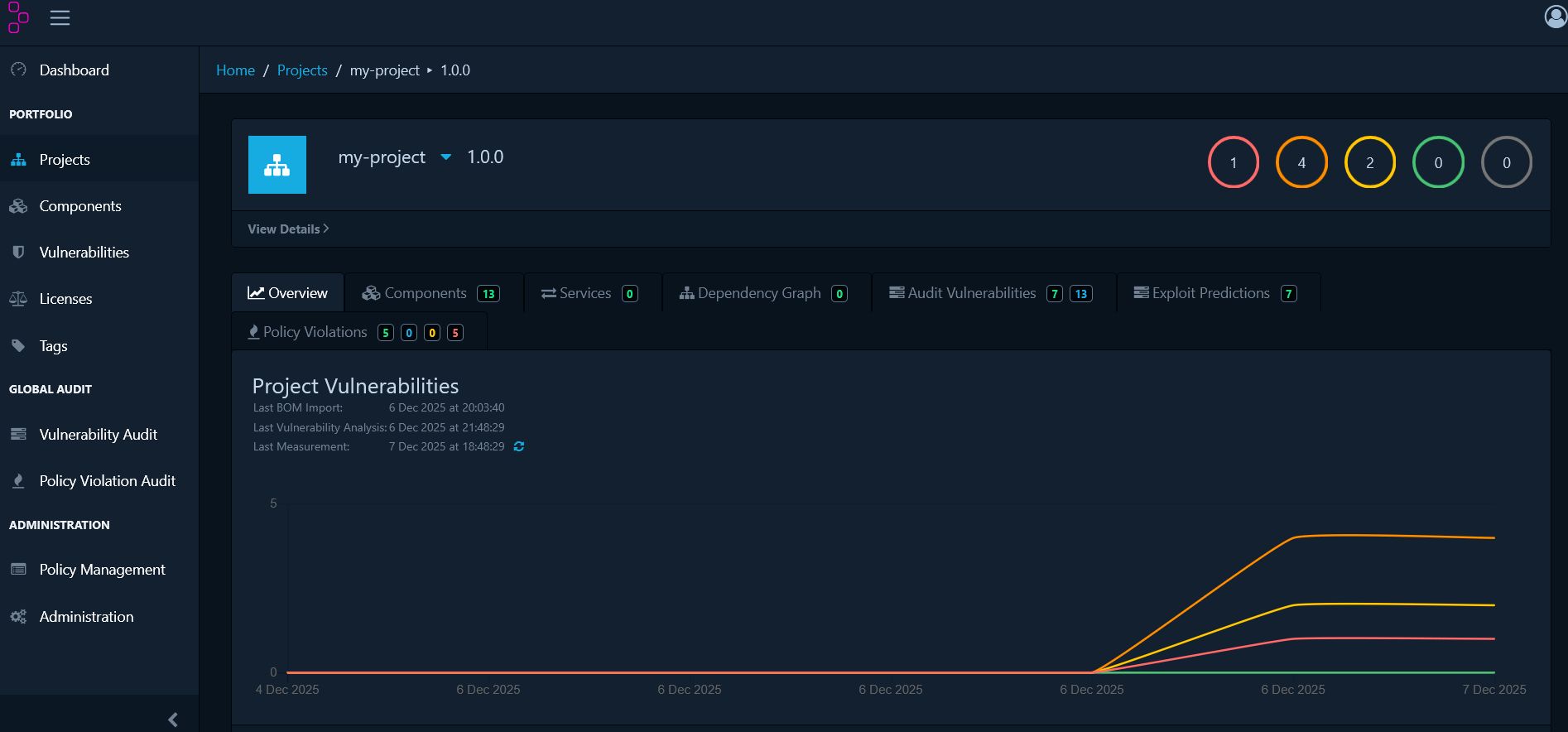 From here, [Dependency-Track](/en/latest/integrations/dependency-track) covers the full dashboard tour: exploring components and the dependency graph, managing individual vulnerabilities, and creating organisational policies for licenses, vulnerability severity, and component age.
## ORT Integration
[OSS Review Toolkit (ORT)](https://github.com/oss-review-toolkit/ort) is an enterprise-grade FOSS policy automation and orchestration toolkit.
### Prerequisites
Before you begin, ensure you have:
* [Java](https://www.oracle.com/es/java/technologies/downloads/): JDK 25 or later
* [Git](https://git-scm.com/)
* SCANOSS API key
* A shell environment:
* **Windows**: PowerShell, Command Prompt, or Git Bash
* **macOS/Linux**: Terminal (Bash/Zsh)
### Install ORT
```bash theme={null}
# Clone and build ORT (macOS/Linux)
git clone https://github.com/oss-review-toolkit/ort.git
cd ort
./gradlew installDist
export PATH="$(pwd)/cli/build/install/ort/bin:$PATH"
# Verify installation
ort --help
```
Building ORT is memory-intensive; set `JAVA_OPTS="-Xmx8g"` first if the build fails. For the PowerShell/Command Prompt equivalent on Windows, see [Installation](/en/latest/integrations/oss-review-toolkit#installation) in the OSS Review Toolkit guide.
### Configure SCANOSS as a Scanner
Create `~/.ort/config/config.yml` (Windows: `%USERPROFILE%\.ort\config\config.yml`):
```yaml theme={null}
ort:
scanner:
config:
SCANOSS:
options:
apiUrl: "https://api.scanoss.com"
secrets:
apiKey: "your-scanoss-api-key-here"
```
Replace `your-scanoss-api-key-here` with your actual SCANOSS API key.
### Analyse and Scan Your Project
Navigate to your project directory and run the analyser, then scan with SCANOSS:
```bash theme={null}
cd /path/to/your/project
# Run dependency analysis
ort analyze -i . -o ort-results
# Scan for licenses and vulnerabilities
ort scan --ort-file ort-results/analyzer-result.yml --output-dir ort-results --scanners SCANOSS
```
### Generate a Report
```bash theme={null}
ort report \
--ort-file ort-results/scan-result.yml \
--output-dir ort-results \
--report-formats StaticHtml
```
Open `ort-results/scan-report-web-app.html` in your browser to view it.
For defining custom policy rules, running evaluations against them, and generating SPDX or CycloneDX SBOMs, see [Policy Evaluation](/en/latest/integrations/oss-review-toolkit#policy-evaluation) and [Additional Formats](/en/latest/integrations/oss-review-toolkit#additional-formats) in the OSS Review Toolkit guide.
## What's Next
This completes the Evaluation Path. For deeper coverage of the same integrations, see [Interfaces & Integrations](/en/latest/poc/interfaces-integrations). To evaluate SCANOSS's other datasets in depth, see [License Dataset](/en/latest/poc/datasets/license-dataset), [Encryption Dataset](/en/latest/poc/datasets/encryption-dataset), and [Security Dataset](/en/latest/poc/datasets/security-dataset).
Need help? [Contact our AI assistant](?assistant=open)
From here, [Dependency-Track](/en/latest/integrations/dependency-track) covers the full dashboard tour: exploring components and the dependency graph, managing individual vulnerabilities, and creating organisational policies for licenses, vulnerability severity, and component age.
## ORT Integration
[OSS Review Toolkit (ORT)](https://github.com/oss-review-toolkit/ort) is an enterprise-grade FOSS policy automation and orchestration toolkit.
### Prerequisites
Before you begin, ensure you have:
* [Java](https://www.oracle.com/es/java/technologies/downloads/): JDK 25 or later
* [Git](https://git-scm.com/)
* SCANOSS API key
* A shell environment:
* **Windows**: PowerShell, Command Prompt, or Git Bash
* **macOS/Linux**: Terminal (Bash/Zsh)
### Install ORT
```bash theme={null}
# Clone and build ORT (macOS/Linux)
git clone https://github.com/oss-review-toolkit/ort.git
cd ort
./gradlew installDist
export PATH="$(pwd)/cli/build/install/ort/bin:$PATH"
# Verify installation
ort --help
```
Building ORT is memory-intensive; set `JAVA_OPTS="-Xmx8g"` first if the build fails. For the PowerShell/Command Prompt equivalent on Windows, see [Installation](/en/latest/integrations/oss-review-toolkit#installation) in the OSS Review Toolkit guide.
### Configure SCANOSS as a Scanner
Create `~/.ort/config/config.yml` (Windows: `%USERPROFILE%\.ort\config\config.yml`):
```yaml theme={null}
ort:
scanner:
config:
SCANOSS:
options:
apiUrl: "https://api.scanoss.com"
secrets:
apiKey: "your-scanoss-api-key-here"
```
Replace `your-scanoss-api-key-here` with your actual SCANOSS API key.
### Analyse and Scan Your Project
Navigate to your project directory and run the analyser, then scan with SCANOSS:
```bash theme={null}
cd /path/to/your/project
# Run dependency analysis
ort analyze -i . -o ort-results
# Scan for licenses and vulnerabilities
ort scan --ort-file ort-results/analyzer-result.yml --output-dir ort-results --scanners SCANOSS
```
### Generate a Report
```bash theme={null}
ort report \
--ort-file ort-results/scan-result.yml \
--output-dir ort-results \
--report-formats StaticHtml
```
Open `ort-results/scan-report-web-app.html` in your browser to view it.
For defining custom policy rules, running evaluations against them, and generating SPDX or CycloneDX SBOMs, see [Policy Evaluation](/en/latest/integrations/oss-review-toolkit#policy-evaluation) and [Additional Formats](/en/latest/integrations/oss-review-toolkit#additional-formats) in the OSS Review Toolkit guide.
## What's Next
This completes the Evaluation Path. For deeper coverage of the same integrations, see [Interfaces & Integrations](/en/latest/poc/interfaces-integrations). To evaluate SCANOSS's other datasets in depth, see [License Dataset](/en/latest/poc/datasets/license-dataset), [Encryption Dataset](/en/latest/poc/datasets/encryption-dataset), and [Security Dataset](/en/latest/poc/datasets/security-dataset).
Need help? [Contact our AI assistant](?assistant=open)