> ## Documentation Index
> Fetch the complete documentation index at: https://docs.scanoss.com/llms.txt
> Use this file to discover all available pages before exploring further.
# OSS Review Toolkit (ORT)
> The [OSS Review Toolkit (ORT)](https://github.com/oss-review-toolkit/ort) is an enterprise-grade FOSS policy automation and orchestration toolkit.
When integrated with SCANOSS, it provides:
* **Comprehensive License Scanning**: Detect licenses and copyrights using SCANOSS's vast open source knowledge base
* **Policy Automation**: Define and enforce custom compliance rules
* **SBOM Generation**: Create CycloneDX and SPDX SBOMs
* **Automated Compliance**: Generate attribution documents and compliance reports
* **Vulnerability Detection**: Identify security issues in dependencies
## Architecture Overview
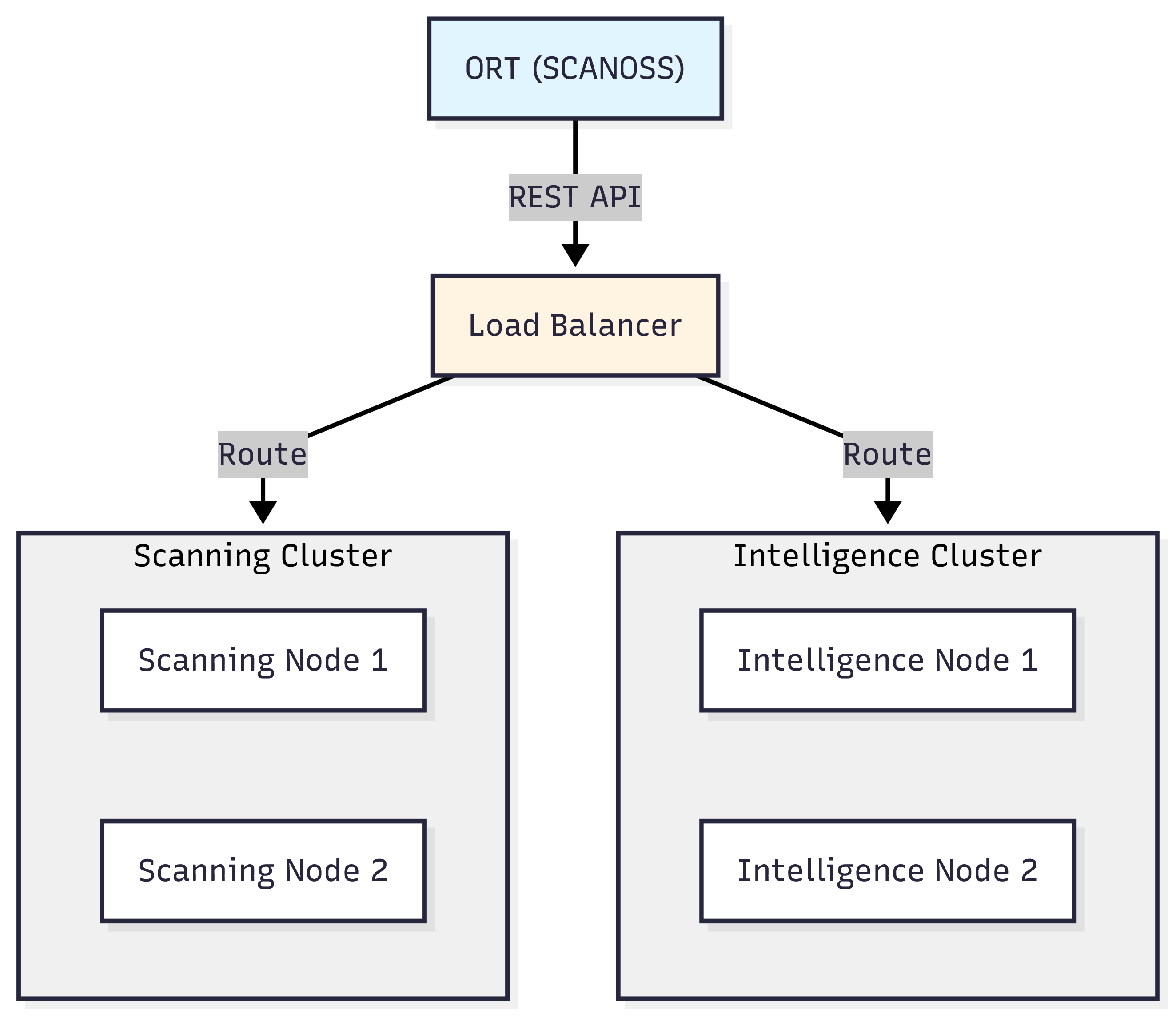
### ORT Client-Server Architecture
ORT leverages a distributed architecture to efficiently process scans and deliver intelligence.
 ## Prerequisites
* **Java**: JDK 21 or later
* **Git**
* **SCANOSS API key**
* **Shell environment**:
* Windows: PowerShell, Command Prompt, or Git Bash
* macOS/Linux: Terminal (Bash/Zsh)
* **Text editor**: VS Code, Notepad++, nano, vim, or any editor of your choice
## Installation
**For Windows:**
```powershell theme={null}
# Clone ORT repository
git clone https://github.com/oss-review-toolkit/ort.git
cd ort
# Build ORT using Gradle
.\gradlew.bat installDist
# Add ORT to your PATH (temporarily for this session)
$env:PATH = "$PWD\cli\build\install\ort\bin;$env:PATH"
# To add permanently, use System Properties > Environment Variables
# Or add to your PowerShell profile:
# notepad $PROFILE
# Add this line to the profile:
# $env:PATH = "C:\path\to\ort\cli\build\install\ort\bin;$env:PATH"
# Verify installation
ort --help
```
**Configure Java Memory (Windows):**
Set via System Properties > Environment Variables:
* Variable name: `JAVA_OPTS`
* Variable value: `-Xmx8g`
Or set temporarily in PowerShell:
```powershell theme={null}
$env:JAVA_OPTS = "-Xmx8g"
```
**For macOS/Linux:**
```bash theme={null}
# Clone ORT repository
git clone https://github.com/oss-review-toolkit/ort.git
cd ort
# Build ORT using Gradle
./gradlew installDist
# Configure Java memory (8GB recommended)
echo 'export JAVA_OPTS="-Xmx8g"' >> ~/.bashrc
source ~/.bashrc
# Add ORT to your PATH
echo "export PATH=\"$(pwd)/cli/build/install/ort/bin:\$PATH\"" >> ~/.bashrc
source ~/.bashrc
# Verify installation
ort --help
```
## Configuration
Create the ORT configuration directory and file:
**For Windows:**
```powershell theme={null}
# Create config directory
New-Item -ItemType Directory -Force -Path "$env:USERPROFILE\.ort\config"
# Create/edit configuration file using your preferred text editor
# For example, using Notepad:
notepad "$env:USERPROFILE\.ort\config\config.yml"
# Or using VS Code if installed:
# code "$env:USERPROFILE\.ort\config\config.yml"
```
Add the following content to `config.yml`:
```yaml theme={null}
ort:
scanner:
scanners:
SCANOSS:
options:
apiUrl: "https://api.scanoss.com"
secrets:
apiKey: "your-scanoss-api-key-here"
```
Replace `your-scanoss-api-key-here` with your actual SCANOSS API key.
**For macOS/Linux:**
```bash theme={null}
# Create config directory
mkdir -p ~/.ort/config
# Create/edit configuration file using your preferred text editor
# Options include: nano, vim, code (VS Code), or any text editor
nano ~/.ort/config/config.yml
# Or use cat to create the file directly:
cat > ~/.ort/config/config.yml << 'EOF'
ort:
scanner:
scanners:
SCANOSS:
options:
apiUrl: "https://api.scanoss.com"
secrets:
apiKey: "your-scanoss-api-key-here"
EOF
```
Replace `your-scanoss-api-key-here` with your actual SCANOSS API key.
## How ORT Works with SCANOSS
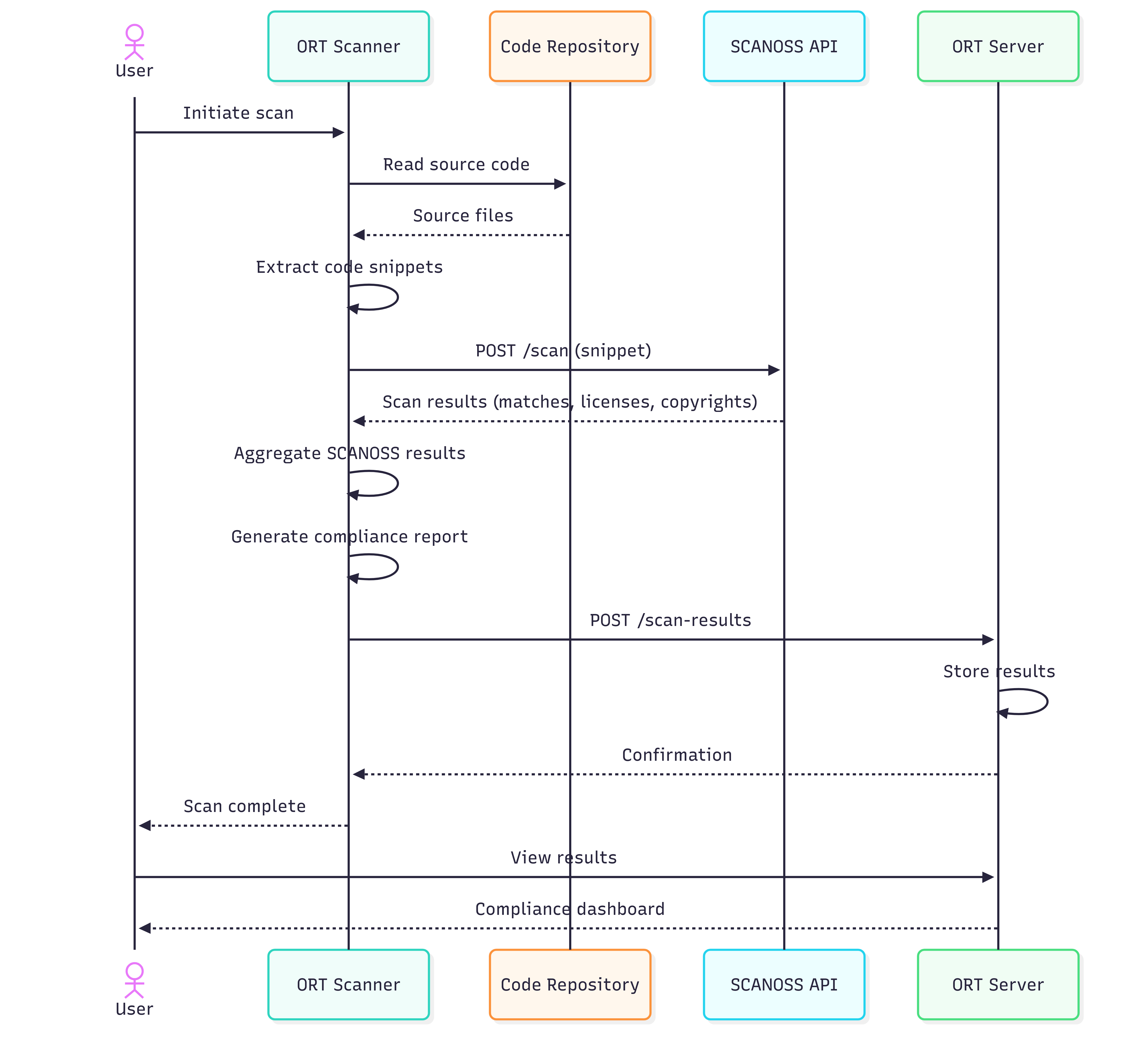
### ORT Sequence Flow
Here's how ORT orchestrates the scanning workflow when integrated with SCANOSS.
## Prerequisites
* **Java**: JDK 21 or later
* **Git**
* **SCANOSS API key**
* **Shell environment**:
* Windows: PowerShell, Command Prompt, or Git Bash
* macOS/Linux: Terminal (Bash/Zsh)
* **Text editor**: VS Code, Notepad++, nano, vim, or any editor of your choice
## Installation
**For Windows:**
```powershell theme={null}
# Clone ORT repository
git clone https://github.com/oss-review-toolkit/ort.git
cd ort
# Build ORT using Gradle
.\gradlew.bat installDist
# Add ORT to your PATH (temporarily for this session)
$env:PATH = "$PWD\cli\build\install\ort\bin;$env:PATH"
# To add permanently, use System Properties > Environment Variables
# Or add to your PowerShell profile:
# notepad $PROFILE
# Add this line to the profile:
# $env:PATH = "C:\path\to\ort\cli\build\install\ort\bin;$env:PATH"
# Verify installation
ort --help
```
**Configure Java Memory (Windows):**
Set via System Properties > Environment Variables:
* Variable name: `JAVA_OPTS`
* Variable value: `-Xmx8g`
Or set temporarily in PowerShell:
```powershell theme={null}
$env:JAVA_OPTS = "-Xmx8g"
```
**For macOS/Linux:**
```bash theme={null}
# Clone ORT repository
git clone https://github.com/oss-review-toolkit/ort.git
cd ort
# Build ORT using Gradle
./gradlew installDist
# Configure Java memory (8GB recommended)
echo 'export JAVA_OPTS="-Xmx8g"' >> ~/.bashrc
source ~/.bashrc
# Add ORT to your PATH
echo "export PATH=\"$(pwd)/cli/build/install/ort/bin:\$PATH\"" >> ~/.bashrc
source ~/.bashrc
# Verify installation
ort --help
```
## Configuration
Create the ORT configuration directory and file:
**For Windows:**
```powershell theme={null}
# Create config directory
New-Item -ItemType Directory -Force -Path "$env:USERPROFILE\.ort\config"
# Create/edit configuration file using your preferred text editor
# For example, using Notepad:
notepad "$env:USERPROFILE\.ort\config\config.yml"
# Or using VS Code if installed:
# code "$env:USERPROFILE\.ort\config\config.yml"
```
Add the following content to `config.yml`:
```yaml theme={null}
ort:
scanner:
scanners:
SCANOSS:
options:
apiUrl: "https://api.scanoss.com"
secrets:
apiKey: "your-scanoss-api-key-here"
```
Replace `your-scanoss-api-key-here` with your actual SCANOSS API key.
**For macOS/Linux:**
```bash theme={null}
# Create config directory
mkdir -p ~/.ort/config
# Create/edit configuration file using your preferred text editor
# Options include: nano, vim, code (VS Code), or any text editor
nano ~/.ort/config/config.yml
# Or use cat to create the file directly:
cat > ~/.ort/config/config.yml << 'EOF'
ort:
scanner:
scanners:
SCANOSS:
options:
apiUrl: "https://api.scanoss.com"
secrets:
apiKey: "your-scanoss-api-key-here"
EOF
```
Replace `your-scanoss-api-key-here` with your actual SCANOSS API key.
## How ORT Works with SCANOSS
### ORT Sequence Flow
Here's how ORT orchestrates the scanning workflow when integrated with SCANOSS.
 ## Getting Started
### Analyse Dependencies
```bash theme={null}
# Run analyzer
ort analyze -i . -o ort-results
```
### Scan with SCANOSS
```bash theme={null}
# Scan for licenses and vulnerabilities
ort scan --ort-file ort-results/analyzer-result.yml --output-dir ort-results --scanners SCANOSS
```
### Generate HTML Report
```bash theme={null}
# Generate HTML report
ort report \
--ort-file ort-results/scan-result.yml \
--output-dir ort-results \
--report-formats StaticHtml
```
### View Reports
Open the generated HTML report in your browser:
**For Windows:**
```powershell theme={null}
# PowerShell
Start-Process ort-results\scan-report-web-app.html
# Command Prompt
start ort-results\scan-report-web-app.html
```
**For macOS:**
```bash theme={null}
open ort-results/scan-report-web-app.html
```
**For Linux:**
```bash theme={null}
xdg-open ort-results/scan-report-web-app.html
```
## Additional Formats
Generate reports in various formats.
```bash theme={null}
# SPDX SBOM
ort report --ort-file ort-results/scan-result.yml \
--output-dir ort-results --report-formats SpdxDocument
# CycloneDX SBOM
ort report --ort-file ort-results/scan-result.yml \
--output-dir ort-results --report-formats CycloneDx
# Multiple formats
ort report --ort-file ort-results/scan-result.yml \
--output-dir ort-results \
--report-formats StaticHtml,SpdxDocument,CycloneDx
```
## Policy Evaluation
Define and enforce custom compliance policies using ORT's policy rules.
### Create Policy Rules
Create a policy rules file using your preferred text editor:
**For Windows (PowerShell):**
```powershell theme={null}
# Create policy rules file using your preferred text editor
# For example, using Notepad:
notepad "$env:USERPROFILE\.ort\config\rules.kts"
# Or using VS Code if installed:
# code "$env:USERPROFILE\.ort\config\rules.kts"
```
Add the following content to `rules.kts`:
```kotlin theme={null}
/**
* Minimal ORT Policy Rules
*/
import org.ossreviewtoolkit.model.*
ruleSet(ortResult, licenseInfoResolver) {
// Simple rule: warn about packages without declared licenses
packageRule("DECLARED_LICENSE_CHECK") {
require {
pkg.metadata.declaredLicenses.isNotEmpty()
}
warning(
message = "Package ${pkg.metadata.id.toCoordinates()} has no declared license",
howToFix = "Add license information to the package"
)
}
}
```
**For macOS/Linux (Bash/Zsh):**
```bash theme={null}
# Create policy rules file using your preferred text editor
# Options include: nano, vim, code (VS Code), or any text editor
nano ~/.ort/config/rules.kts
# Or use cat to create the file directly:
cat > ~/.ort/config/rules.kts << 'EOF'
/**
* Minimal ORT Policy Rules
*/
import org.ossreviewtoolkit.model.*
ruleSet(ortResult, licenseInfoResolver) {
// Simple rule: warn about packages without declared licenses
packageRule("DECLARED_LICENSE_CHECK") {
require {
pkg.metadata.declaredLicenses.isNotEmpty()
}
warning(
message = "Package ${pkg.metadata.id.toCoordinates()} has no declared license",
howToFix = "Add license information to the package"
)
}
}
EOF
```
### Run Evaluation
**For macOS/Linux:**
```bash theme={null}
# Evaluate policies
ort evaluate \
--ort-file ort-results/scan-result.yml \
--output-dir ort-results \
--rules-file ~/.ort/config/rules.kts
# Generate report with evaluation
ort report \
--ort-file ort-results/evaluation-result.yml \
--output-dir ort-results \
--report-formats StaticHtml
```
**For Windows (PowerShell):**
```powershell theme={null}
# Evaluate policies
ort evaluate `
--ort-file ort-results/scan-result.yml `
--output-dir ort-results `
--rules-file "$env:USERPROFILE\.ort\config\rules.kts"
# Generate report with evaluation
ort report `
--ort-file ort-results/evaluation-result.yml `
--output-dir ort-results `
--report-formats StaticHtml
```
**For Windows (Command Prompt):**
```cmd theme={null}
rem Evaluate policies
ort evaluate ^
--ort-file ort-results/scan-result.yml ^
--output-dir ort-results ^
--rules-file "%USERPROFILE%\.ort\config\rules.kts"
rem Generate report with evaluation
ort report ^
--ort-file ort-results/evaluation-result.yml ^
--output-dir ort-results ^
--report-formats StaticHtml
```
## Getting Started
### Analyse Dependencies
```bash theme={null}
# Run analyzer
ort analyze -i . -o ort-results
```
### Scan with SCANOSS
```bash theme={null}
# Scan for licenses and vulnerabilities
ort scan --ort-file ort-results/analyzer-result.yml --output-dir ort-results --scanners SCANOSS
```
### Generate HTML Report
```bash theme={null}
# Generate HTML report
ort report \
--ort-file ort-results/scan-result.yml \
--output-dir ort-results \
--report-formats StaticHtml
```
### View Reports
Open the generated HTML report in your browser:
**For Windows:**
```powershell theme={null}
# PowerShell
Start-Process ort-results\scan-report-web-app.html
# Command Prompt
start ort-results\scan-report-web-app.html
```
**For macOS:**
```bash theme={null}
open ort-results/scan-report-web-app.html
```
**For Linux:**
```bash theme={null}
xdg-open ort-results/scan-report-web-app.html
```
## Additional Formats
Generate reports in various formats.
```bash theme={null}
# SPDX SBOM
ort report --ort-file ort-results/scan-result.yml \
--output-dir ort-results --report-formats SpdxDocument
# CycloneDX SBOM
ort report --ort-file ort-results/scan-result.yml \
--output-dir ort-results --report-formats CycloneDx
# Multiple formats
ort report --ort-file ort-results/scan-result.yml \
--output-dir ort-results \
--report-formats StaticHtml,SpdxDocument,CycloneDx
```
## Policy Evaluation
Define and enforce custom compliance policies using ORT's policy rules.
### Create Policy Rules
Create a policy rules file using your preferred text editor:
**For Windows (PowerShell):**
```powershell theme={null}
# Create policy rules file using your preferred text editor
# For example, using Notepad:
notepad "$env:USERPROFILE\.ort\config\rules.kts"
# Or using VS Code if installed:
# code "$env:USERPROFILE\.ort\config\rules.kts"
```
Add the following content to `rules.kts`:
```kotlin theme={null}
/**
* Minimal ORT Policy Rules
*/
import org.ossreviewtoolkit.model.*
ruleSet(ortResult, licenseInfoResolver) {
// Simple rule: warn about packages without declared licenses
packageRule("DECLARED_LICENSE_CHECK") {
require {
pkg.metadata.declaredLicenses.isNotEmpty()
}
warning(
message = "Package ${pkg.metadata.id.toCoordinates()} has no declared license",
howToFix = "Add license information to the package"
)
}
}
```
**For macOS/Linux (Bash/Zsh):**
```bash theme={null}
# Create policy rules file using your preferred text editor
# Options include: nano, vim, code (VS Code), or any text editor
nano ~/.ort/config/rules.kts
# Or use cat to create the file directly:
cat > ~/.ort/config/rules.kts << 'EOF'
/**
* Minimal ORT Policy Rules
*/
import org.ossreviewtoolkit.model.*
ruleSet(ortResult, licenseInfoResolver) {
// Simple rule: warn about packages without declared licenses
packageRule("DECLARED_LICENSE_CHECK") {
require {
pkg.metadata.declaredLicenses.isNotEmpty()
}
warning(
message = "Package ${pkg.metadata.id.toCoordinates()} has no declared license",
howToFix = "Add license information to the package"
)
}
}
EOF
```
### Run Evaluation
**For macOS/Linux:**
```bash theme={null}
# Evaluate policies
ort evaluate \
--ort-file ort-results/scan-result.yml \
--output-dir ort-results \
--rules-file ~/.ort/config/rules.kts
# Generate report with evaluation
ort report \
--ort-file ort-results/evaluation-result.yml \
--output-dir ort-results \
--report-formats StaticHtml
```
**For Windows (PowerShell):**
```powershell theme={null}
# Evaluate policies
ort evaluate `
--ort-file ort-results/scan-result.yml `
--output-dir ort-results `
--rules-file "$env:USERPROFILE\.ort\config\rules.kts"
# Generate report with evaluation
ort report `
--ort-file ort-results/evaluation-result.yml `
--output-dir ort-results `
--report-formats StaticHtml
```
**For Windows (Command Prompt):**
```cmd theme={null}
rem Evaluate policies
ort evaluate ^
--ort-file ort-results/scan-result.yml ^
--output-dir ort-results ^
--rules-file "%USERPROFILE%\.ort\config\rules.kts"
rem Generate report with evaluation
ort report ^
--ort-file ort-results/evaluation-result.yml ^
--output-dir ort-results ^
--report-formats StaticHtml
```