

What is ORT?
The OSS Review Toolkit (ORT) is an open-source toolkit for Free and Open Source Software (FOSS) policy automation and orchestration. It provides a suite of tools to help organisations manage open-source software compliance, security, and quality throughout the software development lifecycle. When integrated with SCANOSS, ORT provides:- Licence Scanning: Detect licences and copyrights using the SCANOSS knowledge base
- Policy Automation: Define and enforce custom compliance rules
- SBOM Generation: Create Software Bills of Materials (SBOMs) in CycloneDX and SPDX formats
- Compliance Reporting: Generate attribution documents and compliance reports
- Vulnerability Detection: Identify security issues in dependencies
Architecture Overview
ORT Client–Server Architecture
ORT uses a distributed architecture to process scans and return results.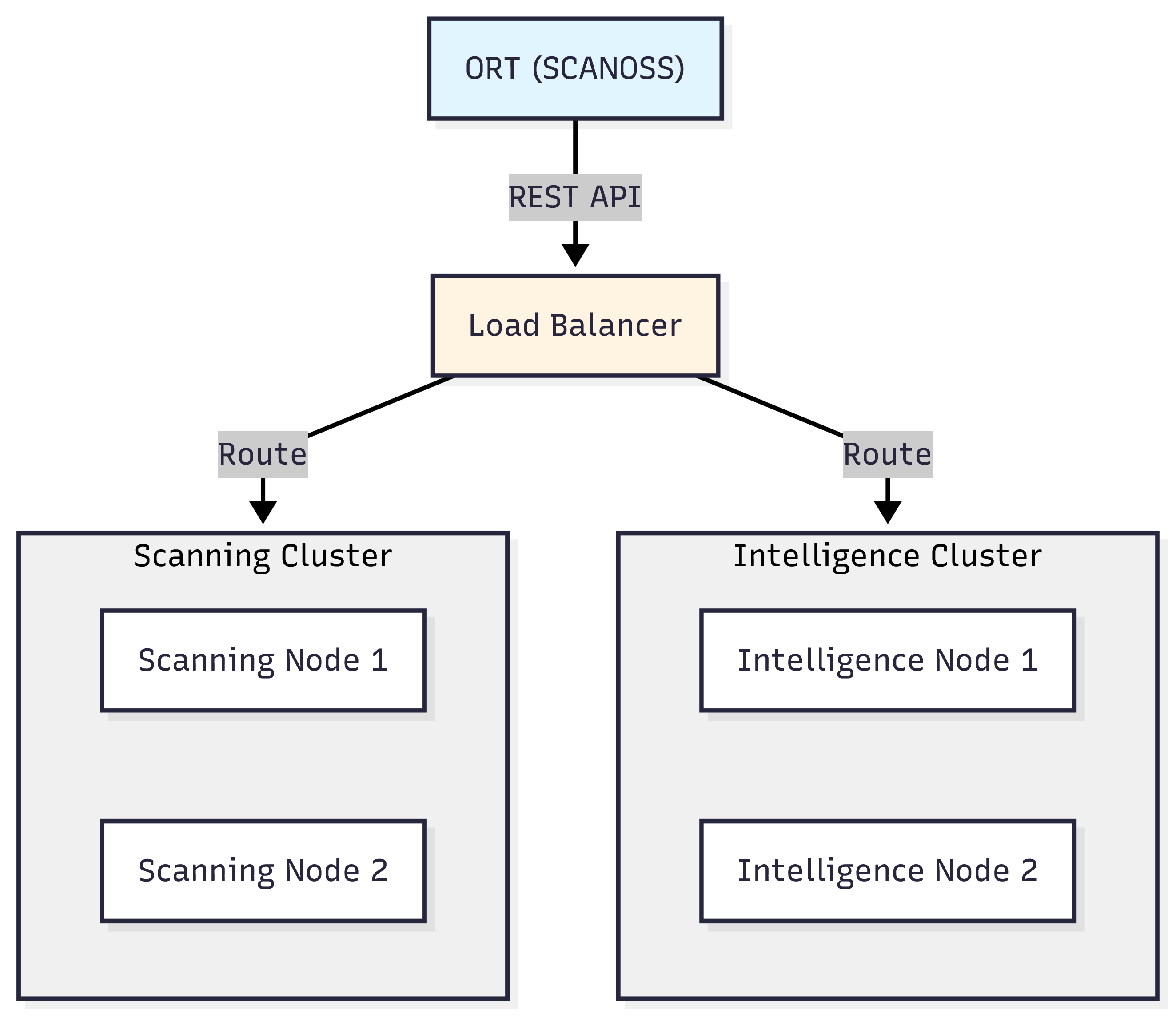
- Analyser: Identifies dependencies from package manager manifests
- Scanner: Performs licence and copyright detection (integrates with SCANOSS)
- Evaluator: Applies policy rules to scan results
- Reporter: Generates compliance reports in multiple formats
- Advisor: Retrieves vulnerability information
How ORT Works with SCANOSS
ORT Sequence Flow
The following describes how ORT orchestrates the scanning workflow when integrated with SCANOSS.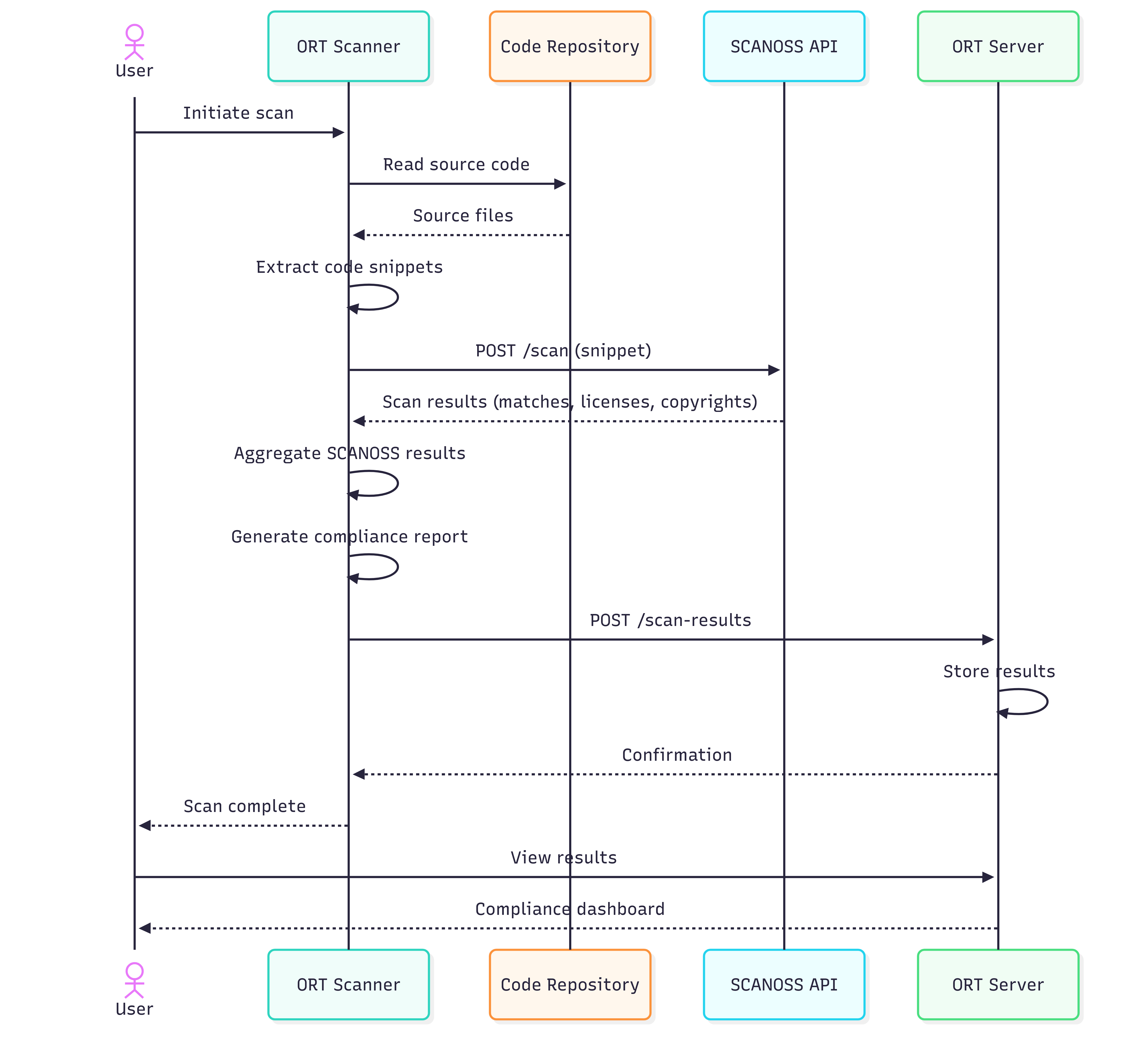
- Analysis Phase: ORT analyses the project’s package manager manifests
(
package.json,pom.xml, etc.) to build a dependency graph. - Scanning Phase: SCANOSS scans the source code to detect licences, copyrights, and component matches.
- Evaluation Phase: ORT applies custom policy rules to the scan results.
- Reporting Phase: ORT generates compliance reports, SBOMs, and attribution documents.
Key Features
Dependency Analysis
ORT supports a wide range of package managers and build systems:- JavaScript/TypeScript: npm, Yarn, pnpm
- Java: Maven, Gradle
- Python: pip, Poetry, Pipenv
- Ruby: Bundler
- Go: Go Modules
- PHP: Composer
Licence Detection
Through SCANOSS integration, ORT provides:- File-level licence detection
- Copyright statement identification
- Licence compatibility analysis
- Licence obligation tracking
Policy Enforcement
Custom policy rules are defined using the Kotlin DSL (Domain-Specific Language) supported by ORT’s Evaluator component. Rules can be used to:- Block specific licences or licence groups
- Flag high-severity vulnerabilities
- Enforce component age policies
- Require licence declarations
- Implement custom business logic
Report Generation
ORT generates compliance artefacts in the following formats:- HTML Reports: Web-based reports containing summary charts and detailed tables
- SPDX: Industry-standard SBOM format
- CycloneDX: Machine-readable SBOM format with vulnerability tracking support
- NOTICE Files: Attribution documents for legal compliance
- Custom Reports: User-defined report templates
Prerequisites
Before using ORT with SCANOSS, ensure the following are available:- Java: JDK 21 or later
- Git: Required for cloning the ORT repository
- SCANOSS API key: Required for accessing the SCANOSS knowledge base
- Shell environment:
- Windows: PowerShell, Command Prompt, or Git Bash
- macOS/Linux: Bash or Zsh
Use Cases
Continuous Integration
ORT can be integrated into CI/CD pipelines to:- Scan pull requests for licence and policy compliance
- Block builds that violate defined policy rules
- Generate SBOMs for each release
- Track dependency changes over time
Compliance Audits
ORT supports periodic compliance reviews by enabling users to:- Generate licence reports across a project’s dependencies
- Identify components requiring legal review
- Produce attribution documents for product releases
- Record and track policy violations and remediation steps
Security Monitoring
ORT can be used to monitor the software supply chain for security risks by:- Identifying vulnerable dependencies
- Tracking Common Vulnerabilities and Exposures (CVEs) across a codebase
- Enforcing vulnerability policies
- Generating security reports for review
Next Steps
To get started with ORT and SCANOSS:- Installation: Follow the Installation guide to set up ORT.
- Configuration: Follow the Configuration guide to configure the SCANOSS scanner in ORT.
- Usage: Run your first scan and generate compliance reports.
- Policy Rules: Define custom policies for your organisation.