

Why API keys
A pipeline or script shouldn’t sign in as a person. An API key gives it its own identity, so Earnie records its actions against the key, not against whoever set it up. A person always creates a key, and the audit log records that person as its owner. When you create a key, you decide what it can do (its permissions), which projects it can reach, and when it stops working (its expiry).Creating a key
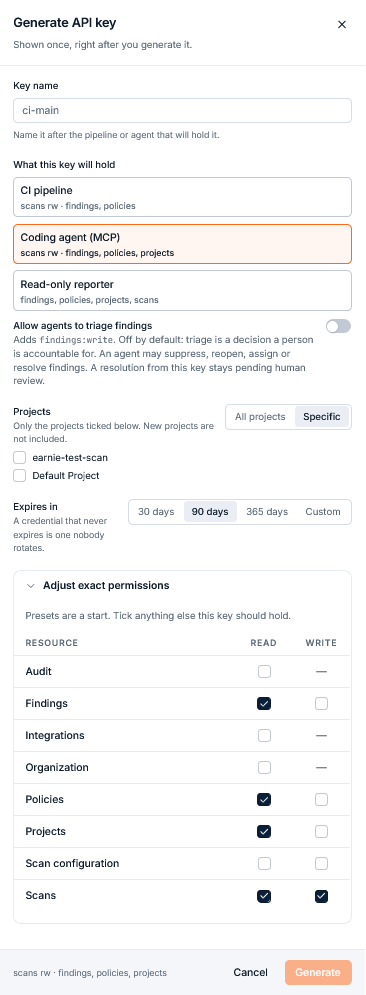
- Go to Settings → API keys and select Generate key.
- Enter a Key name. Name it after the pipeline or agent that will hold it, for example
ci-main. - Choose its permissions, projects, and expiry, as described below.
- Generate the key, then copy it straight away.
Permissions
Under What this key will hold, choose what the key may do. These are the same permissions that roles are built from. Three presets tick the boxes for common jobs, and you can then adjust the individual read and write permissions:
A preset only ticks boxes for you. The key stores its scopes, not the preset, so you can start from a preset and add or remove scopes before you generate the key. If your deployment doesn’t offer a scope that a preset lists, the preset leaves that scope out.
You can only grant a key permissions you hold yourself, so a key never reaches further than the person accountable for it.
Scope reference
These are all the scopes a key can hold:
Earnie refuses a request that needs a scope the key doesn’t hold with
403. The API reference lists every operation an API key can call.
A key can never hold some permissions, however it requests them. Only a person can:
- approving, rejecting, or revoking a policy approval (
policies:approve), which also covers confirming or promoting a decision in the review queue - managing members (
members:*) - SSO (
sso:*) - changing organisation settings (
organization:write) - connecting or disconnecting integrations (
integrations:write) - creating or revoking API keys (
apikeys:*)
Letting an agent triage
With the Coding agent (MCP) preset, you can also turn on Allow agents to triage findings. It’s off by default, and it adds thefindings:write permission.
Think before turning this on. A key with triage permission can close
findings and record the reason, including reasons that stop a finding
counting towards a pull request’s gate. An automation can then turn a
failing gate green without a person checking it.A person doing triage has the same authority, and you undo a key’s decision
the same way. The decision goes to the review queue, where someone can revert it, and
reopening the finding puts it back in the gate. A key can never
accept a violation it agrees is real. That needs a policy approval request, and
only a person can make one.
Projects
Under Projects, choose All projects, or Specific to pick a set. Earnie refuses a key that tries to act on a project outside its set. The Coding agent (MCP) preset doesn’t cover all projects by default, so the project list opens with none ticked, and Generate stays off until you tick at least one project or choose All projects. A line under Projects says so.How a project-scoped key is refused
Earnie checks a key limited to specific projects on every request. When it calls the API directly, it can get one of two403 errors:
The event history for a single finding or other item (
GET /v1/audit/events) can’t be narrowed to a project, so a project-scoped key can’t read it.
Some lists don’t need a filter. Listing projects, the scan posture overview, the resolution queue, the audit log, and a policy’s attachments return only the key’s own projects.
When a request identifies something by its own ID rather than by project, such as a scan, a finding, or an SBOM snapshot, and it belongs to a project outside the key’s set, the key gets 404, as if it didn’t exist.
Expiry
Every key expires. Under Expires in, choose 30 days, 90 days (the default), 365 days, or a Custom date. 365 days is the longest allowed.Copying the key
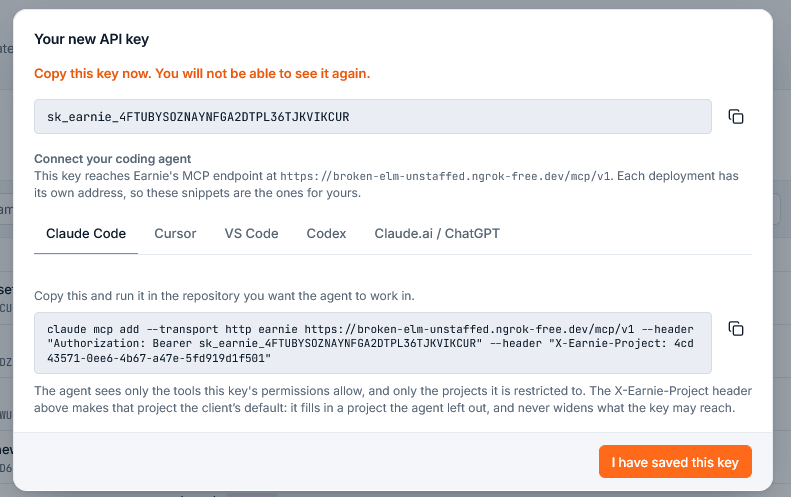
Earnie shows the key only once. Copy it with Copy key before you close
the panel. You can’t retrieve it afterwards.
X-Earnie-Project header.
Like the key, the snippets disappear once you close the panel. If you need one later, generate a new key.
Using a key with the Earnie CLI
On your own machine, sign in and enter the key when prompted:EARNIE_API_KEY can supply a credential for a single run. The CLI never writes it to the client configuration.
See the Earnie CLI reference for scanning, verdicts, policies, and connecting a coding agent over MCP.
Managing keys
The API keys page lists your keys. For each one, it shows:
Use the status filter to show Active keys (the default), keys Expiring soon, Revoked keys, or All. Search by name, key prefix, or owner. Select a key to see its full details, including its owner.
Earnie keeps revoked keys for the audit log rather than deleting them, and hides them from the default view.
Revoking a key
To revoke a key, select Revoke key and confirm. Revoking takes effect immediately and you can’t undo it. If you need the access again, generate a new key. A revoked key stays in the audit log, so past actions keep naming it.Give each consumer its own key. Use one key per pipeline, named for that
pipeline, with only the permissions that pipeline needs. Then, when something
needs revoking, you revoke exactly one thing, and the audit log tells you
which automation did what.
Removing a member revokes their keys. To keep their automation running,
re-issue the keys under a current member before you
remove the member.Two other states can appear on older keys. A key whose creator was never
recorded shows as having No active owner. A key made before permissions
existed shows None. Re-issue it before it can do anything.Some older keys are also limited to particular scanners. That limit is
deprecated. Such a key gets
403 module_scope_forbidden for data from any
other scanner. Re-issue the key to remove the limit.